




Question

SliverRemover Filling In Donutholes

  • July 6, 2017
  • 6 replies
  • 85 views

mikeinhamilton
Contributor
Forum|alt.badge.img+5

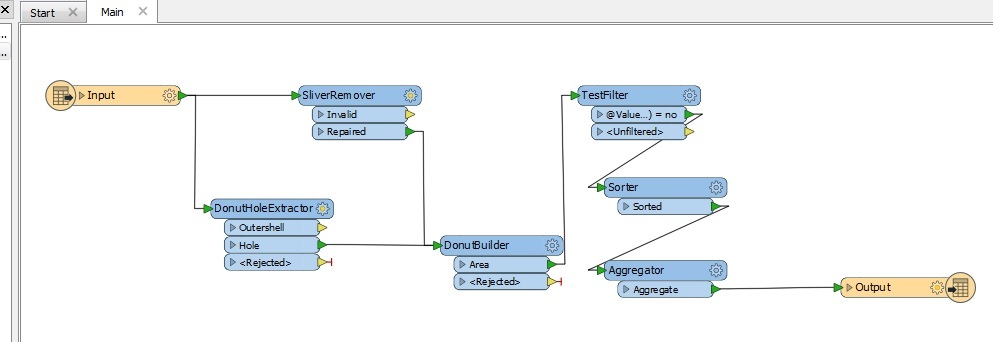
I'm having an issue while trying to clean up a dataset. I'm using the SliverRemover to remove slivers found in the dataset. I'm finding that it is filling in any donut holes in the process. I was able to remedy this by adding in a DonutHoleExtractor and DonutBuilder then a TestFilter to rebuild the donuts then remove the holes.

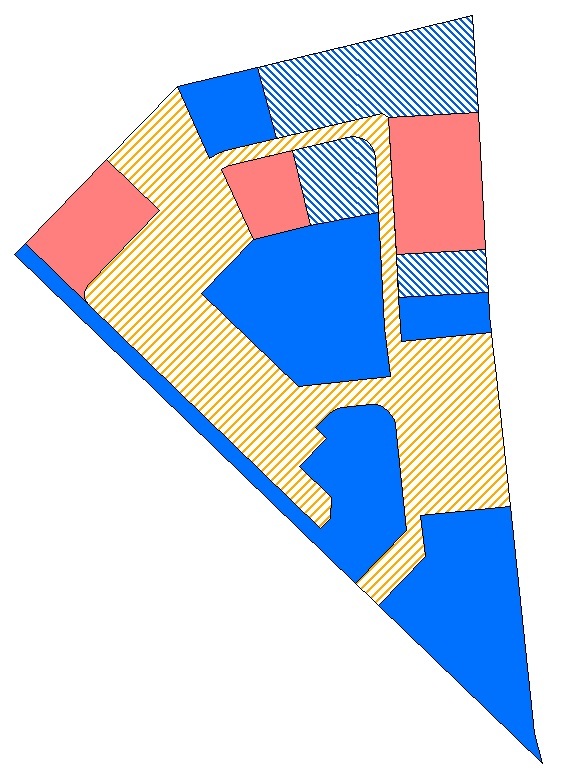
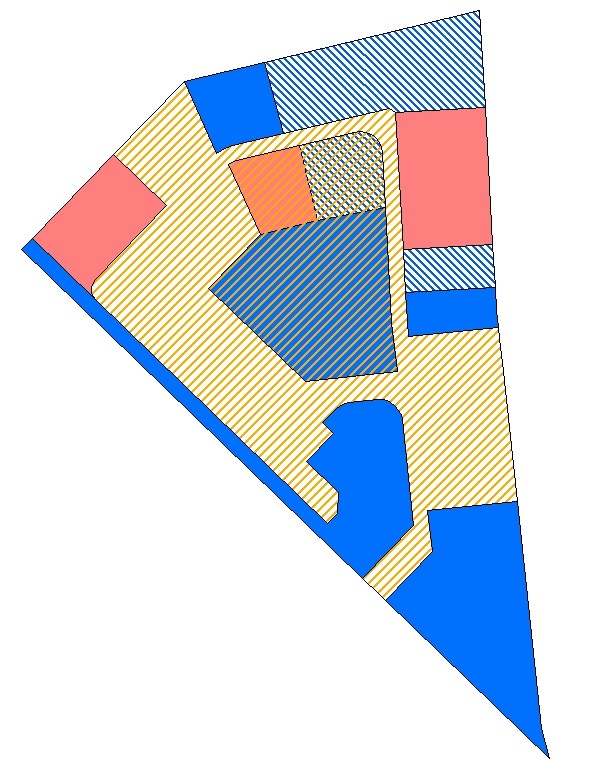
This creates a new issue though. In areas where there are polygons that create a "hole" but there is actually a polygon there the area is getting merged. So in the end there are overlapping polygons and I don't want this. I've tried my best to describe what's happening in the following two images.

In the first image, the original dataset with no overlapping polygons.
The second image, the output with the overlapping polygons.
Here is a screencap of my workspace.
Does anyone know of a way to keep the original geometry in place while running the SliverRemover? Any help would be greatly appreciated.

Thanks

This post is closed to further activity.
It may be an old question, an answered question, an implemented idea, or a notification-only post.
Please check post dates before relying on any information in a question or answer.
For follow-up or related questions, please post a new question or idea.
If there is a genuine update to be made, please contact us and request that the post is reopened.

6 replies

jdh
Contributor
Forum|alt.badge.img+40
  • Contributor
  • July 6, 2017

Try assigning a unique ID to your input at the start, and in the DonutBuilder group by that ID, and set Drop Holes to yes.


mikeinhamilton
Contributor
Forum|alt.badge.img+5

Try assigning a unique ID to your input at the start, and in the DonutBuilder group by that ID, and set Drop Holes to yes.

Thanks for the response. I gave it a shot and unfortunately it didn't work. The output still has the overlapping polygons.


ebygomm
Influencer
Forum|alt.badge.img+46
  • Influencer
  • July 7, 2017

What repair method are you using with the SliverRemover?


mikeinhamilton
Contributor
Forum|alt.badge.img+5

What repair method are you using with the SliverRemover?

Right now I'm using Longest Boundary. I was previously using Priority (Area Enlarging) with the same results.


ebygomm
Influencer
Forum|alt.badge.img+46
  • Influencer
  • July 7, 2017

Thanks for the response. I gave it a shot and unfortunately it didn't work. The output still has the overlapping polygons.

@jdh 's suggestion *should* work... Although I guess you could be reintroducing new slivers if you use the original donut holes....


jdh
Contributor
Forum|alt.badge.img+40
  • Contributor
  • July 7, 2017
@jdh 's suggestion *should* work... Although I guess you could be reintroducing new slivers if you use the original donut holes....


It shouldn't unless the donut holes were touching each other or a boundary.


@mikey can you post the a sample of the original data?




