Question

how can I capture and fme_feature_type attribute into an open editor?

  • October 17, 2013
  • 15 replies
  • 103 views

Forum|alt.badge.img
Hi


 I  have exposed the fme_feature_type attribute from a feature class and need  to pass it  into the open editor but dont know how. The fme_feature_type contains the name of the feature class  which I need to use in a string of text.


Any pointers on how to bring that into the open editor? who can I format the bolded text in the editor so I can see the actual value?


{fme:get-attribute("fme_feature_type")} at $(Base1), $(Location1) $(City2), $(State), ($(Year))


 Thanks in advance for any guidance :)

This post is closed to further activity.
It may be an old question, an answered question, an implemented idea, or a notification-only post.
Please check post dates before relying on any information in a question or answer.
For follow-up or related questions, please post a new question or idea.
If there is a genuine update to be made, please contact us and request that the post is reopened.

15 replies

fmelizard
Safer
Forum|alt.badge.img+21
  • Safer
  • October 17, 2013
Have you tried @value(fme_feature_type)?


Forum|alt.badge.img
  • Author
  • October 17, 2013
Itay, 


 this is what I got when I used the @value(fme_feature_type)


@value(fme_feature_type) at Navy, Tampa, Florida, (2013) for example


What I need to see as a result is :


Signs at Navy, Tampa, Florida, (2013) for example


Forum|alt.badge.img
  • Author
  • October 17, 2013
the other values you see in the string  were casted as parameters. I dont know if there is a way to call the fme_feateure_type and make it a parameter that I could call in my string of text.

fmelizard
Safer
Forum|alt.badge.img+21
  • Safer
  • October 17, 2013
I usually use the feature type extractor 


http://docs.safe.com/fme/html/FME_Transformers/Default.htm#Transformers/featuretypeextractor.htm


Or copy it into a new attribute 

fmelizard
Safer
Forum|alt.badge.img+21
  • Safer
  • October 17, 2013
You can always create a parameter and fetch the ft with a parameter fetcher but that seems excessive to me

Forum|alt.badge.img
  • Author
  • October 17, 2013
This is what I got:


@value("_feature_type") at Navy, Tampa, Florida, (2013)

fmelizard
Safer
Forum|alt.badge.img+21
  • Safer
  • October 17, 2013
Mmm last shot at it.... Have you tried the attribute dereferencer?

Forum|alt.badge.img
  • Author
  • October 17, 2013
I will try that in a few. Thanks for all of the help man

fmelizard
Safer
Forum|alt.badge.img+21
  • Safer
  • October 17, 2013
No sweat ;) could be that the ft cannot be reached because of the dynamic properties of the translation, another possibility would be to use the string concatenator or attribute creator


takashi
Celebrity
  • October 17, 2013
Hi Gerardo,


FME is basically case sensitive except in some specific cases, and FME function name starts with @ and an upper case letter. Try @Value(fme_feature_type).


Takashi

david_r
Celebrity
  • October 18, 2013
Hi,


Takashi is right, FME is mostly case sensitive so you need to write "@Value" with an upper case V. The expression "@value" which was suggested below will therefore not work.


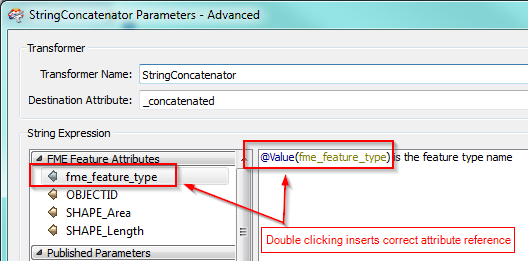
The easiest way, in my opinion, to build strings like this is to use the StringConcatenator. I prefer the Advanced view, which isn't really that complicated. Just double-click in the attribute and function list on the left and the correct reference will be inserted into the cursor position:


David

fmelizard
Safer
Forum|alt.badge.img+21
  • Safer
  • October 18, 2013
Typo...

Forum|alt.badge.img
  • Author
  • October 18, 2013
I see. your suggestions seem to work well in the open editor from the string concatenator.


My problem is that  I am using the open editor from the xml updater.. and that one doesnt like the @Value. Regardless of what attributes I double click  or drag over. it is spitting it out literally instead of extracting the value into the editor. This leads me to believe that it might be a formatting issue

fmelizard
Safer
Forum|alt.badge.img+21
  • Safer
  • October 18, 2013
Hi Gerardo,


I am sure Safe would appreciate hearing about it, sounds like a bug to me.


Forum|alt.badge.img
  • Author
  • October 18, 2013
Itay, Takashi and David.  Thanks for all of your help