Question

DWG points to symbols?

  • January 7, 2016
  • 6 replies
  • 32 views

Forum|alt.badge.img

Hi,

I have a DWG file containing wells, trees, mast etc. They are symbolized using points but my users would like if it would be possible to use symbols instead of points. How can I do that? Thanks! Christian


This post is closed to further activity.
It may be an old question, an answered question, an implemented idea, or a notification-only post.
Please check post dates before relying on any information in a question or answer.
For follow-up or related questions, please post a new question or idea.
If there is a genuine update to be made, please contact us and request that the post is reopened.

6 replies

erik_jan
Contributor
Forum|alt.badge.img+26
  • Contributor
  • January 7, 2016

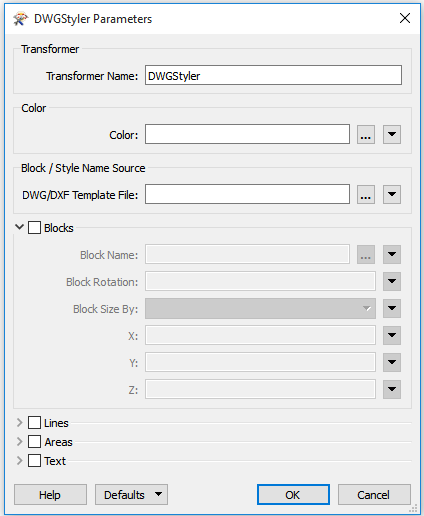
The transformer DWGSTyler will allow you to define BLOCKS for point objects.

You will need a template file containing the block definitions and then you can pick the block by name from the template.


davideagle
Contributor
Forum|alt.badge.img+22
  • Contributor
  • January 7, 2016

Assuming each point has some sort of differentiation within the data to discern the difference, such as an ID, a classification type, or even a colour, then you'll be able to filter off each feature by type. Wells go one way and trees go another etc...

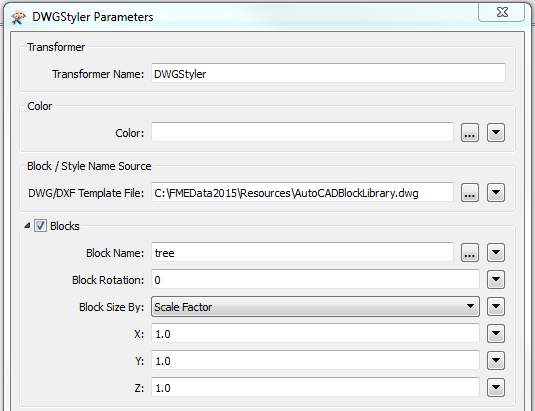
Once filtered you can either send the features to a different DWGStyler each and apply some AutoCAD 'Blocks' that one of your colleagues might be able to prepare for you and save into a template file... like this:

Or alternatively you could set the DWG block attributes yourself with an AttributeCreator, autocad_block_name for instance.

Or if you are a bit more advanced then using the SchemaMapper and looking up the styles from a spreadsheet you've designed is also a very useful approach.

Good luck.


davideagle
Contributor
Forum|alt.badge.img+22
  • Contributor
  • January 7, 2016

Assuming each point has some sort of differentiation within the data to discern the difference, such as an ID, a classification type, or even a colour, then you'll be able to filter off each feature by type. Wells go one way and trees go another etc...

Once filtered you can either send the features to a different DWGStyler each and apply some AutoCAD 'Blocks' that one of your colleagues might be able to prepare for you and save into a template file... like this:

Or alternatively you could set the DWG block attributes yourself with an AttributeCreator, autocad_block_name for instance.

Or if you are a bit more advanced then using the SchemaMapper and looking up the styles from a spreadsheet you've designed is also a very useful approach.

Good luck.

How about that, two almost identical answers, posted at almost the same time from different continents... The power of the interweb :0)


erik_jan
Contributor
Forum|alt.badge.img+26
  • Contributor
  • January 7, 2016

How about that, two almost identical answers, posted at almost the same time from different continents... The power of the interweb :0)

If was a little faster, but only because I did not take time to fill in the blanks.


fmelizard
Safer
Forum|alt.badge.img+21
  • Safer
  • January 7, 2016

If was a little faster, but only because I did not take time to fill in the blanks.

So if two great answers come in at the same time, how can the moderator pick a "best answer"????


davideagle
Contributor
Forum|alt.badge.img+22
  • Contributor
  • January 7, 2016

So if two great answers come in at the same time, how can the moderator pick a "best answer"????

Very carefully!