Question

How to convert a file CSV to oracle table (type POINT object)

  • February 12, 2016
  • 9 replies
  • 57 views

Forum|alt.badge.img

Hi,

I have created a graphic ORACLE table from a CSV file. The CSV file contains the coordinates X and Y to create points. Now the ORACLE table contains the points but the graphic column contains null values.

It seems that I must :

1. Check the types of geometry it is passing to writer (i.e. line / point) , but how to do what ?

2. Define the parameter " oracle_type " with an attribute creator, but which value "point" or "oracle_point" or "SDO_point" ?

Thanks you for yours answers

This post is closed to further activity.
It may be an old question, an answered question, an implemented idea, or a notification-only post.
Please check post dates before relying on any information in a question or answer.
For follow-up or related questions, please post a new question or idea.
If there is a genuine update to be made, please contact us and request that the post is reopened.

9 replies

erik_jan
Contributor
Forum|alt.badge.img+26
  • Contributor
  • February 12, 2016

Dis you use the "Oracle Spatial Objects" writer. It seems you are using the "Oracle Non-Spatial" writer and hat one does not write the Spatial (geometry) column to Oracle.


Forum|alt.badge.img
  • Author
  • February 12, 2016

Yes I have used the "Oracle Spatial Objects" writer and I have indicated the name of the Spatial (geometry) column (=> GEOM)


erik_jan
Contributor
Forum|alt.badge.img+26
  • Contributor
  • February 12, 2016

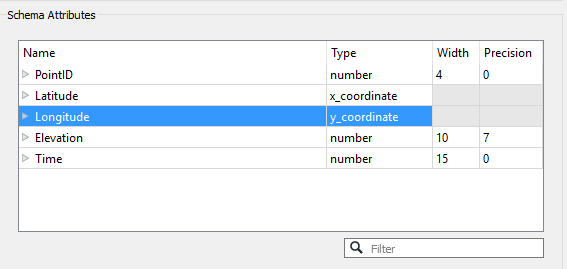
How did you read the X and Y columns in the CSV reader. If you add the CSV reader you can change the type for X and Y to coordinates as shown in the image:

That will create the point geometry.


Forum|alt.badge.img
  • Author
  • February 12, 2016

How did you read the X and Y columns in the CSV reader. If you add the CSV reader you can change the type for X and Y to coordinates as shown in the image:

That will create the point geometry.

I have used the "2dpointreplacer" and "CoordinateSystemSetter" transformers to do that. I have not used the type for X_coordonate and Y_coordonate to coordinate.


erik_jan
Contributor
Forum|alt.badge.img+26
  • Contributor
  • February 12, 2016

I have used the "2dpointreplacer" and "CoordinateSystemSetter" transformers to do that. I have not used the type for X_coordonate and Y_coordonate to coordinate.

If you redirect your output (writers menu) to the inspector, what is the value of the fme_type (should be fme_point) attribute, and do you see any attributes starting with oracle_ ?


Forum|alt.badge.img
  • Author
  • February 12, 2016

for the first question the value of the fme_type (fme_point) attribute i can't answer you, it is the wee-end. for the second question yes I see the diferents lines and the others attributes but the Spatial (geometry) column is null


erik_jan
Contributor
Forum|alt.badge.img+26
  • Contributor
  • February 12, 2016

for the first question the value of the fme_type (fme_point) attribute i can't answer you, it is the wee-end. for the second question yes I see the diferents lines and the others attributes but the Spatial (geometry) column is null

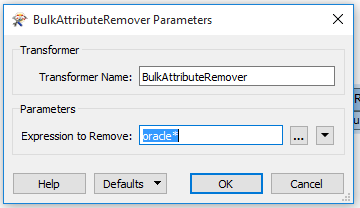
DO you read any data from an Oracle table in this workspace (for example an ID from a sequence in a SQLExecutor or additional attributes from a non spatial Oracle table)? Because that would lead to an attribute oracle_geometry with value oracle_nil and that would explain why the geometry is not written. If so, use the BulkAttributeRemover with these settings:


Forum|alt.badge.img
  • Author
  • February 12, 2016

Yes I can read any data from an Oracle table in this workspace. (oracle spatial table or not oracle spatial table). So I will test the BulkAttributeRemover transformer to resolve my problem. Thanks you for your help


Forum|alt.badge.img
  • Author
  • February 15, 2016

I found the solution this morning. In the output parameters there is a parameter named "Allowed Geometries" but it is fixed to "All" and I can't change it.

The solution is to create an attribute named "oracle_type" and to define this parameter with "oracle_point" value. And to expose the ORACLE output parameter named "oracle_type".