Solved

Excel FeatureWriter, how to add a blank line

  • January 29, 2019
  • 5 replies
  • 149 views

I wish to add a blank line for every 'x' line in an Excel spreadsheet createt in the FeatureWriter.


Any help or guide on how to do this?


Thank you!

Best answer by takashi

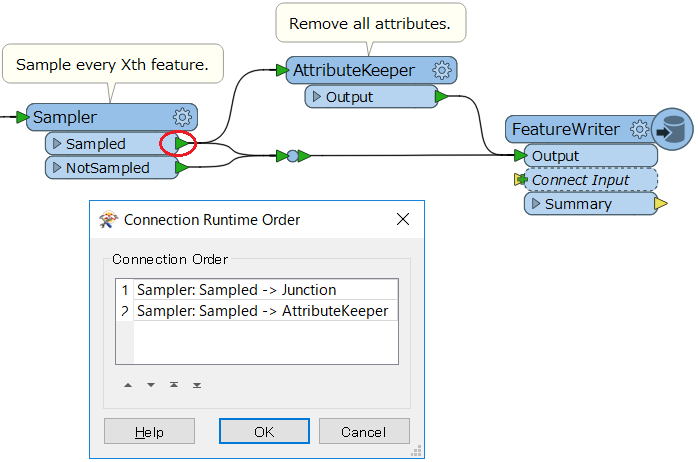
A possible way it to duplicate every Xth feature, remove all attributes from that, and send the empty feature to the writer. The Sampler and the AttributeKeeper might help you to do that.

This post is closed to further activity.
It may be an old question, an answered question, an implemented idea, or a notification-only post.
Please check post dates before relying on any information in a question or answer.
For follow-up or related questions, please post a new question or idea.
If there is a genuine update to be made, please contact us and request that the post is reopened.

5 replies

takashi
Celebrity
  • Best Answer
  • January 29, 2019

A possible way it to duplicate every Xth feature, remove all attributes from that, and send the empty feature to the writer. The Sampler and the AttributeKeeper might help you to do that.



  • Author
  • January 31, 2019

A possible way it to duplicate every Xth feature, remove all attributes from that, and send the empty feature to the writer. The Sampler and the AttributeKeeper might help you to do that.

Thanks for your reply, I can't seem to make it work though. The empty features is not being added as a blank line, instead the featurewriter is creating a new sheet for all the empty features.


takashi
Celebrity
  • January 31, 2019

A possible way it to duplicate every Xth feature, remove all attributes from that, and send the empty feature to the writer. The Sampler and the AttributeKeeper might help you to do that.
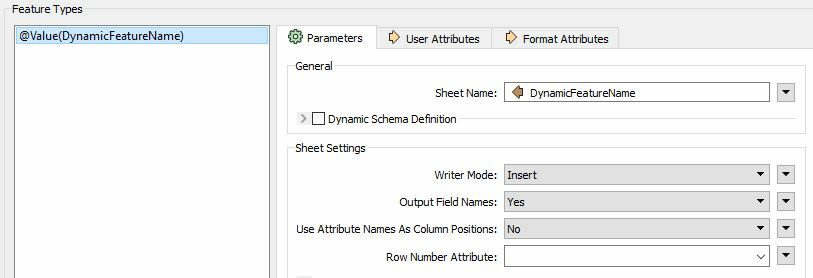
How did you set destination Sheet Name (feature type name) in the FeatureWriter?


  • Author
  • January 31, 2019

A possible way it to duplicate every Xth feature, remove all attributes from that, and send the empty feature to the writer. The Sampler and the AttributeKeeper might help you to do that.

The sheet names are specified by an attribute created earlier in the script


takashi
Celebrity
  • January 31, 2019

A possible way it to duplicate every Xth feature, remove all attributes from that, and send the empty feature to the writer. The Sampler and the AttributeKeeper might help you to do that.

Well, try keeping the attribute "DynaicFeatureName" in the AttributeKeeper.