Solved

Use template file to filter

  • November 25, 2019
  • 2 replies
  • 24 views

Forum|alt.badge.img

Hi,


I have a lot of DXF files and want only specific layers from this data. Additionally I have an excel file with all layers I want to filter in one column.How can I use the excel file as kind of a filter for the DXF files? The names of the DXF layer are pretty long and it would take to much time to write them all in a testfilter.


Thanks and best regards

 

Best answer by erik_jan

Similar to @markatsafe, you could also read both Excel and DXF files and use the FeatureJoiner transformer (DXF as Left, Excel as Right).

The Joined output port will output all DXF data from layers that are in the Excel sheet.

Hope this helps.

This post is closed to further activity.
It may be an old question, an answered question, an implemented idea, or a notification-only post.
Please check post dates before relying on any information in a question or answer.
For follow-up or related questions, please post a new question or idea.
If there is a genuine update to be made, please contact us and request that the post is reopened.

2 replies

Forum|alt.badge.img+2
  • November 27, 2019

@joe_gerner You can use a DatabaseJoiner. Expose the fme_feature_type attribute on your AutoCad reader feature type. Then do a join on your Excel table. Test the results for the _matched_records attribute that the DatabaseJoiner adds.

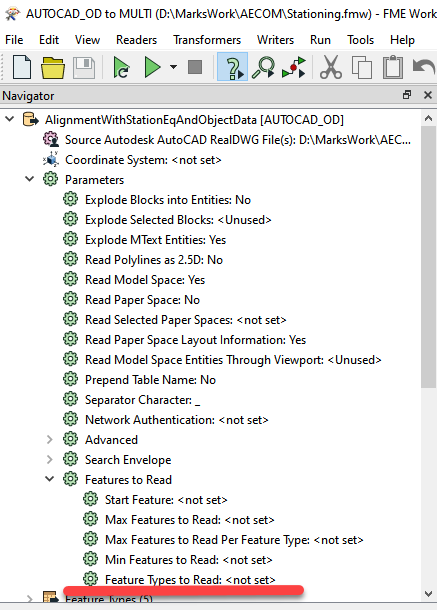
Alternative, just cut & paste the list of AutoCAD layers into the Feature Types to Read parameter on the AutoCAD reader


erik_jan
Contributor
Forum|alt.badge.img+26
  • Contributor
  • Best Answer
  • November 27, 2019

Similar to @markatsafe, you could also read both Excel and DXF files and use the FeatureJoiner transformer (DXF as Left, Excel as Right).

The Joined output port will output all DXF data from layers that are in the Excel sheet.

Hope this helps.