Question

File Geodatabase Where Clause for geometry filter

  • July 26, 2019
  • 5 replies
  • 70 views

Forum|alt.badge.img+1

Hi,

I can't seem to find anywhere the sql syntax for performing a geometry filter in the where clause of the File Geodatabase - (Esri Geodatabase (File Geodb Open API) Reader). I would like to only read in geometry of a certain min x, min x, max y and max y bounding.

Also, is using the 'where' clause for this the quickest way of filtering a File Geodatabase? I have millions of records so need to optimize the filtering.

I am using FME2017.1

Thank you in advance.

This post is closed to further activity.
It may be an old question, an answered question, an implemented idea, or a notification-only post.
Please check post dates before relying on any information in a question or answer.
For follow-up or related questions, please post a new question or idea.
If there is a genuine update to be made, please contact us and request that the post is reopened.

5 replies

david_r
Celebrity
  • July 26, 2019

If you use the FeatureReader, make sure that the input feature contains a rectangular polygon that describes your bounding box. Then set the FeatureReader's spatial filter to "Envelope Intersects".

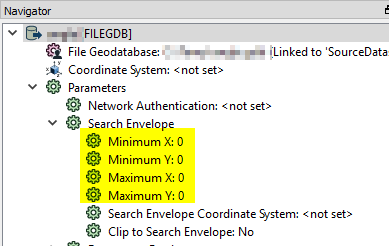
If you use the regular reader, you can use the following parameters to only read the contents of a given bounding box:

As long as your input feature class has a spatial index, the above should be very efficient.


Forum|alt.badge.img+1
  • Author
  • July 26, 2019

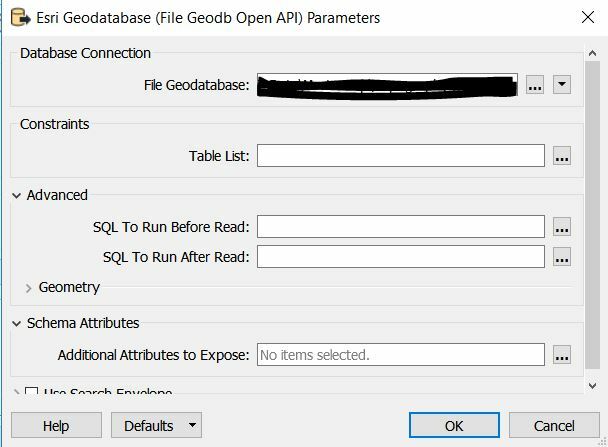
Thank you for the quick reply @david_r . I also noticed that in FME2018.1 in the Esri Geodatabase (File Geodb Open API) Reader and the Feature Reader there is the option for setting 'SQL To Run Before Read'. Do you know if this is more efficient than using the Search Envelope as you described above?


david_r
Celebrity
  • July 26, 2019

Thank you for the quick reply @david_r . I also noticed that in FME2018.1 in the Esri Geodatabase (File Geodb Open API) Reader and the Feature Reader there is the option for setting 'SQL To Run Before Read'. Do you know if this is more efficient than using the Search Envelope as you described above?

I don't think it's possible to use "SQL to run before read" the way you describe here. That option doesn't replace a where-clause, it must be a separate, standalone SQL statement.


Forum|alt.badge.img+1
  • Author
  • July 26, 2019

I don't think it's possible to use "SQL to run before read" the way you describe here. That option doesn't replace a where-clause, it must be a separate, standalone SQL statement.

ah ok, so what would you use the 'SQL to run before read' to do?


david_r
Celebrity
  • July 26, 2019

ah ok, so what would you use the 'SQL to run before read' to do?

Depends, but you could e.g. create a temporary index or drop a constraint and then recreate it afterwards using "SQL to run after read". The statement is not limited to the table that is read in the FeatureReader, meaning that you could also insert a log entry in a separate table. The imagination is the limit :-)