Question

write multiple layers containing polylines to a single dxf file

  • April 30, 2014
  • 2 replies
  • 64 views

I am wondering if it is possible to output polylines that are created through seperate worlflows in a single workbench to a single dxf file? I am reading  x,y data out of a database and using FME to create polylines and write that to a DXF file. I am able to get that to work with a single polyline file but if I try to do it with two only one will appear in the output file when I would like to have two seperate layers. I'm hoping I just need to find the transfromer to do that.


Thanks,


Vince

This post is closed to further activity.
It may be an old question, an answered question, an implemented idea, or a notification-only post.
Please check post dates before relying on any information in a question or answer.
For follow-up or related questions, please post a new question or idea.
If there is a genuine update to be made, please contact us and request that the post is reopened.

2 replies

takashi
Celebrity
  • May 1, 2014
Hi Vince,


Just create another writer feature type for the second layer. An easy way is:


Right-click on the 1st writer feature type; select "Duplicate"; modify feature type name (i.e. layer name) and other properties if necessary.


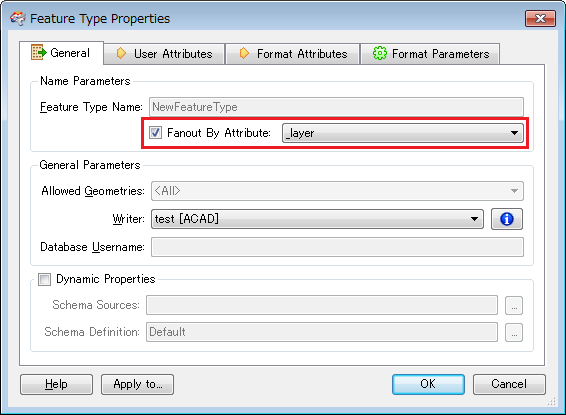
Alternatively, you can also use fanout option of the writer feature type if the two layers have the same schema.


Append preferable layer name as an attribute (e.g. named "_layer") to each polyline; send them to the same writer feature type; fanout features by "_layer".


This image shows an example for fanout option settings on the writer feature type.


Takashi

  • Author
  • May 1, 2014
Thanks Takashi, using duplicate worked. I tried something similar earlier when I created an other writer that pointed to the same output file but that didn't seem to work. Thanks for your help!