Best Answer

Convert AutoCAD text to SHP attribut

  • October 10, 2017
  • 4 replies
  • 300 views

Hello,

I have a DWG file with two layers. In the first one I have lines representing a nework of pipes. In the second one I have autoCAD text describing the pipes diameters. I would like to create a shape file representing the pipes with their diameter as an attribute.

I linked a DWG reader containing the first layer to a SHP writer to create the shape file representing the network of pipe. How can I extract the text (diameter information) from the second layer of my DWG file and how can I link the diameter to the right pipe in the SHP file ?

Thank you for your help,

Best answer by erik_jan

The text value will be in the format attribute fme_text_string (you might have to expose that).

You can rename that on the text objects to Diameter by using an AttributeManager transformer.

The NeighborFinder transformer allows you to find the closest text for each pipe and will add the attribute Diameter to the pipe objects.

Finally you need to add it manually to the output definition for the Shape (or set that to Automatic, but that can add too much).

This post is closed to further activity.
It may be an old question, an answered question, an implemented idea, or a notification-only post.
Please check post dates before relying on any information in a question or answer.
For follow-up or related questions, please post a new question or idea.
If there is a genuine update to be made, please contact us and request that the post is reopened.

4 replies

erik_jan
Contributor
Forum|alt.badge.img+26
  • Contributor
  • Best Answer
  • October 10, 2017

The text value will be in the format attribute fme_text_string (you might have to expose that).

You can rename that on the text objects to Diameter by using an AttributeManager transformer.

The NeighborFinder transformer allows you to find the closest text for each pipe and will add the attribute Diameter to the pipe objects.

Finally you need to add it manually to the output definition for the Shape (or set that to Automatic, but that can add too much).


erik_jan
Contributor
Forum|alt.badge.img+26
  • Contributor
  • October 10, 2017

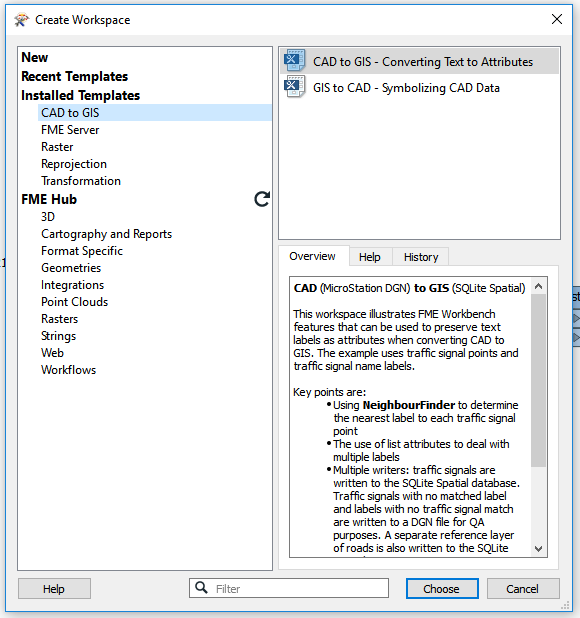
You can find a good example of this in the installed FME Templates:


Thanks for helping a beginner, it is working fine


  • June 12, 2018
I have a similar need. Does your DWG file yield text points with a valid coordinate system? The solution from @erik_jan seems to suggest that it does, but in my case the DWG file does not, coordinate system "unknown." Any suggestions? Thx in adv.