Question

Write DWG with coordinate system and units

  • November 14, 2012
  • 5 replies
  • 314 views

Forum|alt.badge.img
Using FME Professional Desktop 2012 SP3, Windows 7 Pro, 64-bit.


I have a workbench that I created to extract geometries in WKB format from SQL Server and write them into an AutoCAD Map DWG file.  I noticed the resulting DWG file has no coordinate system assigned, and the units are set to "unitless".  Although the objects are correctly positioned and the coordinates are correct, the coordinate system is not set.  Is there any way to write the AutoCAD Map DWG file with the coordinate system and the units set?


I have posted this question in the Google group FME Talk.  I am just trying to increase exposure to my question.


Thanks,

This post is closed to further activity.
It may be an old question, an answered question, an implemented idea, or a notification-only post.
Please check post dates before relying on any information in a question or answer.
For follow-up or related questions, please post a new question or idea.
If there is a genuine update to be made, please contact us and request that the post is reopened.

5 replies

Forum|alt.badge.img
  • November 14, 2012
With the units, FME seems to have a problem with this.  Workaround is create a blank DWG file with the units set to metres (in Auto_xxx, type UNITS and set to 6), save as .dwg file.


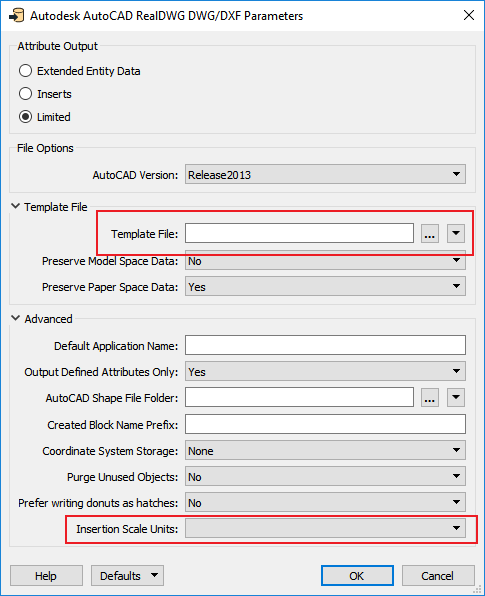
In Add Writer dialog box in Parameters select the file you've just created as the Template File.  I suspect you could set the coordinate system in the blank template too.

Forum|alt.badge.img
  • Author
  • November 14, 2012
It Worked!  Thanks!

bpn1990
Contributor
Forum|alt.badge.img+3
  • Contributor
  • June 7, 2018

@amit where can you select the template file? we are trying to do dwg -->dwg through snakegrid converter..


lars_de_vries
Forum|alt.badge.img+10

It is possible to set the units and the coordinate system, as well as the template, in the parameters of the writer. When you add the Writer, select 'parameters' and set the correct values under 'Advanced'. If the Writer is already added, you can also find the parameters in the Navigator pane under the Writer.


jneujens
Forum|alt.badge.img
  • June 12, 2018

@amit where can you select the template file? we are trying to do dwg -->dwg through snakegrid converter..

Click on the writer in the navigator window (which is probably on the left of your Workbench).


Under one of these items, you should see something like 'Template file'.