
Solved

StringReplacer behaves differently on different columns

  • February 7, 2022
  • 2 replies
  • 29 views

Hello,

The following settings of the StringReplacer works for some feature attributes, and doesn't work for others.

This is aimed to replace dots for commas (or vice-versa) in a decimal number.

So, it normally works for example like 100.5 -> 100,5

But, I just used the very same transformer in a different feature, and the result is zero, for example: 100.5 -> 0
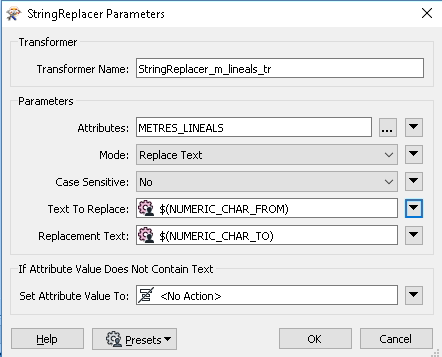
string-replacer-0Both columns are 64-bit real. I can see in the the "cached features" in Data Inspector that a valid decimal number goes in, and out goes the zero.

Any ideas?

Thanks in advance

Best answer by ebygomm

Are there any warnings in the log file?


Does the same error persist if you hardcode the Text To Replace and Replacment Text rather than using parameters?

This post is closed to further activity.
It may be an old question, an answered question, an implemented idea, or a notification-only post.
Please check post dates before relying on any information in a question or answer.
For follow-up or related questions, please post a new question or idea.
If there is a genuine update to be made, please contact us and request that the post is reopened.

2 replies

ebygomm
Influencer
Forum|alt.badge.img+46
  • Influencer
  • Best Answer
  • February 7, 2022

Are there any warnings in the log file?


Does the same error persist if you hardcode the Text To Replace and Replacment Text rather than using parameters?


  • Author
  • February 7, 2022

I'm sorry, my bad - works perfectly. I don't know what I was looking at, I guess another feature. Sorry again!


