

Question

LineCombiner joining contours along perimeter

  • March 11, 2019
  • 6 replies
  • 60 views

Forum|alt.badge.img

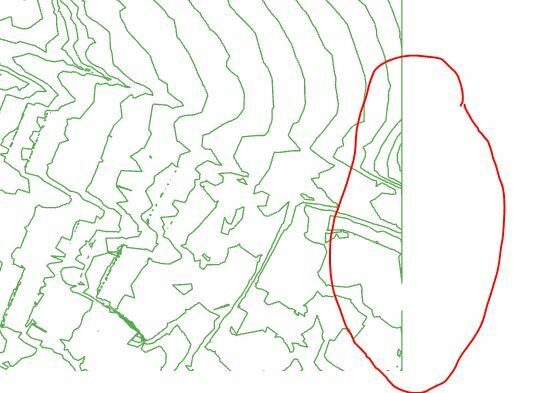
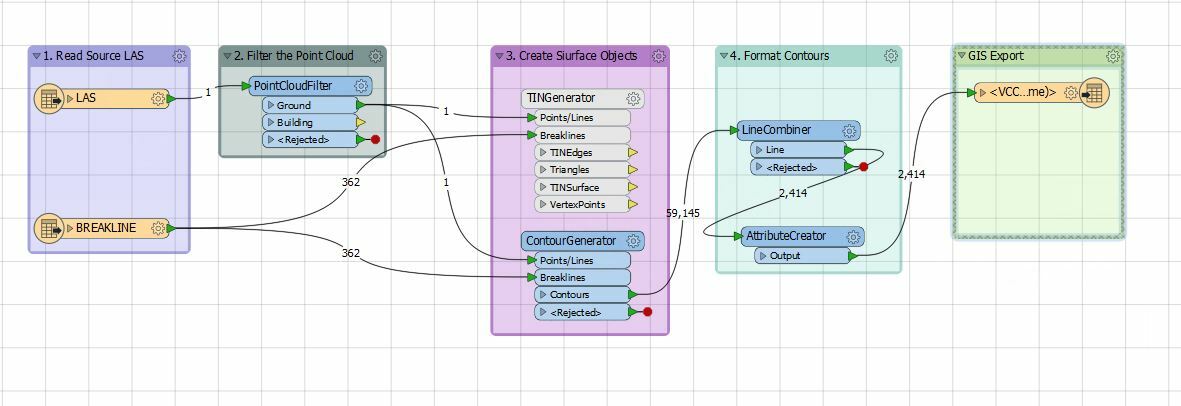
i am using a LAS dataset, which is too large to share and when using a combine line I get a boundary. I keep getting a combine line around the boundary of the area I am processing. This will have multiple contours that have different elevations, each one connects to another contour along the boundary a ways away. Thank you for your suggestions.
This post is closed to further activity.
It may be an old question, an answered question, an implemented idea, or a notification-only post.
Please check post dates before relying on any information in a question or answer.
For follow-up or related questions, please post a new question or idea.
If there is a genuine update to be made, please contact us and request that the post is reopened.

6 replies

danilo_fme
Celebrity
Forum|alt.badge.img+52
  • Celebrity
  • March 11, 2019

Hello


Could you share the workspace or FFS files to test?


Thanks,


Danilo


Forum|alt.badge.img
  • Author
  • March 12, 2019

lasprocessor.fmw

Here is my workspace.


ebygomm
Influencer
Forum|alt.badge.img+46
  • Influencer
  • March 12, 2019

lasprocessor.fmw

Here is my workspace.

The link does not open


Forum|alt.badge.img+2

@vanhornsky The best way to avoid these edge effects is to grab more data than you need and then clip back to the extent you're actually interested. As a general rule, if you can extend you data an extra 10% past the area of interest, contour that, then clip back to the area of interest. This works well if you're contouring tiles as well. ensure there is about 10% overlap on the neighbouring tiles and then clip back to the tile boundary.


Forum|alt.badge.img
  • Author
  • March 19, 2019

@vanhornsky The best way to avoid these edge effects is to grab more data than you need and then clip back to the extent you're actually interested. As a general rule, if you can extend you data an extra 10% past the area of interest, contour that, then clip back to the area of interest. This works well if you're contouring tiles as well. ensure there is about 10% overlap on the neighbouring tiles and then clip back to the tile boundary.

How do I build the boundary? I have the general square tile areas, but I would like to build the area of interest.


Forum|alt.badge.img+2

How do I build the boundary? I have the general square tile areas, but I would like to build the area of interest.

@vanhornsky If you have the tile boundary, you can use the Bufferer or GeographicBuffer to expand the tile boundary by some amount. If you don't have the tile boundary, you can use the BoundingBoxAccumulator to get the extents of your dataset and then buffer that








