Question

Fixing donuts/holes

  • January 20, 2016
  • 22 replies
  • 912 views

Forum|alt.badge.img

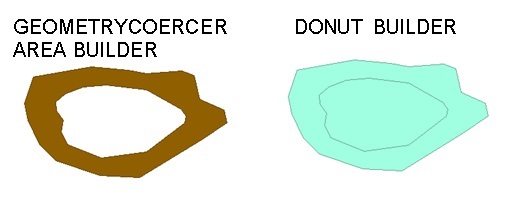
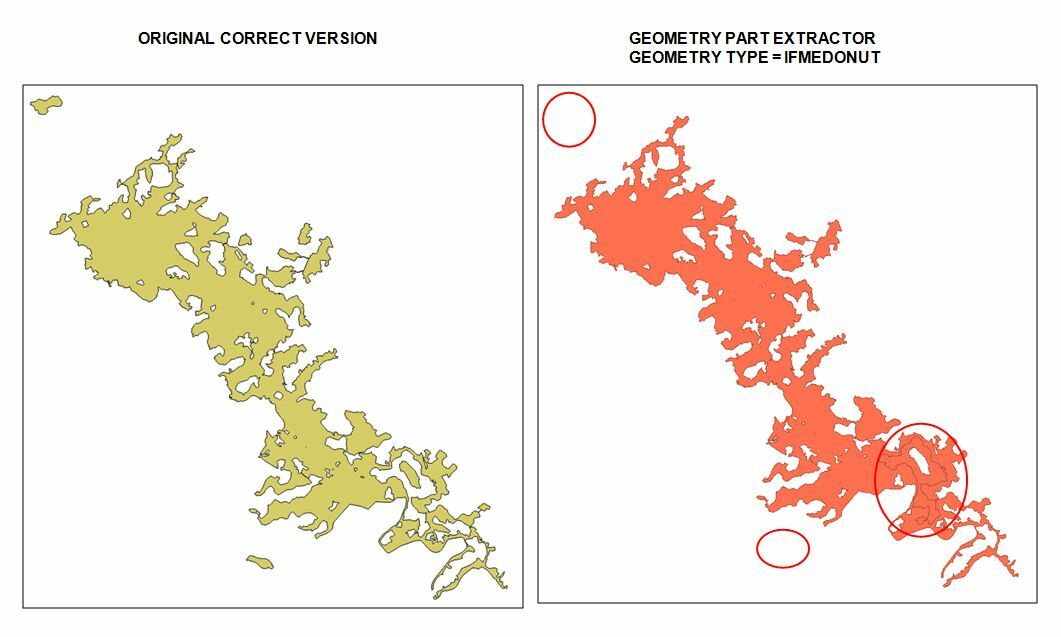
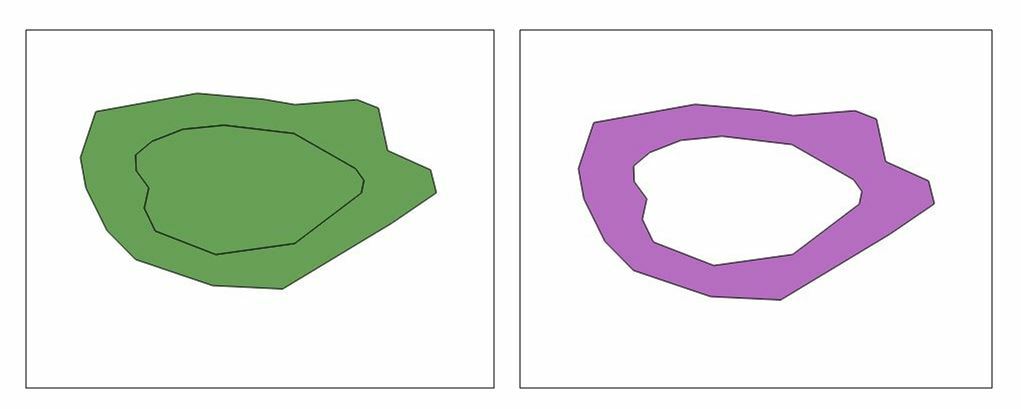
I have got a shapefile (left picture) where the donuts have been included as part of the polygon. I need to try to get the outcome of the right picture, which is the correct polygon of the site and which will allow to calculate the correct area of the site.

Is there an easy way of adding a transformer that fixes that?
This post is closed to further activity.
It may be an old question, an answered question, an implemented idea, or a notification-only post.
Please check post dates before relying on any information in a question or answer.
For follow-up or related questions, please post a new question or idea.
If there is a genuine update to be made, please contact us and request that the post is reopened.

22 replies

david_r
Celebrity
  • January 20, 2016

Hi

Have a look at the DonutBuilder.

David


erik_jan
Contributor
Forum|alt.badge.img+26
  • Contributor
  • January 20, 2016

And the DonutHoleExtractor would do exactly what you describe.


Forum|alt.badge.img
  • Author
  • January 20, 2016

I can't get my head around the difference between DonutBuilder and DountHoleExtractor. Can anyone give a simple explanation?


takashi
Celebrity
  • January 20, 2016

I can't get my head around the difference between DonutBuilder and DountHoleExtractor. Can anyone give a simple explanation?

The DonutBuilder clips a larger area by smaller area(s) within it, to create a donut geometry. If you set "yes" to the "Drop Holes" parameter, polygons representing the hole(s) (i.e. the smaller area(s)) will be discarded. The DonutHoleExtractor splits a donut geometry into an outershell and hole polygon(s).

I think the DonutBuilder is what you should use in this case as David suggested. See the help doc and try it anyway, then you can understand how the transformer works.


gio
Contributor
Forum|alt.badge.img+15
  • Contributor
  • January 22, 2016

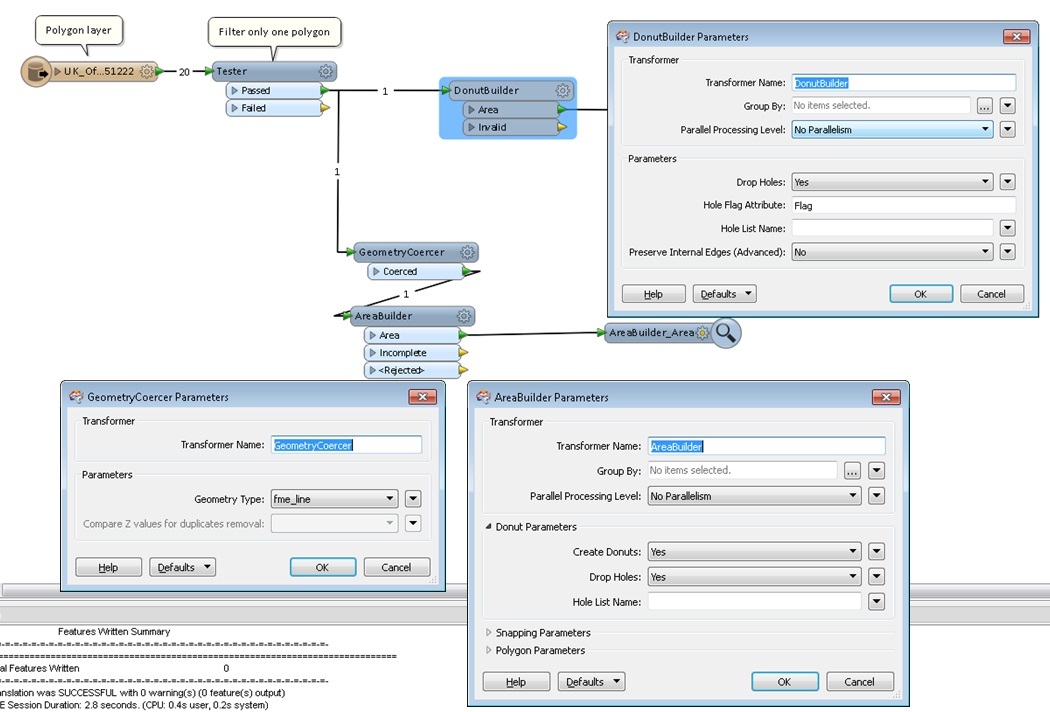
or u can use geomterycoercer to lines.

THen area builder set to drop holes.


Forum|alt.badge.img
  • Author
  • January 25, 2016

I have tried both the DonutBuilder and the GeometryCoercer with AreaBuilder. I can only make work the second one. The DonutBuilder doesn't work for me unless I added a AttributeExposer (expose "fme_geometry") and then a tester ("fme_geometry" = "fme_donut").

Some screenshots attached.


david_r
Celebrity
  • January 25, 2016

I have tried both the DonutBuilder and the GeometryCoercer with AreaBuilder. I can only make work the second one. The DonutBuilder doesn't work for me unless I added a AttributeExposer (expose "fme_geometry") and then a tester ("fme_geometry" = "fme_donut").

Some screenshots attached.

Are the results you posted with or without the Tester that only lets one polygon through?


takashi
Celebrity
  • January 25, 2016

I have tried both the DonutBuilder and the GeometryCoercer with AreaBuilder. I can only make work the second one. The DonutBuilder doesn't work for me unless I added a AttributeExposer (expose "fme_geometry") and then a tester ("fme_geometry" = "fme_donut").

Some screenshots attached.

I suspect that the original geometry is an Aggregate which consists of a Donut and a Polygon representing the hole. If so, it can be explained that the features output from the DonutBuilder was filtered with testing "fme_geometry = fme_donut".


takashi
Celebrity
  • January 25, 2016

I suspect that the original geometry is an Aggregate which consists of a Donut and a Polygon representing the hole. If so, it can be explained that the features output from the DonutBuilder was filtered with testing "fme_geometry = fme_donut".

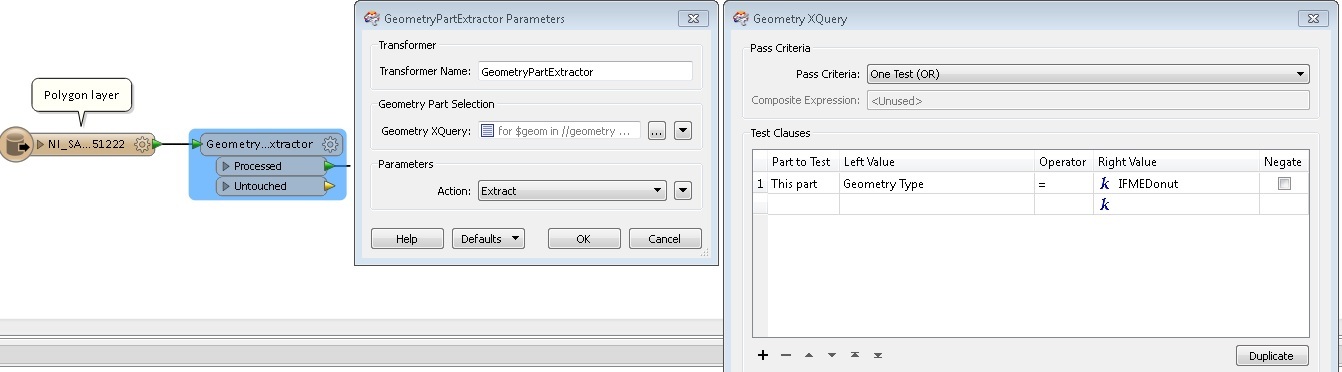
If my guess is correct, the GeometryExtractor should work to extract the donut part from the aggregate.

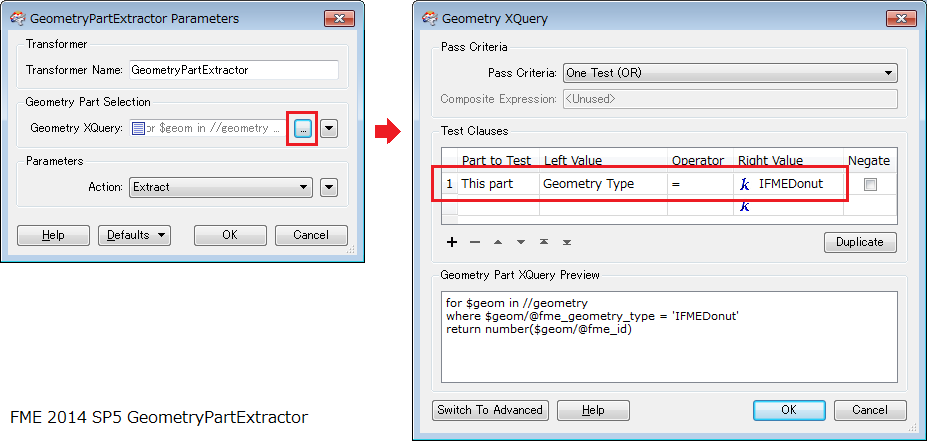
Geometry XQuery: This part | GeometryType | = | IFMEDonut

[correction] please replace GeometryExtractor with GeometyrPartExtractor


Forum|alt.badge.img
  • Author
  • January 26, 2016

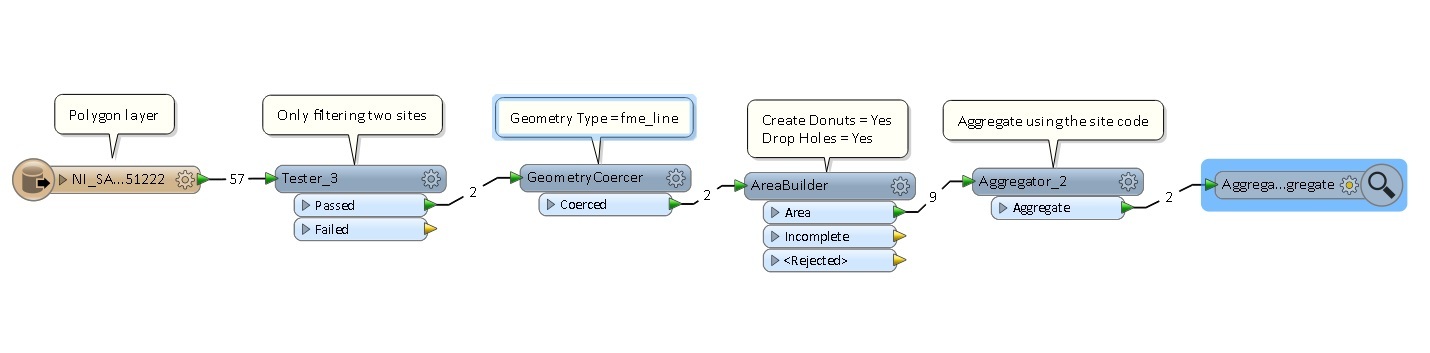
David - The Tester helps me to only filter two polygons that I know have this donut problem, so the workbench runs faster.

Takashi - I don't really understand how I can use Geometry XQuery. When I add a GeometryExtractor, I get stuck with the parameters. Can't find a

The GeometryCoecer and AreaBuilder transformers seem to work really well in this case. See my latest workbench below.


Forum|alt.badge.img
  • Author
  • January 26, 2016

Takashi - I don't really understand how I can use Geometry XQuery. When I add a GeometryExtractor, I get stuck with the parameters. Can't find a Geometry XQuery anywhere.


takashi
Celebrity
  • January 26, 2016

Takashi - I don't really understand how I can use Geometry XQuery. When I add a GeometryExtractor, I get stuck with the parameters. Can't find a Geometry XQuery anywhere.

This is it. If the source geometry is an aggregate and contains a donut as a part, the GeometryPartExtractor with this setting extracts the donut part.


takashi
Celebrity
  • January 26, 2016

Takashi - I don't really understand how I can use Geometry XQuery. When I add a GeometryExtractor, I get stuck with the parameters. Can't find a Geometry XQuery anywhere.

Actually I don't know what the original geometry type is. Have you checked the original geometry with Data Inspector? What kind of geometry type (IFME***) is shown in the Feature Information window?


takashi
Celebrity
  • January 26, 2016

This is it. If the source geometry is an aggregate and contains a donut as a part, the GeometryPartExtractor with this setting extracts the donut part.

Ahh.. sorry. I made a typo in the previous post. GeometryExtractor was wrong. I intended to say GeometryPartExtractor.


Forum|alt.badge.img
  • Author
  • January 27, 2016

Hi Takashi,

Your GeometryPartExtractor using Geometry XQuery (Geometry Type = IFMEDonut) seems to do only work partially. It misses some small polygons located outside the main one and extracts something that it shouldn't and keeps something that it should be removed in the main polygon.

Do you have any ideas why this might happen?


takashi
Celebrity
  • January 27, 2016

Hi Takashi,

Your GeometryPartExtractor using Geometry XQuery (Geometry Type = IFMEDonut) seems to do only work partially. It misses some small polygons located outside the main one and extracts something that it shouldn't and keeps something that it should be removed in the main polygon.

Do you have any ideas why this might happen?

hi @darius, the GeometryPartExstractor works as expected only when the input geometry is an aggregate consisting of a Donut part and Polygon parts (holes). If the input geometry is not such an aggregate, it doesn't make sense.

The best solution is different depending on the geometry type of each input feature. That's why I asked the questions: "Have you checked the original geometry with Data Inspector? What kind of geometry type (IFME***) is shown in the Feature Information window?"


Forum|alt.badge.img
  • Author
  • January 27, 2016

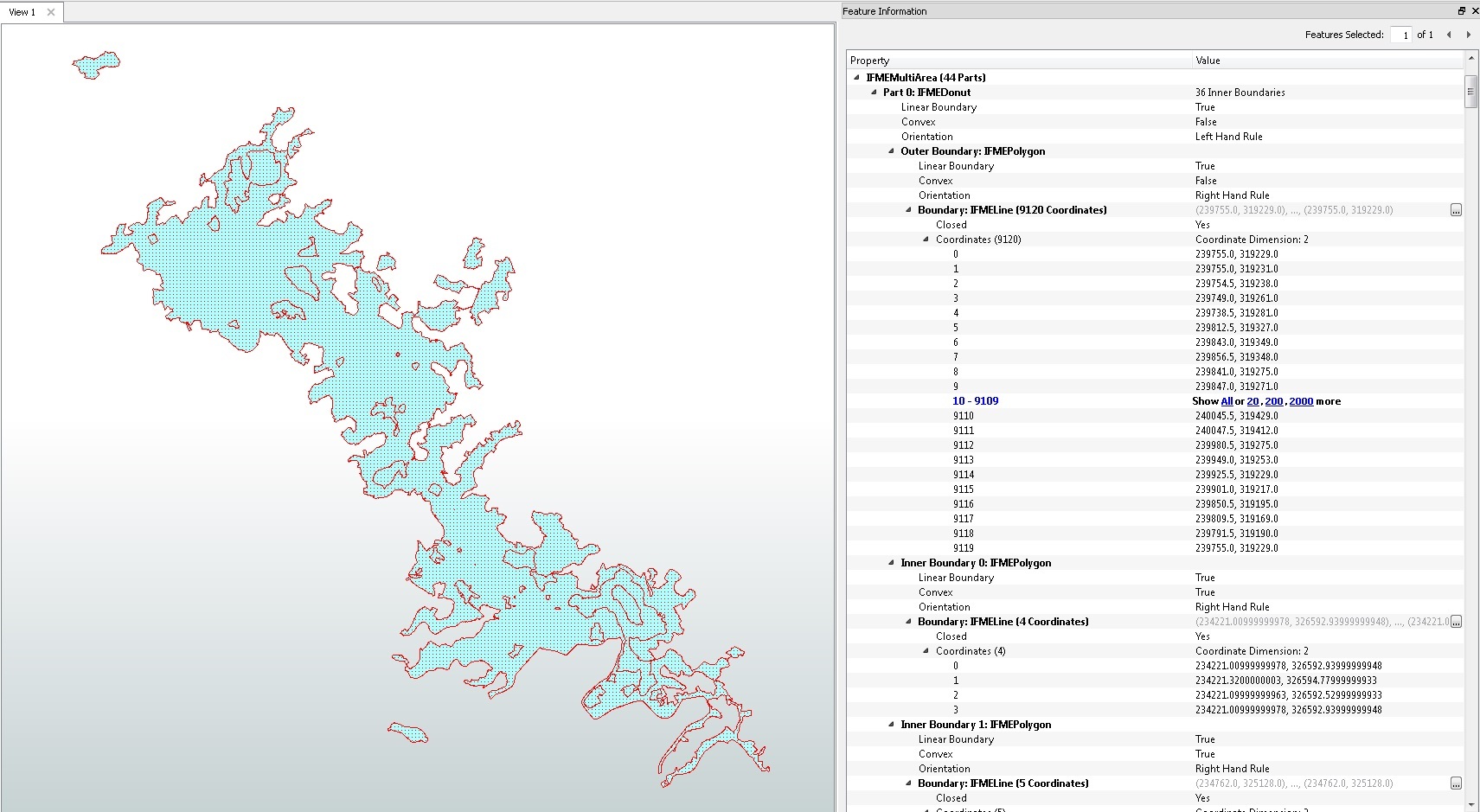
I checked the geometry type but I couldn't get my head around. It seems that under the section IFMEMultiArea there are 44 parts. An example attached.


takashi
Celebrity
  • January 27, 2016

I checked the geometry type but I couldn't get my head around. It seems that under the section IFMEMultiArea there are 44 parts. An example attached.

Ah, the input geometry is a single MultiArea object consisting of multiple donuts and multiple polygons, probably... Try this.

1. Decompose the MultiArea into 44 part geometries (donuts and polygons) with the Deaggregator.

2. Filter the independent island-like polygons with the SpatialRelator and Tester.

SpatialRelator

  • Send all features to both Requestor and Supplier port.
  • Tests to Perform: Intersects
  • Attribute(s) that Must Differ: _part_number (part number added by the Deaggregator)

Then, use the Tester to filter the independent polygons (_related_candidates = 0).

3. From the remaining features, extract donuts with the GeometryPartExtractor (This Part Geometry Type = IFMEDonut).

4. Finally send the donuts to the DonutBuilder (Drop Holes: yes), to re-construct the nested part.

Hope this helps!


takashi
Celebrity
  • January 27, 2016

I checked the geometry type but I couldn't get my head around. It seems that under the section IFMEMultiArea there are 44 parts. An example attached.

hi @darius, this may also work in this case.

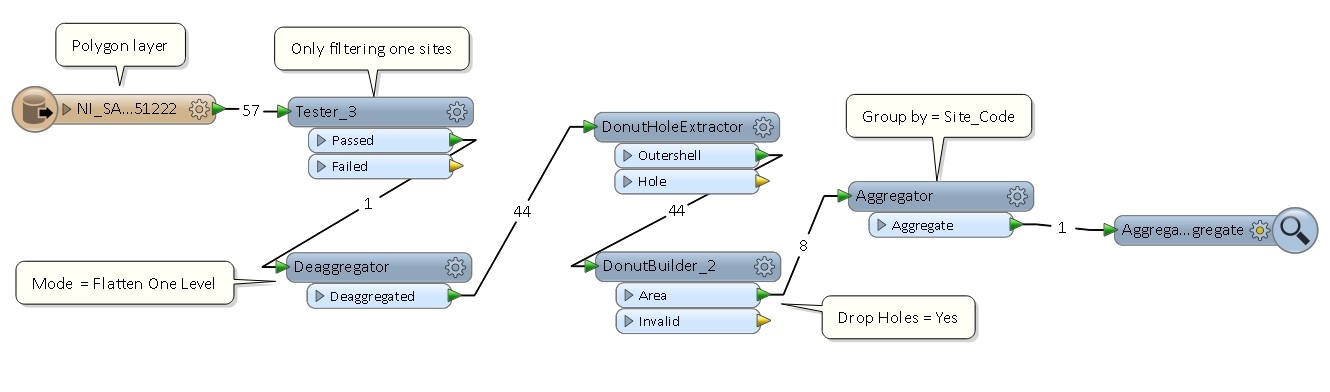
  1. Use the Deaggregator to decompose the MultiArea into 44 parts.
  2. Send all parts to the DonutHoleExtractor.
  3. Send all Outershell features to the DonutBuilder (Drop Holes: yes)

Forum|alt.badge.img
  • Author
  • January 28, 2016

@takashi your last suggestion worked really nicely.

Thanks for your time and I hope it is useful for other users.


takashi
Celebrity
  • January 29, 2016

@takashi your last suggestion worked really nicely.

Thanks for your time and I hope it is useful for other users.

Good to hear, @darius. From the result, it has become clear that the input geometry was a MultiArea consisting of [1] donuts, [2] polygons representing holes of the donuts, and [3] isolated polygons. [2] polygons match the holes of [1] donuts. The DonutHoleExtractor extracts Outershells from [1] donuts, and then the DonutBuilder repairs donuts using the Outershells and [2] polygons (holes). The nested donuts (right-bottom in the screenshot) can also be repaired simultaneously by the DonutBuilder. Those transformers will not change [3] isolated polygons. Inspecting source data is always important ;)


  • December 1, 2016

In case someone is still struggling with making donut holes using 3 steps approach mentioned by @takashi. I had to add OGCGeometryValidator after extracting the donutholes before sending it to the DonutBuilder. Otherwise FME was throwing an exception INVALID_GEOMETRY_TYPE. Applying basic geometry validation fixed this problem for me.