
Hello to the lovely FME community
I am fairly new to the FME world and am currently working in a small project to update the metadata of a feature class using the XMLUpdater. The process is working fine except for when I am trying to update the XML values of a drop down menu. For example If you go to the Item Description of the feature class and go to "Overview" --> "Citation Contacts" I am trying to change the "Role" from Distributor to Publisher like this:
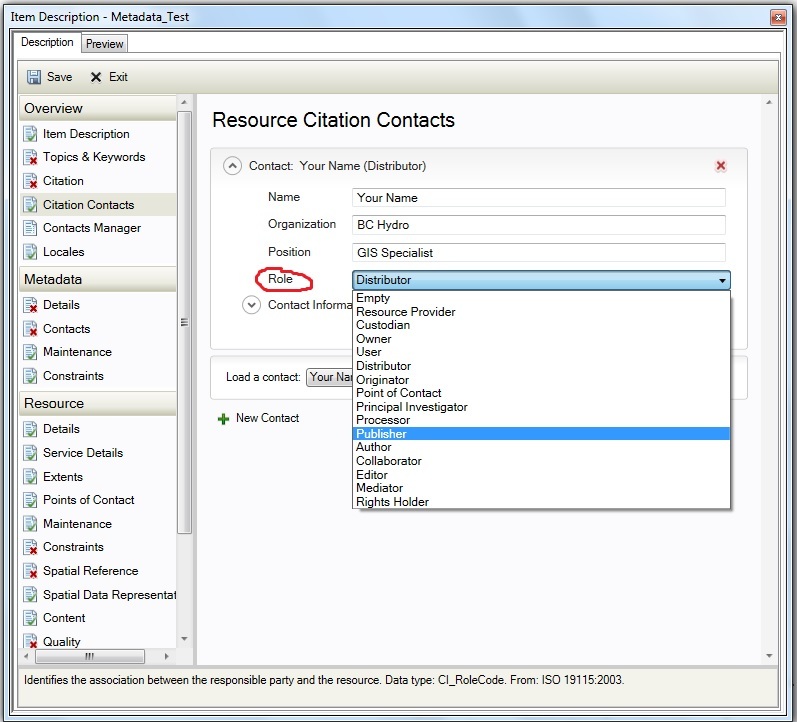
After some trial and error I found that the XML tag for this particular field is:
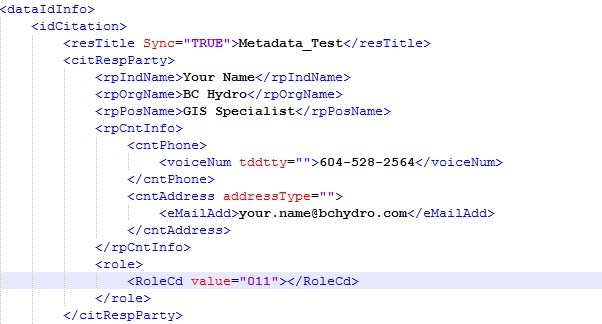
As you can see "value = 011" is inside the tag and I tried different options within the XMLUpdater but it seems you are only able to replace whats after or before the tag(RoleCd value="011"), not what is inside (in need to change the number 011 to 010). I think It is not something I can replace using XMLUpdater (at least to my knowledge) so I was wondering If somebody could provide some feedback and point me in the right direction.
Thanks in advance.



