

Solved

Excel Fill Down Function

  • February 19, 2020
  • 2 replies
  • 113 views

Forum|alt.badge.img

Hello Friends,

I need an urgent help. Can anyone please help?

I am having something like this:
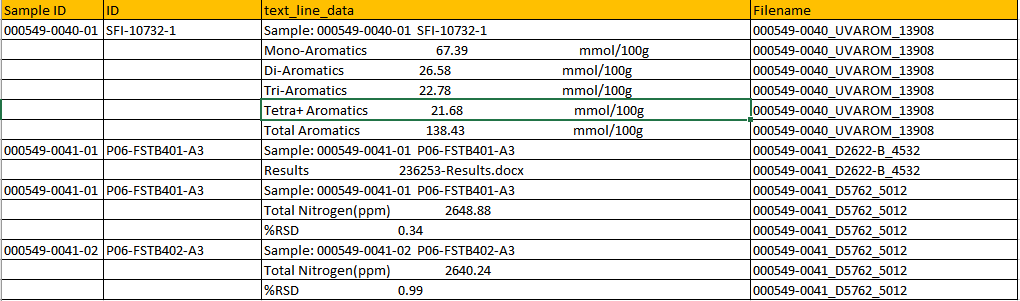
and i want to fill down the values something like this in excel:
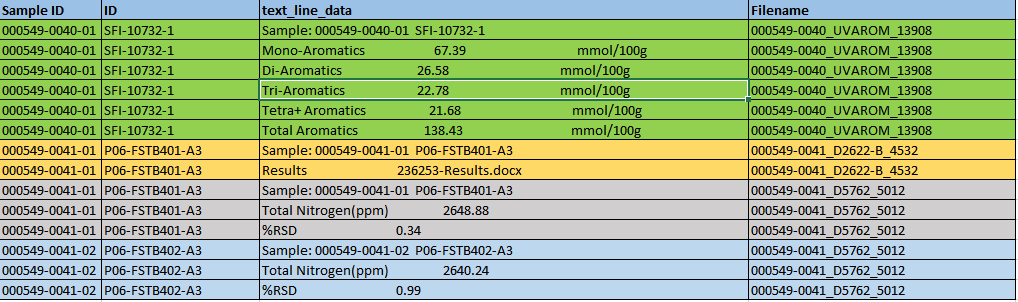
its like a fill down option for sample id and ID till the time it finds a new sample line in text_line data or till the time it finds a blank value in its own column and stop when next row has a value.

Also attaching the excel file for your reference.

Thanks
Best answer by ebygomm

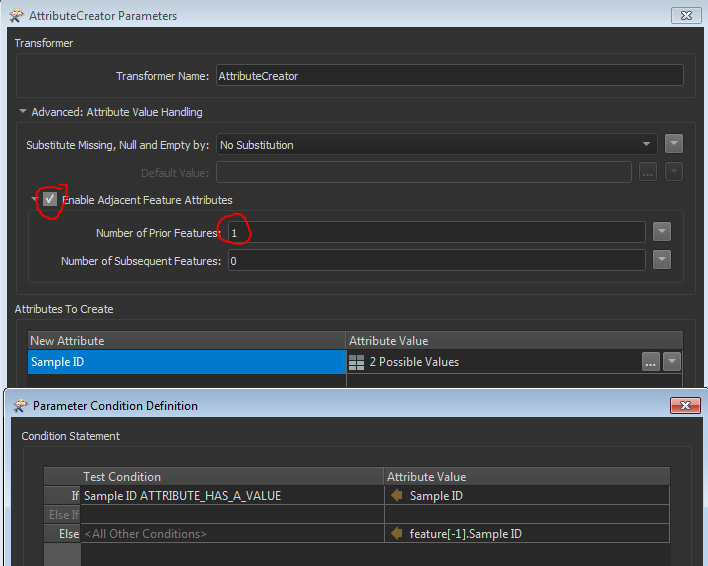
Yes, you can do this in an Attribute Creator using adjacent feature attribute handling and a conditional formula. So this looks at whether Sample ID has a value and if it does then the value remains as is, otherwise it is set to the Sample ID of the previous feature

This post is closed to further activity.
It may be an old question, an answered question, an implemented idea, or a notification-only post.
Please check post dates before relying on any information in a question or answer.
For follow-up or related questions, please post a new question or idea.
If there is a genuine update to be made, please contact us and request that the post is reopened.

2 replies

ebygomm
Influencer
Forum|alt.badge.img+46
  • Influencer
  • Best Answer
  • February 19, 2020

Yes, you can do this in an Attribute Creator using adjacent feature attribute handling and a conditional formula. So this looks at whether Sample ID has a value and if it does then the value remains as is, otherwise it is set to the Sample ID of the previous feature


Forum|alt.badge.img

Yes, you can do this in an Attribute Creator using adjacent feature attribute handling and a conditional formula. So this looks at whether Sample ID has a value and if it does then the value remains as is, otherwise it is set to the Sample ID of the previous feature

You are a life saver!! Thanks a ton



