


Solved

Map list values to attribute values

  • October 9, 2018
  • 3 replies
  • 116 views

sunsilk11
Contributor
Forum|alt.badge.img+6

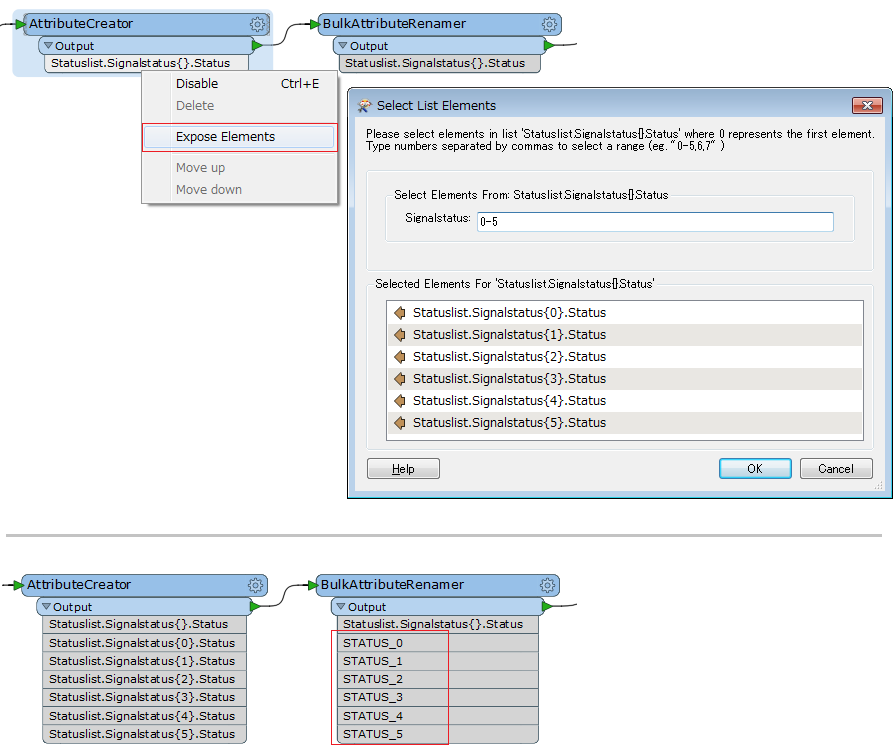
Hi I have used JsonFragmenter to read a json file and have ended up with a set of attribute values plus a list of values for each feature. I need to write the list to single attributes in a table based on the index. (see attached)

e.g Signalstatus[0] written to field STATUS_0

Signalstatus[1] -> STATUS_1 e.tc.

Any suggestion ?

Best answer by jdh

There is sadly no listFlattener transformer.


You can however use the BulkAttributeRenamer with Regular Expression Replace


Text to Find: ^Signalstatus{(\\d+)}$


String: STATUS_\\1

EDIT: use the exact list name in the data, based on the png it would likely be ^Statuslist\\.Signalstatus{(\\d+)}\\.Status$

This post is closed to further activity.
It may be an old question, an answered question, an implemented idea, or a notification-only post.
Please check post dates before relying on any information in a question or answer.
For follow-up or related questions, please post a new question or idea.
If there is a genuine update to be made, please contact us and request that the post is reopened.

3 replies

jdh
Contributor
Forum|alt.badge.img+40
  • Contributor
  • Best Answer
  • October 9, 2018

There is sadly no listFlattener transformer.


You can however use the BulkAttributeRenamer with Regular Expression Replace


Text to Find: ^Signalstatus{(\\d+)}$


String: STATUS_\\1

EDIT: use the exact list name in the data, based on the png it would likely be ^Statuslist\\.Signalstatus{(\\d+)}\\.Status$


geosander
Forum|alt.badge.img+7
  • October 9, 2018

Or use a ListRenamer followed by a ListKeyValuePairExtractor (on FME Hub).


takashi
Celebrity
  • October 10, 2018

There is sadly no listFlattener transformer.


You can however use the BulkAttributeRenamer with Regular Expression Replace


Text to Find: ^Signalstatus{(\\d+)}$


String: STATUS_\\1

EDIT: use the exact list name in the data, based on the png it would likely be ^Statuslist\\.Signalstatus{(\\d+)}\\.Status$

Good suggestion.


If you expose the list elements under a prior transformer (right-click on the list name > Expose Elements > Select List Elements), the BulkAttributeRenamer would expose destination attribute names automatically, for what it's worth.