

Question

How do I set the Feature Type as a published parameter in the FeatureReader with a Microstation DGN file

  • April 29, 2020
  • 3 replies
  • 26 views

Forum|alt.badge.img+1

Hi

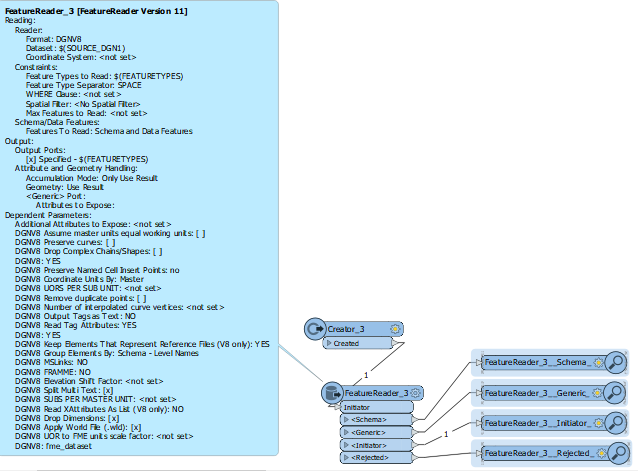
This is a problem which has bugged me for years. I cannot work out how to set the feature type as a published parameter in a FeatureReader transformer that is reading in a Microstation DGN file. I have a number of different combinations of the following settings and none seem to work. All I get is one record coming out of the Initiator Port and the DGN file data does not come out of any of the ports.

Can anyone help me with this?

I am on FME Desktop 2019.1.

Thanks!
This post is closed to further activity.
It may be an old question, an answered question, an implemented idea, or a notification-only post.
Please check post dates before relying on any information in a question or answer.
For follow-up or related questions, please post a new question or idea.
If there is a genuine update to be made, please contact us and request that the post is reopened.

3 replies

virtualcitymatt
Celebrity
Forum|alt.badge.img+47

I see you have the "Specified" for output ports. Have you tried Generic (single output port).


It works for me at least using the Geodatbase reader (didn't try with microstation).


If using specified I would suggest using a proper (existing) file to first create the "specified" ports.


Do you get any messages in the log?

Forum|alt.badge.img+1
  • Author
  • April 29, 2020

I see you have the "Specified" for output ports. Have you tried Generic (single output port).


It works for me at least using the Geodatbase reader (didn't try with microstation).


If using specified I would suggest using a proper (existing) file to first create the "specified" ports.


Do you get any messages in the log?

Thanks @virtualcitymatt I realised that if I put the FEATURETYPE value in talking marks (") then the records do come out of the 'Generic' port. I didn't want to put the existing file in first to create the 'specified' ports because this won't allow for situations where I don't know the FEATURETYPE value in advance...


virtualcitymatt
Celebrity
Forum|alt.badge.img+47

Thanks @virtualcitymatt I realised that if I put the FEATURETYPE value in talking marks (") then the records do come out of the 'Generic' port. I didn't want to put the existing file in first to create the 'specified' ports because this won't allow for situations where I don't know the FEATURETYPE value in advance...

Oh interesting - so you have it working now then? after adding the (") marks? Thats a good tip.



