

Solved

tabular data

  • November 11, 2019
  • 6 replies
  • 42 views

remco

Hello, have a excel sheet with more then 20.000 records and only two columns.
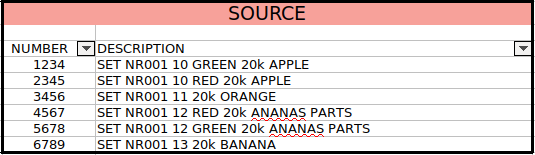
 

I want to divide the two columns into 7 columns:
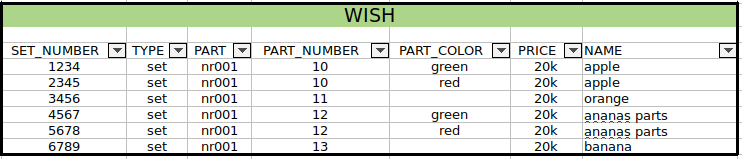
 

The problem now sits in the PART_COLOR, not every row has a color, see my result:
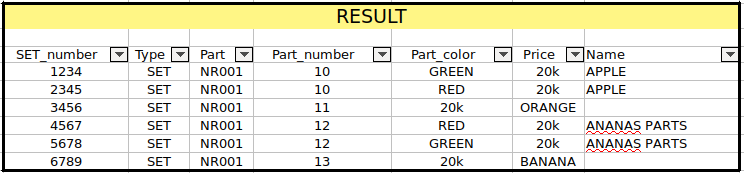
 

Is there anyone who can help me with this "little" problem?


I will explain what my workflow now is:
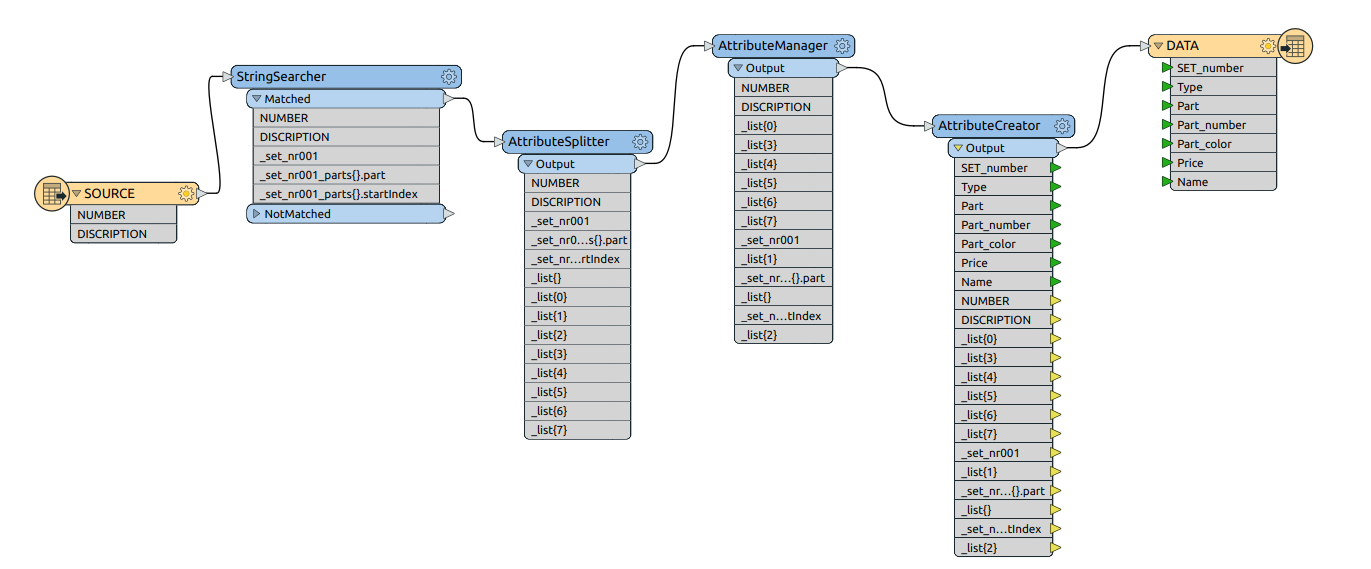
StringSearcher: I search for the string "SET NR001" in the Description column. So I only get this value's instead of all the other ones. (about 90 different parts).

AttributeSplitter: split the Description column on every "space" and put them in lists.

AttributeManager: create outputs for every list.

AttributeCreator: create the different outputs for the different inputs, for the "Name" output I use list5 + list6.


Perhaps I am using the wrong tools, but I am a starting user at FME.
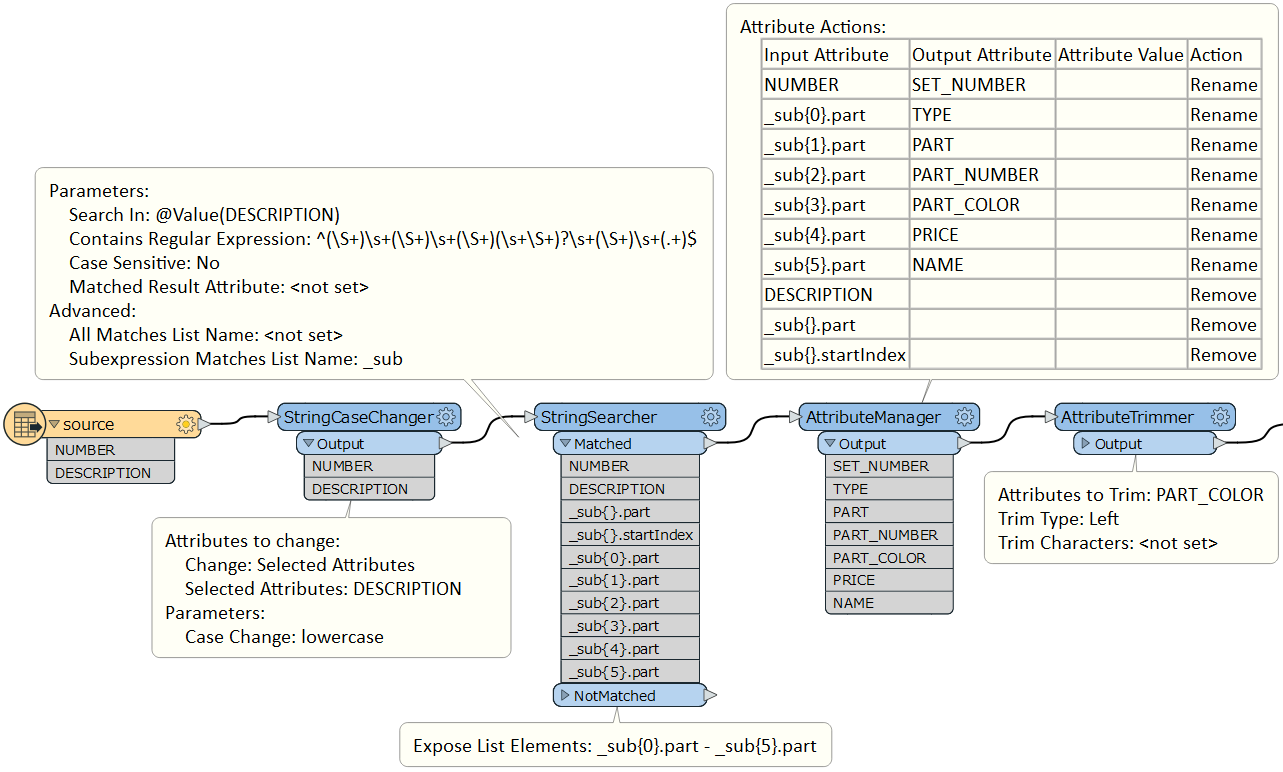
Best answer by takashi

Hi @remco, I thinks this workflow does the trick.

Regex:

^(\S+)\s+(\S+)\s+(\S+)(\s+\S+)?\s+(\S+)\s+(.+)$

0684Q00000ArLGhQAN.png

This post is closed to further activity.
It may be an old question, an answered question, an implemented idea, or a notification-only post.
Please check post dates before relying on any information in a question or answer.
For follow-up or related questions, please post a new question or idea.
If there is a genuine update to be made, please contact us and request that the post is reopened.

6 replies

danilo_fme
Celebrity
Forum|alt.badge.img+52
  • Celebrity
  • November 11, 2019

Hi @remco

In this case - what do you want to do with these "blank" rows? Add some particular value or not?


Thanks,

Danilo


remco
  • Author
  • November 11, 2019

Hello @danilo_fme

I want to leave the blank rows blank.


Remco


danilo_fme
Celebrity
Forum|alt.badge.img+52
  • Celebrity
  • November 11, 2019

Hello @danilo_fme

I want to leave the blank rows blank.


Remco

Hi @remco

Thanks you answer - Could you share your Workspace Template ( .fmwt )?


Thanks


danilo_fme
Celebrity
Forum|alt.badge.img+52
  • Celebrity
  • November 11, 2019

Hello @danilo_fme

I want to leave the blank rows blank.


Remco

Hi - Please use this attached file ( Colors Names in Excel ) to compare with your Attribute Part_color - if has the name is true.

I suggest you first to Uppercase all values from Excel ( Colors Names ) before the compare process ( transformer FeatureMerger ).


Thanks, colors.xlsx


Danilo


takashi
Celebrity
  • Best Answer
  • November 11, 2019

Hi @remco, I thinks this workflow does the trick.

Regex:

^(\S+)\s+(\S+)\s+(\S+)(\s+\S+)?\s+(\S+)\s+(.+)$

0684Q00000ArLGhQAN.png


remco
  • Author
  • November 12, 2019

Mister @takashi thank you for your answer, that is for me the solution.

@danilo_fme thank you for your help thinking about my problem.






