Solved

Postgres - Record in 2 Tables with dependencies

  • October 12, 2018
  • 2 replies
  • 32 views

Hi, I am new user in FME. I have build a workspace that informs as in the drawing below, if the farm is illegible or eligible, based on some socio-environmental criteria of my country. In this table must be updated daily, what only changes in it is if the farm is eligible or ineligible in the status field. Here I need to make a simple update. Look below
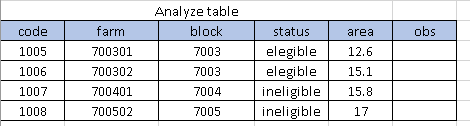
The problem is that this is not the only table I need to update, I need to also update another table, which describes in more detail the reason for the Inegibility or eligibility. However I have to be very careful with the code so I do not qualify the wrong farm.


The table that I show below, is the second table and notice that the field analyze_code is equal to the code of the first table. How can I do to update the first table according to the code that already exists and then use the code of the first one to update the criteria of the second table using the FME?
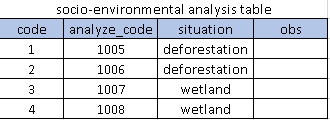
Can you help me? Was I clear on my question? I need to make this workspace that will run automatically, and thus justify the purchase of FME for my managers.

Thank´s
Best answer by takashi

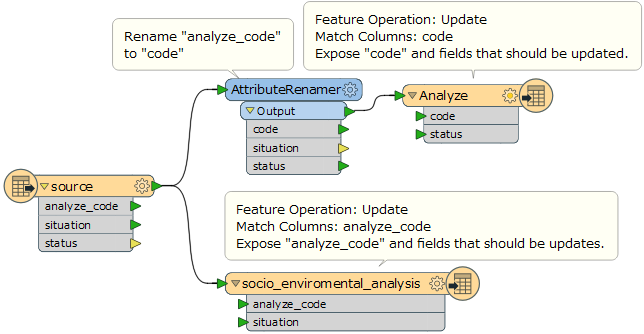
Hi @el_shaddai, I suppose that you have a source dataset whose record contains at least three fields - "analyze_code", "situation" and "status", and which is changed daily.

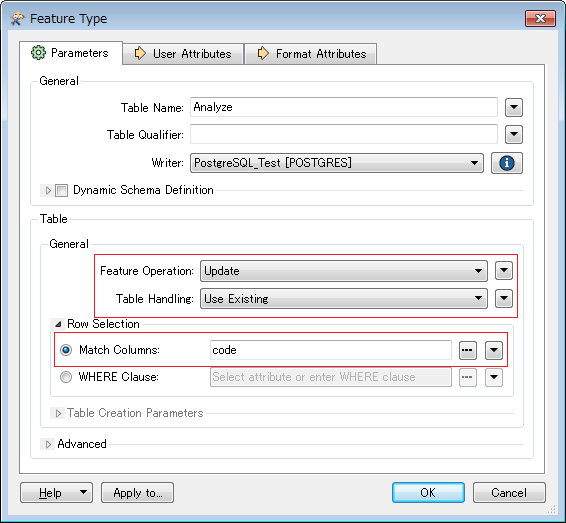
If you intend to update the two existing PostgreSQL database tables simultaneously based on the same source, you can just read the source dataset, and send the features to two PostgreSQL writer feature types corresponding to the two tables. The workflow looks like this.

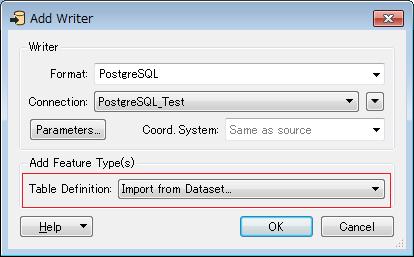
You can import feature types (table definitions) from the existing database when adding the PostgreSQL writer by setting "Import from Dataset" to the Table Definition parameter in the Add Writer dialog. After adding the feature types on the Canvas, you can remove the fields which should not be updated, through the User Attributes tab in the feature type.

Alternatively, you can add a writer feature type belonging to a writer through right-click menu on the Canvas (right-click > Insert Writer Feature Type), after adding the writer to the workspace.

Hope this helps.

This post is closed to further activity.
It may be an old question, an answered question, an implemented idea, or a notification-only post.
Please check post dates before relying on any information in a question or answer.
For follow-up or related questions, please post a new question or idea.
If there is a genuine update to be made, please contact us and request that the post is reopened.

2 replies

takashi
Celebrity
  • Best Answer
  • October 13, 2018

Hi @el_shaddai, I suppose that you have a source dataset whose record contains at least three fields - "analyze_code", "situation" and "status", and which is changed daily.

If you intend to update the two existing PostgreSQL database tables simultaneously based on the same source, you can just read the source dataset, and send the features to two PostgreSQL writer feature types corresponding to the two tables. The workflow looks like this.

You can import feature types (table definitions) from the existing database when adding the PostgreSQL writer by setting "Import from Dataset" to the Table Definition parameter in the Add Writer dialog. After adding the feature types on the Canvas, you can remove the fields which should not be updated, through the User Attributes tab in the feature type.

Alternatively, you can add a writer feature type belonging to a writer through right-click menu on the Canvas (right-click > Insert Writer Feature Type), after adding the writer to the workspace.

Hope this helps.


  • Author
  • October 14, 2018

Hi @el_shaddai, I suppose that you have a source dataset whose record contains at least three fields - "analyze_code", "situation" and "status", and which is changed daily.

If you intend to update the two existing PostgreSQL database tables simultaneously based on the same source, you can just read the source dataset, and send the features to two PostgreSQL writer feature types corresponding to the two tables. The workflow looks like this.

You can import feature types (table definitions) from the existing database when adding the PostgreSQL writer by setting "Import from Dataset" to the Table Definition parameter in the Add Writer dialog. After adding the feature types on the Canvas, you can remove the fields which should not be updated, through the User Attributes tab in the feature type.

Alternatively, you can add a writer feature type belonging to a writer through right-click menu on the Canvas (right-click > Insert Writer Feature Type), after adding the writer to the workspace.

Hope this helps.

hi,


Your suggestion is very good. But I solved my problem in other way.


I like your opinion. I guess that you help a lot this community.


Thank´s