
Solved

IFC export to SQL Database

  • December 1, 2017
  • 2 replies
  • 172 views

Forum|alt.badge.img

I received a sample of IFC data and was asked to import it into MS SQL database spatial database.

I was able to import the data but no geometry. How do I get the geometry? This is new data for me.

@DaveAtSafe

Best answer by markatsafe

MS SQL Server supports a limited number of geometry types as defined the SQL Server documentation and not the more complex 3D geometries of IFC. You can see the complexity of the IFC geometry if you open your IFC data in FME Data Inspector.
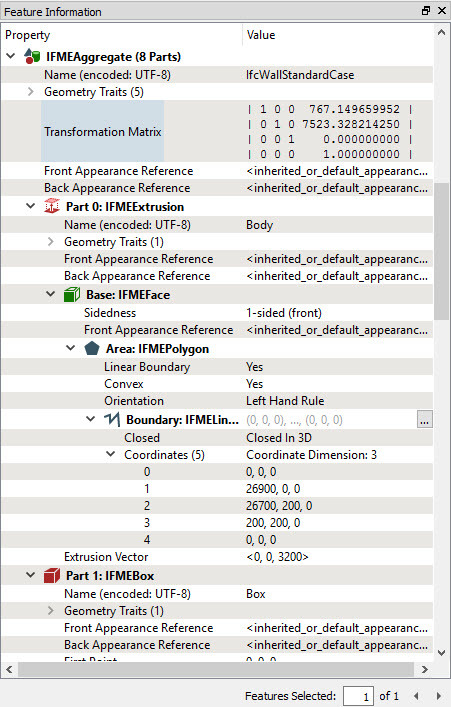
So you probably need to decide on what aspect of the IFC geometry your customer wants to preserve and go from there. One option might be to convert it to GML using the GeometryExtractor and store it as a GML attribute column in your database.

This post is closed to further activity.
It may be an old question, an answered question, an implemented idea, or a notification-only post.
Please check post dates before relying on any information in a question or answer.
For follow-up or related questions, please post a new question or idea.
If there is a genuine update to be made, please contact us and request that the post is reopened.

2 replies

Forum|alt.badge.img+2
  • Best Answer
  • December 1, 2017

MS SQL Server supports a limited number of geometry types as defined the SQL Server documentation and not the more complex 3D geometries of IFC. You can see the complexity of the IFC geometry if you open your IFC data in FME Data Inspector.

So you probably need to decide on what aspect of the IFC geometry your customer wants to preserve and go from there. One option might be to convert it to GML using the GeometryExtractor and store it as a GML attribute column in your database.


Hi hcode,


I am trying to import the data from a IFC File into a Database (postgresql). Can you please explain me how you managed to do that?


Thanky you in advance :)