Question

How do I find and remove funny characters?,How do I find and remove funny characters from a string?

  • August 18, 2017
  • 14 replies
  • 1371 views

Forum|alt.badge.img

Hi,

I have a csv data set that contains addresses and some of them contain funny characters e.g ^ and I am not sure how to find and remove them all easily? I've been using the Tester saying attribute contains ^ but this seems to be a really long process, especially with a large data set.

Also, some of the addresses contain brackets at the beginning e.g (house) 1 valley road, which I also want to remove. However, I want to keep the brackets at the end e.g Pyramids (swimming pool) as these contain useful information. The tester isn't working to narrow down how many contain brackets at the beginning and how to remove them?

Which transformer shall I use to find and remove funny characters and brackets at the beginning of text please?

Apologies if this doesn't make much sense, I am very new to FME.

Kind Regards,

Jess

This post is closed to further activity.
It may be an old question, an answered question, an implemented idea, or a notification-only post.
Please check post dates before relying on any information in a question or answer.
For follow-up or related questions, please post a new question or idea.
If there is a genuine update to be made, please contact us and request that the post is reopened.

14 replies

danilo_fme
Celebrity
Forum|alt.badge.img+52
  • Celebrity
  • August 18, 2017

Hi @jessbeach,

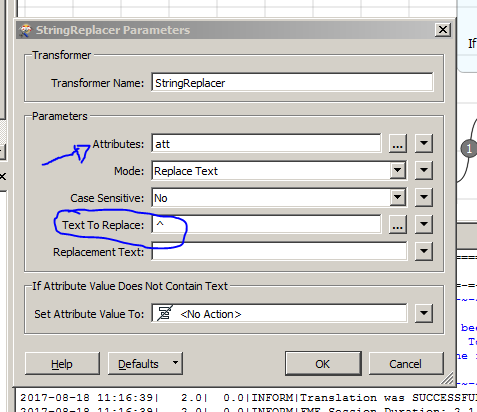
I simulated your case with a transformer AttributeCreator: att = ^Canada

The transformer StringReplacer do what you want.

In Text to Replace you write your symbol: ^

Attached the template file ( FMWT )

Thanks,

Danilo - -workspace-replace.fmwt


fmelizard
Safer
Forum|alt.badge.img+21
  • Safer
  • August 18, 2017

Hi @jessbeach, the method @danilo_inovacao pointed out with the StringReplacer will help you take out those odd characters such as ^. For removing the first set of brackets, I recommend checking out @courtney_m's answer to Remove Multiple Underscores.


Forum|alt.badge.img+2
  • August 18, 2017

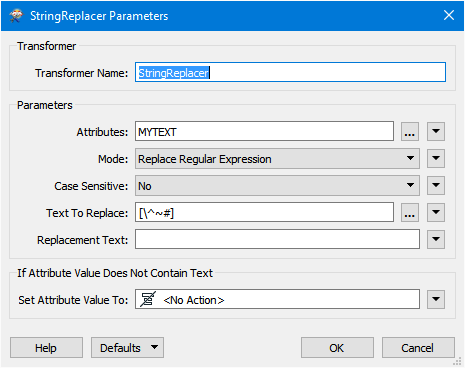
Just add to @danilo_inovacao answer which replaces any ^ symbol, but you mention funny characters so possibly you have additional characters. You can still use the StringReplacer but in Replace Regular Expression Mode where you can use Regex to list the characters. But be aware some Regex characters have special meaning including ^ so you would have to escape them.

Here is an example with some funny characters.


danilo_fme
Celebrity
Forum|alt.badge.img+52
  • Celebrity
  • August 18, 2017

Just add to @danilo_inovacao answer which replaces any ^ symbol, but you mention funny characters so possibly you have additional characters. You can still use the StringReplacer but in Replace Regular Expression Mode where you can use Regex to list the characters. But be aware some Regex characters have special meaning including ^ so you would have to escape them.

Here is an example with some funny characters.

Thanks @mark_1spatial to add this information in this answer :)


courtney_m
Contributor
Forum|alt.badge.img+22
  • Contributor
  • August 18, 2017

Why would you want to remove the funny characters? If a character makes you laugh, it should be worth keeping - I say, remove the non-funny ones! ;-)


danilo_fme
Celebrity
Forum|alt.badge.img+52
  • Celebrity
  • August 18, 2017

Why would you want to remove the funny characters? If a character makes you laugh, it should be worth keeping - I say, remove the non-funny ones! ;-)


uaahaaauhahaua :P

Forum|alt.badge.img
  • August 18, 2017

Hi @jessbeach


if you have a number of 'funny characters' to remove, you might want to use StringPairReplacer to replace all of them with... 'something' that can then be replaced with 'nothing' using StringReplacer.

In the attached example I am getting rid of #, ^, and ( in my string:

  • first I replace each not needed character with © which is not used in my data;
  • then I replace all © characters with nothing;
  • then... I get some not needed multiple spaces (removed characters were surrounded with spaces, we took the characters away leaving all the spaces in place) - we can fix this using regex.removefunnycharacters.fmw


Forum|alt.badge.img
  • August 18, 2017

@jessbeach


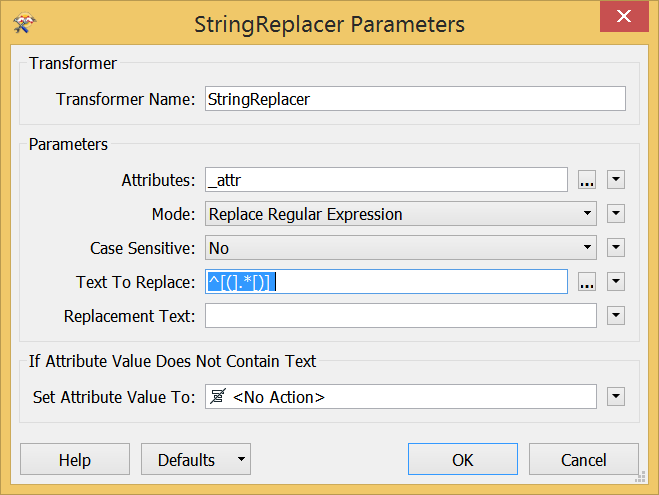
To remove anything in brackets (together with the brackets) at the beginning of the string, you can use

^[(].*[)] regex:


Forum|alt.badge.img+1
  • August 18, 2017

Jess,

A tool you can try is the StringCleaner Transformer available from the FME Hub.

Download directly from within FME thru the Transformer Panel - FME Hub - Strings - StringCleaner OR visit:

StringCleaner Transformer Link

..............

Regular Expressions - VERY useful within FME - these will help in with your particular question.

A good place to start learning / testing them is:

http://rubular.com/


..................

Hope this helps

Howard L'


Forum|alt.badge.img+2
  • August 21, 2017

Jess,

A tool you can try is the StringCleaner Transformer available from the FME Hub.

Download directly from within FME thru the Transformer Panel - FME Hub - Strings - StringCleaner OR visit:

StringCleaner Transformer Link

..............

Regular Expressions - VERY useful within FME - these will help in with your particular question.

A good place to start learning / testing them is:

http://rubular.com/


..................

Hope this helps

Howard L'


Great suggestion @howard_l ... and nice custom transformer @jeroenstiers !

Forum|alt.badge.img
  • Author
  • August 21, 2017

@jessbeach


To remove anything in brackets (together with the brackets) at the beginning of the string, you can use

^[(].*[)] regex:

Hi Lena, thanks for getting back to me. Is there also a way to remove brackets from a middle of a string e.g Jessica (Jess) Beach please?


Forum|alt.badge.img
  • Author
  • August 21, 2017

Thanks for all getting back to me. I will try your suggestions and get back to you if I have any more questions.


ebygomm
Influencer
Forum|alt.badge.img+46
  • Influencer
  • August 21, 2017

Sometimes it's easier to keep the non-funny characters than removing the specific characters you do not want

e.g. removing everything that's not a space or a word character in a stringreplacer with the following regular expression

[^\\s\\w]


bruceharold
Supporter
Forum|alt.badge.img+19
  • Supporter
  • August 21, 2017

Don't remove anything, use a geocoding solution that handles the junk :-)

Look at ExInfo returned by this call:

http://geocode.arcgis.com/arcgis/rest/services/World/GeocodeServer/findAddressCandidates?SingleLine=(House)+380+New+York+Street,+(Swimming%20pool)++Redlands,+CA+92373&category;=&outFields;=ExInfo&forStorage;=false&f;=pjson&maxLocations;=1