


Question

Loop through records and build trace connectivity

  • March 16, 2021
  • 13 replies
  • 36 views

sunsilk11
Contributor
Forum|alt.badge.img+6

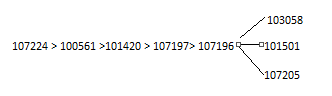
Hi I have a table containing 2 columns StartPt and EndPt [see attached].

I would like to find all the connected nodes for each StartPt in the table.

For example, the connected nodes for Startpts 107224 and 100561 are:


StartPt EndPt

107224 100561

107224 101420

107224 107197

107224 107196

100561 101420

100561 107197

100561 107196

100561 103058


Any suggestion how this can be achieved in FME. Alternatively, I could look at doing this via a stored procedure.


 

13 replies

Forum|alt.badge.img+1
  • March 16, 2021

Hi! If you put an aggregtor and group by StartPt - and put EndPt as for example a string to concatenate (or build a list), that should give you one feature per StartPt, with your set of EndPts either as a list or as a concatenated string. Where will the endpoints go afterwards? That might have an impact on the list-vs-concatednated-string approach.


sunsilk11
Contributor
Forum|alt.badge.img+6
  • Author
  • Contributor
  • March 16, 2021

Hi! If you put an aggregtor and group by StartPt - and put EndPt as for example a string to concatenate (or build a list), that should give you one feature per StartPt, with your set of EndPts either as a list or as a concatenated string. Where will the endpoints go afterwards? That might have an impact on the list-vs-concatednated-string approach.

Thanks for the response. However just the aggregator alone won't work. In the example given , 107224 does not connect to 101420 directly. It only does so via 100561

Seems a bit more involved than it looks.


@Takashi Iijima​ , @daveatsafe​  - any ideas ?


daveatsafe
Safer
Forum|alt.badge.img+20
  • Safer
  • March 16, 2021

Hi @sunsilk11​ ,

If you had geometry on the data, the NetworkTopologyCalculator would give you the answer, but in this case I think you may need to use the PythonCaller to code a solution, or perhaps the InlineQuerier if you prefer SQL.


connecter
Contributor
Forum|alt.badge.img+10
  • Contributor
  • March 16, 2021

Hi @sunsilk11​ ,

If you had geometry on the data, the NetworkTopologyCalculator would give you the answer, but in this case I think you may need to use the PythonCaller to code a solution, or perhaps the InlineQuerier if you prefer SQL.

Maybe 2x VertexCreator behind each other can build a line and after it the NetworkTopolgyCalculator can identify same Networks?!


hkingsbury
Celebrity
Forum|alt.badge.img+67
  • Celebrity
  • March 16, 2021

Maybe 2x VertexCreator behind each other can build a line and after it the NetworkTopolgyCalculator can identify same Networks?!

Create two points one using the StartPt as your X and Y value, and the Second using EndPt as your X and Y value. You can then use a spatialrelater to find which points overlap. You'll then have a list of FIDs (or create a new UUID before making the points) of which are connected


sunsilk11
Contributor
Forum|alt.badge.img+6
  • Author
  • Contributor
  • March 17, 2021

@connecter @daveatsafe​ 

Thank you. I do have the line geometry. However the network is built with the startpt/endpt attributes. NetworkTopologyCalculator does not have the options to use the attributes.

I'll probably go with PythonCaller


ebygomm
Influencer
Forum|alt.badge.img+46
  • Influencer
  • March 18, 2021

@connecter @daveatsafe​ 

Thank you. I do have the line geometry. However the network is built with the startpt/endpt attributes. NetworkTopologyCalculator does not have the options to use the attributes.

I'll probably go with PythonCaller

NetworkX is good for this sort of thing if you're going to use python


sunsilk11
Contributor
Forum|alt.badge.img+6
  • Author
  • Contributor
  • March 18, 2021

NetworkX is good for this sort of thing if you're going to use python

Thanks. I am thinking this may be best done outside FME as would probably require nested loops.


ebygomm
Influencer
Forum|alt.badge.img+46
  • Influencer
  • March 18, 2021

NetworkX is good for this sort of thing if you're going to use python

It should be quite straightforward if you are able to install the networkx python module. I can post an example later​


ebygomm
Influencer
Forum|alt.badge.img+46
  • Influencer
  • March 18, 2021

NetworkX is good for this sort of thing if you're going to use python

Although, I'm not clear why in your example 107224 is not linked to 103058 and beyond as it would appear it goes

Capture


sunsilk11
Contributor
Forum|alt.badge.img+6
  • Author
  • Contributor
  • March 18, 2021

NetworkX is good for this sort of thing if you're going to use python

You are right. 107224 is connected to these 3 nodes too.


sunsilk11
Contributor
Forum|alt.badge.img+6
  • Author
  • Contributor
  • March 19, 2021

NetworkX is good for this sort of thing if you're going to use python

@ebygomm​  Yes you are correct. It was a mistake above. 107224 does link to these 3 nodes too


ebygomm
Influencer
Forum|alt.badge.img+46
  • Influencer
  • March 19, 2021

NetworkX is good for this sort of thing if you're going to use python

And 102412 & 107206 ?