Question

DEM GeoTIFF to rgb band png Tiled Web Map TMS

  • June 8, 2020
  • 1 reply
  • 113 views

Hi, I'm completely new to FME and was wondering if the following was possible, and if yes, how?I have DEM GeoTIFFS Greyscale 32 bit floatingpoint. We need to convert this to .pngs (or similar) where the rgb values/bands represent elevation, so maximum 1,6 million values. We want elevations for the world, so between -12000~ to +8868.

The output is going to be png Tiled web map, like Google maps, TMS with zoom levels folders (for example 10,13,17 and 21). This will be used in a terrainsystem witha custom shader for elevation.

Is this possible? If something is unclear please let me know. Any help is appreciated.

Regards, Robin

This post is closed to further activity.
It may be an old question, an answered question, an implemented idea, or a notification-only post.
Please check post dates before relying on any information in a question or answer.
For follow-up or related questions, please post a new question or idea.
If there is a genuine update to be made, please contact us and request that the post is reopened.

1 reply

takashi
Celebrity
  • June 8, 2020

Hi @robinosc, 

if you have a color palette definition with 256 entries (0-255), you can add the palette definition to the raster to convert it to RGB24 image raster with the RasterPaletteAtter after regulate cell values to the range of unsigned int (0-255).

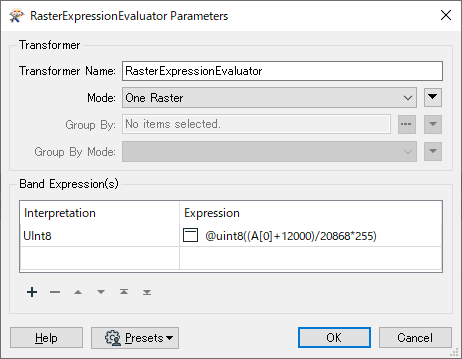
In order to regulate cell values, you can use the RasterExpressionEvaluator. The expression example:

@uint8((A[0]+12000)/20868*255)

0684Q00000ArLsnQAF.png

See the Help on the RasterPaletteExtractor to learn more about palette definition.

The RGBGradationCalculator from the FME Hub might help you to create a palette for a color ramp. 


Then, the WebMapTiler could help you to create web map tiles.

Anyway, firstly try converting the 32 bit numeric raster to RGB24 image raster.