Question

How to make date parameter optional

  • June 24, 2015
  • 2 replies
  • 4 views

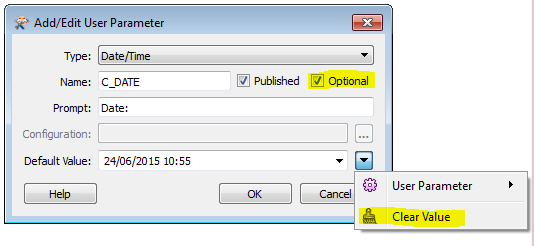
I want to have the option of a date to be used as a parameter for the workbench. If there is a date entered this is used to only process specific records, if the parameter is null then just proceed with all records.


The date/time parameter has an "optional" tick box, but even with this ticked it's impossible to clear the default date? When I run with parameters, I also cannot clear the default date to null.


This is in FME 2015.0 (20150217 Build 15253 WIN64)


This post is closed to further activity.
It may be an old question, an answered question, an implemented idea, or a notification-only post.
Please check post dates before relying on any information in a question or answer.
For follow-up or related questions, please post a new question or idea.
If there is a genuine update to be made, please contact us and request that the post is reopened.

2 replies

takashi
Celebrity
  • June 24, 2015
Hi,


I was able to reproduce the same situation as yours with FME 2015.1.0.2 build 15482. A Date/Time type parameter couldn't be set to blank even if I have checked the Optional check box. I'm not sure whether the behavior is intentional.


As a workaround, how about adding another parameter with Choice "Yes/No" type?


e.g. use the date to process specific records if the user choose "Yes"; ignore the date and process all records, otherwise.


Takashi

  • Author
  • June 24, 2015
Thanks for having a look.


Good suggestion for a work around (more elegant than mine!). I've got this working now with your suggestion.



