


Question

4 x 9 = 16 ???

  • October 10, 2016
  • 12 replies
  • 66 views

lifalin2016
Supporter
Forum|alt.badge.img+40

Hi group,

I've run into a curious problem with the Tiler transformer.

I'm trying to sub-divide tiles, but when I sub-divide a previously sub-divided tile, it doesn't divide up the way it's supposed to.

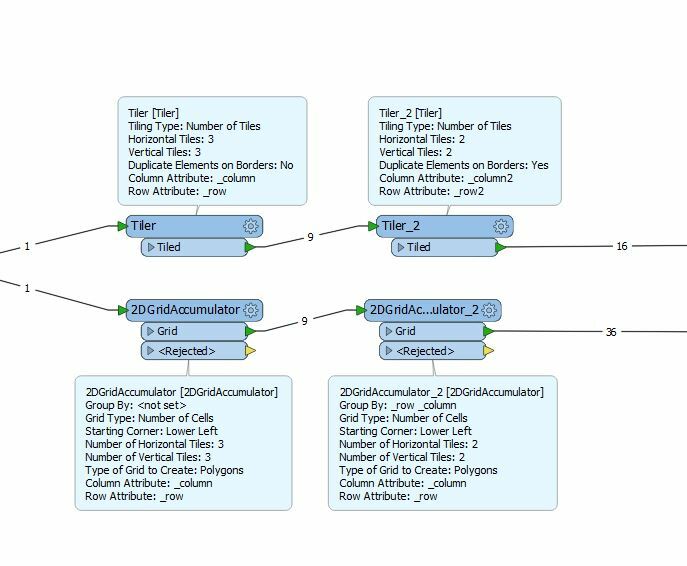
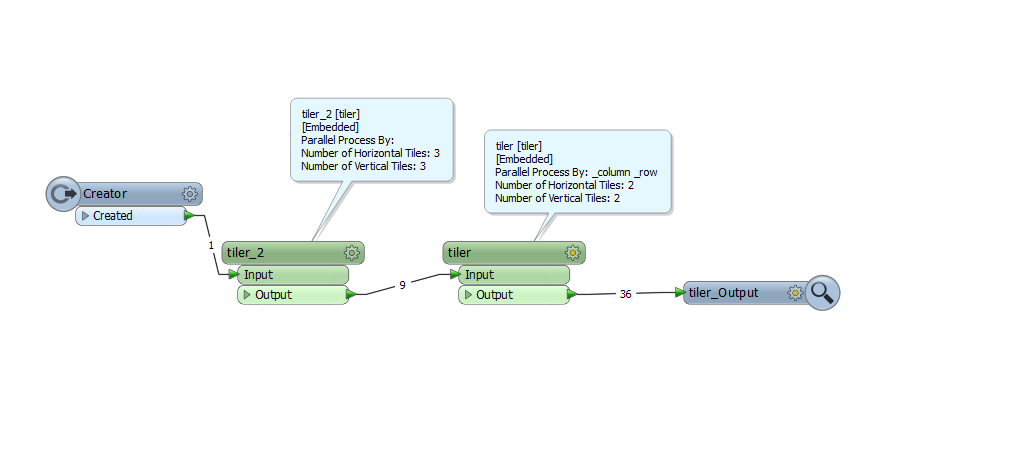
My simple example divided an initial box into 3x3, and then I attempt to sub-divide each of these 9 features into 2x2. I expected 36 tiles, but I end up with 16 boxes !?!

What gives??

Cheers


Lars I.

 

This post is closed to further activity.
It may be an old question, an answered question, an implemented idea, or a notification-only post.
Please check post dates before relying on any information in a question or answer.
For follow-up or related questions, please post a new question or idea.
If there is a genuine update to be made, please contact us and request that the post is reopened.

12 replies

ebygomm
Influencer
Forum|alt.badge.img+46
  • Influencer
  • October 10, 2016

I see the same behaviour, using a 2dGridAccumulator I get 36 tiles


lifalin2016
Supporter
Forum|alt.badge.img+40
  • Author
  • Supporter
  • October 11, 2016

Thanks all.

I would expect the Tiler to work on whatever geometry is given to it, not the whole dataset. So I will still call it a bug. How else can I sub-divide some tiles but not others ?

The 2DGridAccumulator does indeed give me 36 tiles, but only when using grouping, which again assumes an "all dataset" approach, which I can't use.

Any other ideas on how to selectively sub-divide a single tile (that's an output from an already performed tiling) ?

Please don't tell me that I have to build my own custom transformer for this !?!

Cheers


Lars I.


itay
Supporter
Forum|alt.badge.img+18
  • Supporter
  • October 11, 2016

Thanks all.

I would expect the Tiler to work on whatever geometry is given to it, not the whole dataset. So I will still call it a bug. How else can I sub-divide some tiles but not others ?

The 2DGridAccumulator does indeed give me 36 tiles, but only when using grouping, which again assumes an "all dataset" approach, which I can't use.

Any other ideas on how to selectively sub-divide a single tile (that's an output from an already performed tiling) ?

Please don't tell me that I have to build my own custom transformer for this !?!

Cheers


Lars I.

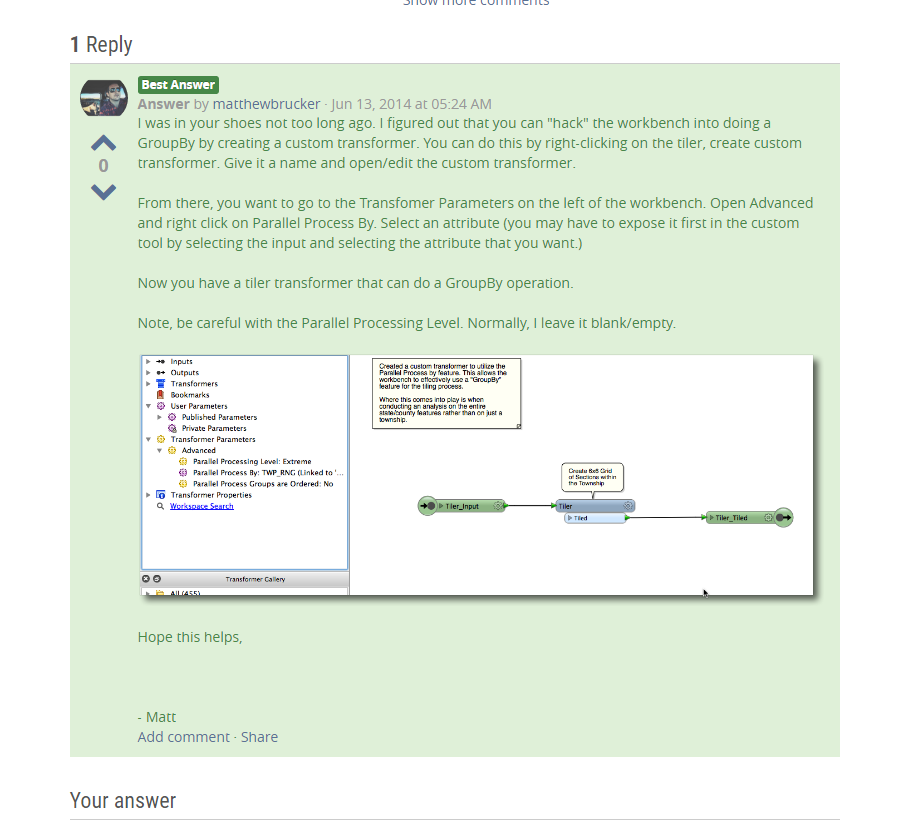
Hi @lifalin2016, well if you want to use the tiler, you will probably need to create one, although its an overkill...the one I was showing contains only one transformer (tiler) using it in an custom transformer makes it possible to use a group by on the _row and _column created by the first transformer.


Creating a parameter in the custom transformer, makes it possible:


https://knowledge.safe.com/questions/34862/group-by-in-rubbersheeter.html


lifalin2016
Supporter
Forum|alt.badge.img+40
  • Author
  • Supporter
  • October 11, 2016

Thanks all.

I would expect the Tiler to work on whatever geometry is given to it, not the whole dataset. So I will still call it a bug. How else can I sub-divide some tiles but not others ?

The 2DGridAccumulator does indeed give me 36 tiles, but only when using grouping, which again assumes an "all dataset" approach, which I can't use.

Any other ideas on how to selectively sub-divide a single tile (that's an output from an already performed tiling) ?

Please don't tell me that I have to build my own custom transformer for this !?!

Cheers


Lars I.

Hi @itay


I'm actually employing a loop-back (in a Workbench custom transformer), so I may be sub-dividing a single tile in multiple iterations based on a test. So the all-dataset+grouping will definitely not work for me.


It would actually be much simpler, if the existing "Tiler" transformer was enhanced with a "divide individually" checkbox, that would enable single geometry sub-divisioning.


I've become quite proficient in making transformers in Python, but it is kinda overkill, as you write.


Cheers,


Lars I.


takashi
Celebrity
  • October 11, 2016

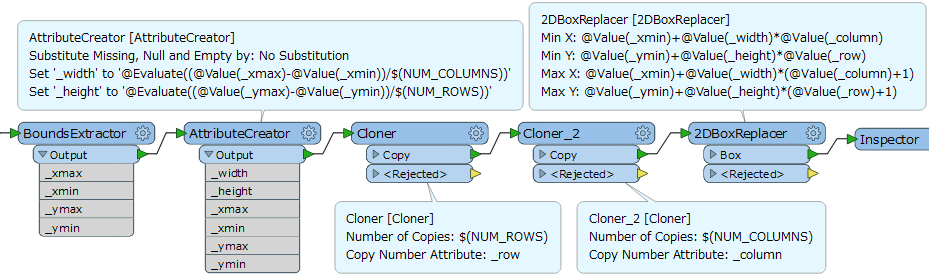
It's not so difficult to create a workflow which can divide a rectangular polygon into N x M tiles. e.g.

You can also create a custom transformer containing this workflow and Loop to iterate the dividing process, if necessary.


lifalin2016
Supporter
Forum|alt.badge.img+40
  • Author
  • Supporter
  • October 11, 2016

Hi all.

I found a simpler way using the 2DGridAccumulator.

I needed the transformer to divide the individual tile separately, using the "group by" functionality. It occurred to me that a dynamically applied random value would do the trick, and so added an attribute "tile_uuid" with the value "@UUID()" to every tile being sub-divided just before running it thru 2DGridAccumulator.

This worked, and I'm now seing successive sub-divisions where applicable.

So thanks @egomm (sorry about the first confusion, itay) for the suggestion to apply the 2DGridAccumulator instead of Tiler.

Cheers


Lars I.


takashi
Celebrity
  • October 11, 2016

Hi all.

I found a simpler way using the 2DGridAccumulator.

I needed the transformer to divide the individual tile separately, using the "group by" functionality. It occurred to me that a dynamically applied random value would do the trick, and so added an attribute "tile_uuid" with the value "@UUID()" to every tile being sub-divided just before running it thru 2DGridAccumulator.

This worked, and I'm now seing successive sub-divisions where applicable.

So thanks @egomm (sorry about the first confusion, itay) for the suggestion to apply the 2DGridAccumulator instead of Tiler.

Cheers


Lars I.

If all you need was just to differentiate individual features uniquely, the sequential number attribute that can be generated by the Counter could also be available.


mark2atsafe
Safer
Forum|alt.badge.img+59
  • Safer
  • October 11, 2016

Just to chime in, yes, the Tiler tiles up all of the data that enters it. What the real "bug" here is that the Tiler doesn't have a group-by parameter. If it had that then it would be simple enough to do what you need.

I will file an enhancement request to suggest we add that [Filed as PR#72941]

So - as you have noted - the 2DGridAccumulator is a fix here. In fact the way I solved this was a Tiler (3x3) and then a 2DGridAccumulator (2x2) using the Tiler _column and _row attributes to group by. That way you don't need to create any ID numbers.


setld_solutions
Contributor
Forum|alt.badge.img+8

Another option


gio
Contributor
Forum|alt.badge.img+15
  • Contributor
  • October 11, 2016

@lifalin2016

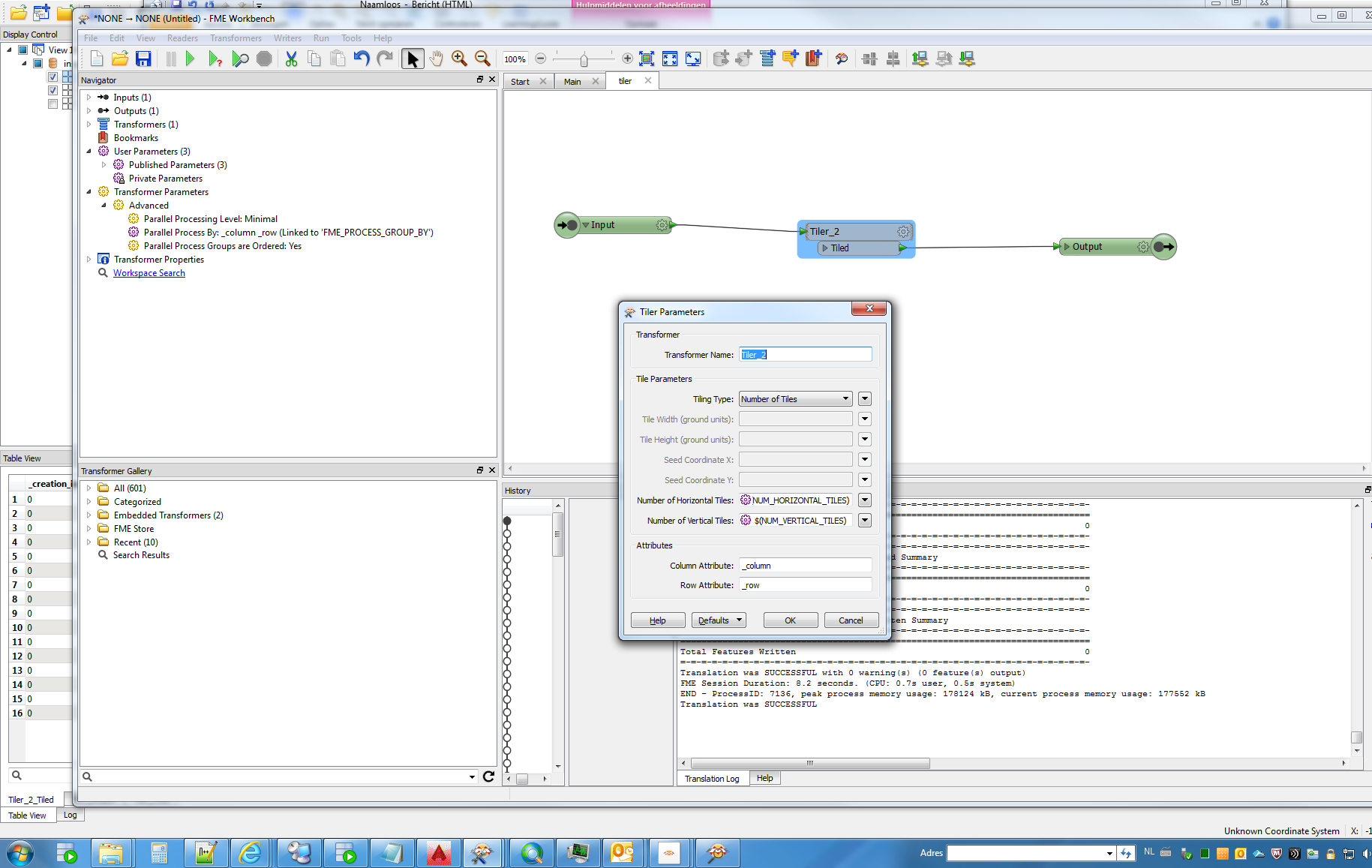
There has been a long standing trick to do this.

Create a custom Tiler.

Make parameters out of the nr of rows and columns attributes.

Set the the custom to paralelprocessing, parallel proces by row and column.

(set paralellel proces to minimal)

Use this rather thne normal tiler.


gio
Contributor
Forum|alt.badge.img+15
  • Contributor
  • October 11, 2016

lol...mathew was faster


mark2atsafe
Safer
Forum|alt.badge.img+59
  • Safer
  • October 18, 2016
Just wanted to announce to everyone that PR#72941 has been completed in FME2017, build 17170. That means the Tiler now has a group-by option. In this case the second Tiler would have a group-by set that used the row/column attributes of the first. For other users, you'll no longer need to create a custom Tiler transformer to carry out a group by.