Solved

AutoCAD DWG page size

  • July 26, 2019
  • 2 replies
  • 42 views

deanhowell
Influencer
Forum|alt.badge.img+24

Is there a way to check the page size of an AutoCAD DWG that is read into a FME workspace?

Best answer by chrisatsafe

Hi @deanhowell2009,

You can check the layout page size using the DWG reader by selecting to read paper space in the DWG Reader Parameters, here you can also specify which layout you want to read in:
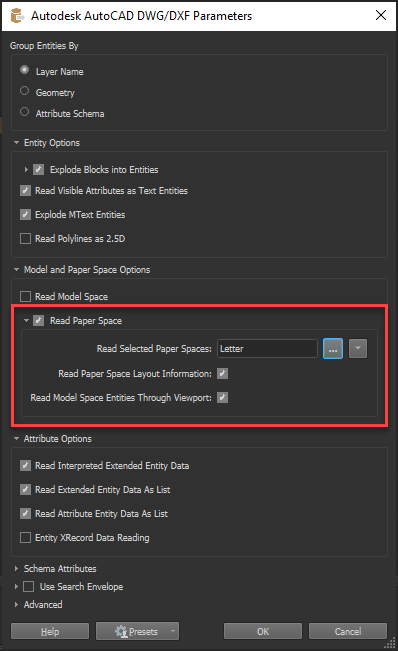
Note: if you just want the page extents, you can just select read paper space; however, if you want the features that are visible in that viewport select read model space entities through viewport as well. See the Autocad Reader Parameters documentation for more info.

Once you have read your data in using paper space, the page size is accessible through the autocad_layour_limit_max_x and autocad_layour_limit_max_y format attributes. These can be exposed in the Reader Feature Type or using an AttributeExposer. The precision may be too high (i.e.10.99999975970411, 8.49999975970411) so you may need to use an AttributeRounder to round the max x/y attributes to 1 decimal place (i.e.11, 8.5).
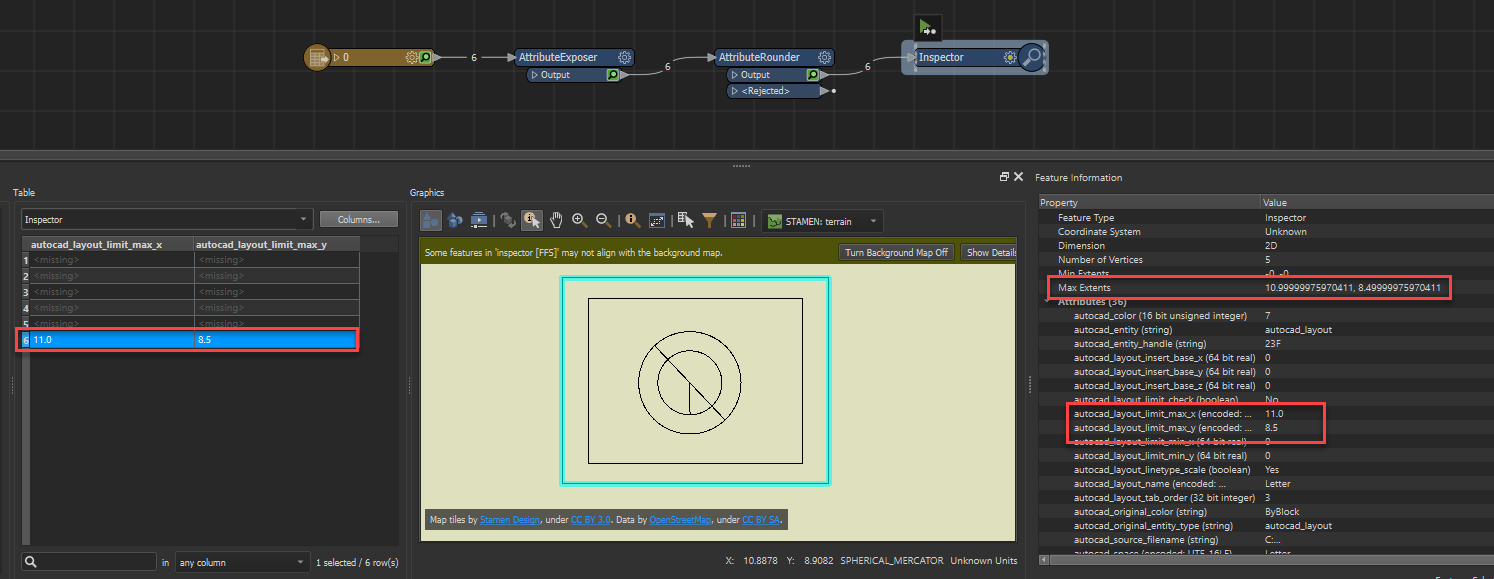
I have attached an example as well: DWG_Page_Size.fmwt

This post is closed to further activity.
It may be an old question, an answered question, an implemented idea, or a notification-only post.
Please check post dates before relying on any information in a question or answer.
For follow-up or related questions, please post a new question or idea.
If there is a genuine update to be made, please contact us and request that the post is reopened.


2 replies

chrisatsafe
Contributor
Forum|alt.badge.img+2
  • Contributor
  • Best Answer
  • August 1, 2019

Hi @deanhowell2009,

You can check the layout page size using the DWG reader by selecting to read paper space in the DWG Reader Parameters, here you can also specify which layout you want to read in:

Note: if you just want the page extents, you can just select read paper space; however, if you want the features that are visible in that viewport select read model space entities through viewport as well. See the Autocad Reader Parameters documentation for more info.

Once you have read your data in using paper space, the page size is accessible through the autocad_layour_limit_max_x and autocad_layour_limit_max_y format attributes. These can be exposed in the Reader Feature Type or using an AttributeExposer. The precision may be too high (i.e.10.99999975970411, 8.49999975970411) so you may need to use an AttributeRounder to round the max x/y attributes to 1 decimal place (i.e.11, 8.5).

I have attached an example as well: DWG_Page_Size.fmwt


deanhowell
Influencer
Forum|alt.badge.img+24
  • Author
  • Influencer
  • August 1, 2019

Hi @deanhowell2009,

You can check the layout page size using the DWG reader by selecting to read paper space in the DWG Reader Parameters, here you can also specify which layout you want to read in:

Note: if you just want the page extents, you can just select read paper space; however, if you want the features that are visible in that viewport select read model space entities through viewport as well. See the Autocad Reader Parameters documentation for more info.

Once you have read your data in using paper space, the page size is accessible through the autocad_layour_limit_max_x and autocad_layour_limit_max_y format attributes. These can be exposed in the Reader Feature Type or using an AttributeExposer. The precision may be too high (i.e.10.99999975970411, 8.49999975970411) so you may need to use an AttributeRounder to round the max x/y attributes to 1 decimal place (i.e.11, 8.5).

I have attached an example as well: DWG_Page_Size.fmwt

Thanks @chrisatsafe, that is perfect for what I need.