Question

Run Python script in FME

  • Jan 3, 2025 4:06 PM UTC
  • 4 replies
  • 343 views

checcosisani
Contributor
Forum|alt.badge.img+14

Hi


I had to create a script to be able to webscrape a web page using Selenium. I would like to be able to launch the script from FME but I don't know how to do it.

If I share the script someone can help me ?


thx


Francesco

4 replies

hkingsbury
Celebrity
Forum|alt.badge.img+73
  • Celebrity
  • Jan 5, 2025 8:33 PM UTC

FME has the SystemCaller - https://docs.safe.com/fme/html/FME-Form-Documentation/FME-Transformers/Transformers/systemcaller.htm

This can trigger an external application/script.

You could also embedded the complete Python logic in a PythonCaller.


The former is more of a fire and forget approach. You can have FME wait for it to finish but you don’t get much feedback/integration with the logic and output. The latter allows you to output results directly into FME. You have more comprehensive integration and overview of what the python is doing.


checcosisani
Contributor
Forum|alt.badge.img+14
  • Author
  • Contributor
  • Jan 10, 2025 9:26 PM UTC

Hi,

Sorry i always forgot to mention that before write the post I always check the documementation but I'm not a programmer so I've asked help because I'm not able to run the script from fme

Thx

Francesco 


checcosisani
Contributor
Forum|alt.badge.img+14
  • Author
  • Contributor
  • Jan 11, 2025 11:30 AM UTC

Hi


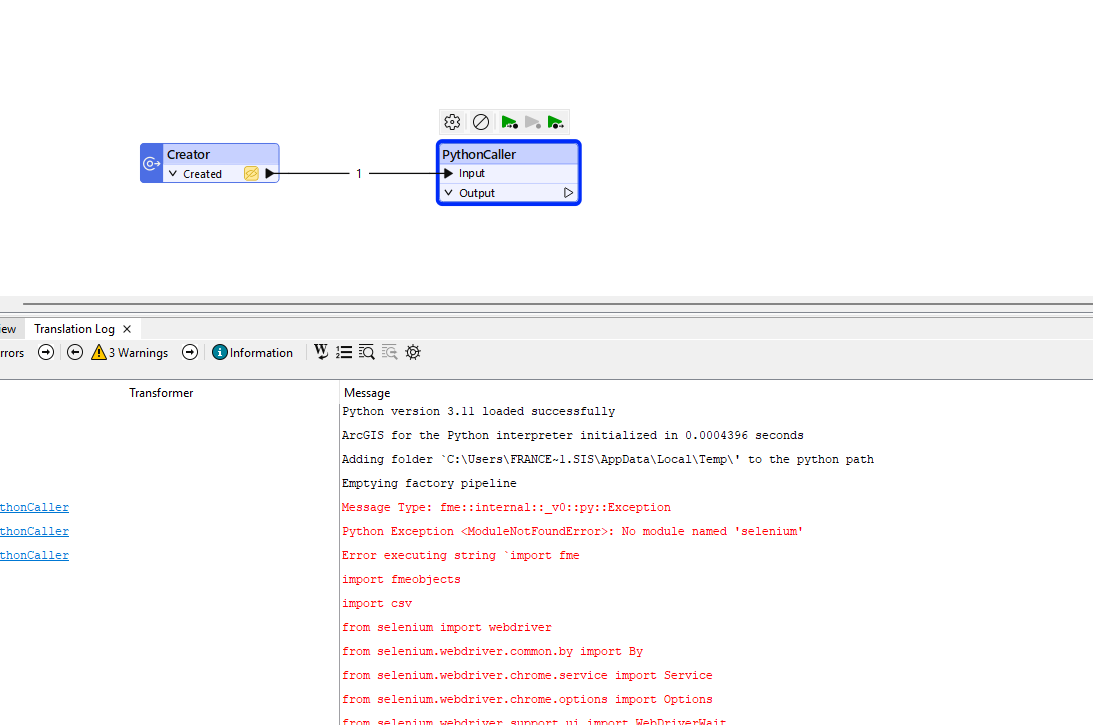
I copied in python caller my  script and this is the result

Aniy suggestion ?

thx

Francesco


hkingsbury
Celebrity
Forum|alt.badge.img+73
  • Celebrity
  • Jan 12, 2025 7:35 PM UTC

Selenium isn’t a standard Python Library included in FME, so you will need to install that:
https://docs.safe.com/fme/html/FME-Form-Documentation/FME-Form/Workbench/Installing-Python-Packages.htm