Open

New "Workspace parameter" - Feature Caching - enable/disable per workspace

Related products:FME Form
  • April 24, 2018
  • 9 replies
  • 135 views

sigtill
Supporter
Forum|alt.badge.img+25

I have some workspaces that are large and have too many lists/tables etc. These will not run with Feature Caching enabled - as they will use 20+ hours. Without it, its done in less than 1 hour.

Other workspaces I like to have Feature Caching enabled, and I easily forget to switch back.

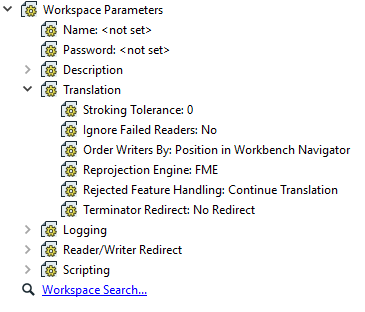
Make a parameter - similar to Rejected Feature Handling - that is "per workspace". For instance:

Feature Caching: Enabled / disabled
9 replies

erik_jan
Contributor
Forum|alt.badge.img+26
  • Contributor
  • April 24, 2018

I would suggest: If you run using batch deploy or using FME Server, turn off feature caching automatically.

Executing a partial run is not an option when using batch or FME Server anyway.


paalped
Contributor
Forum|alt.badge.img+5
  • Contributor
  • December 16, 2018

Or/And make the bool accessible from FME_MacroValues if featureCaching is enabled/true or disabled/false.


tomf
Supporter
Forum|alt.badge.img+23
  • Supporter
  • January 23, 2019

If turning Feature Caching on in one workspace that I currently developing did not affect any other workspace I have open or choose to open subsequently, that would be great. Often I'm running completed workspaces that need to run as fast as possible, to serve others, while continuing to develop another separate workspace.


sigtill
Supporter
Forum|alt.badge.img+25
  • Author
  • Supporter
  • April 3, 2019

Extra issue when I work with 2 workspaces simultaneously. One of them I need to have feature caching on, the other one needs to have featurecaching off (testing parallell processing). They take some time to run so thats why I need to work on the smaller project the same time as the large one. Now I always have to remember to switch on/off featurecaching on the other workspace after I have started to run it.


Forum|alt.badge.img
  • July 22, 2019

Yeah, I pretty much stated the same problem: https://knowledge.safe.com/content/idea/68833/new-workspace-parameter-always-disable-featurecach.html

All run options should be associated with an individual workspace (local) and not impact the run of other workspaces (global). Especially if it results in a destructive operation.


fmelizard
Safer
Forum|alt.badge.img+21
  • Safer
  • July 24, 2019

This does happen.


nic_ran
Contributor
Forum|alt.badge.img+16
  • Contributor
  • January 27, 2021

RT @daleatsafe: yes, it does happen, but if you switch off caching in one Workbench instance, it gets switched off for all instances. It would be good if the toggle would only apply to the instance it's clicked in.


bobw
Contributor
Forum|alt.badge.img+5
  • Contributor
  • January 25, 2022

I started to create this exact request Jan 2022, but found this one languishing since 2018. This would be super useful and save a bunch of time when we realize that caching is on, have to stop the job, and start the run over again. Or, vice versa.


LizAtSafe
Safer
Forum|alt.badge.img+18
  • Safer
  • February 10, 2024
The following idea has been merged into this idea:

All the votes have been transferred into this idea.