


In Development

Desktop alert when FME Form finished processing

Related products:FME Form
  • September 25, 2024
  • 9 replies
  • 225 views

nordpil
Supporter
Forum|alt.badge.img+12

A fair bit of time working with FME Form is waiting, while you run your workbench to test and develop. To improve my productivity, wouldn't it be neat if I could get a little alert/notification when the workspace is finished?
 

There are various hacks one can implement to work around - I solved it this way:
https://gist.github.com/fraxen/ccca53cb496864123c82c7abdd4e12ee

...but it would be neat if it was built in and did not require dirty hacks… :)

 

9 replies

nordpil
Supporter
Forum|alt.badge.img+12
  • Author
  • Supporter
  • September 25, 2024

I have actually implemented this another way previously - using a Autohotkey (AHK) script is looping and that watches the window titles - when a Form window have “Running” removed from the title - then a alert is displayed...


bwn
Evangelist
Forum|alt.badge.img+26
  • Evangelist
  • September 25, 2024

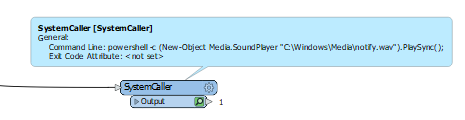
A more out-of-the-box hack. Can use a SystemCaller at the end of a workspace to play Eg. Default Windows Notify WAV file and other Windows API/Powershell calls for Eg. Notifications.
 

powershell -c (New-Object Media.SoundPlayer "C:\Windows\Media\notify.wav").PlaySync();


matthieuv
Enthusiast
Forum|alt.badge.img+29
  • Enthusiast
  • September 25, 2024

Not tested yet, but if you go with a SystemCaller you might try to get the following working:

Generating Windows 10 Notifications With PowerShell · Den Delimarsky

And maybe check before it if you run it on Form or Flow.


matthieuv
Enthusiast
Forum|alt.badge.img+29
  • Enthusiast
  • September 26, 2024

A more out-of-the-box hack. Can use a SystemCaller at the end of a workspace to play Eg. Default Windows Notify WAV file and other Windows API/Powershell calls for Eg. Notifications.
 

powershell -c (New-Object Media.SoundPlayer "C:\Windows\Media\notify.wav").PlaySync();


Playing a sound at the end is already built-in in the GUI as Mark Ireland described in his newsletter:
(2) What's Up Wednesday (25th September 2024): Data Interoperability Explained, Python IDEs, Smart Cities, Waiting for FME, and LOTS of events. | LinkedIn


LizAtSafe
Safer
Forum|alt.badge.img+20
  • Safer
  • October 23, 2024
NewOpen

LizAtSafe
Safer
Forum|alt.badge.img+20
  • Safer
  • January 22, 2025
The following idea has been merged into this idea:

All the votes have been transferred into this idea.

LizAtSafe
Safer
Forum|alt.badge.img+20
  • Safer
  • February 19, 2026
OpenReleased

LizAtSafe
Safer
Forum|alt.badge.img+20
  • Safer
  • February 19, 2026
ReleasedIn Development

JennaKAtSafe
Safer
Forum|alt.badge.img+8

Thank you for your interest in this idea.

We’ve implemented this, and it will be available in the 26.1 release.