



Solved

backupConfiguration Workspace does not use the datestamped attribute in Flow 2025.2.1

  • December 23, 2025
  • 6 replies
  • 116 views

mgg_beca
Enthusiast
Forum|alt.badge.img+17

Hi there,

Just finished a fresh install of FME Flow 2025.2.1.

I was configuring the backups and noticed that the output files were not getting a timestamp.

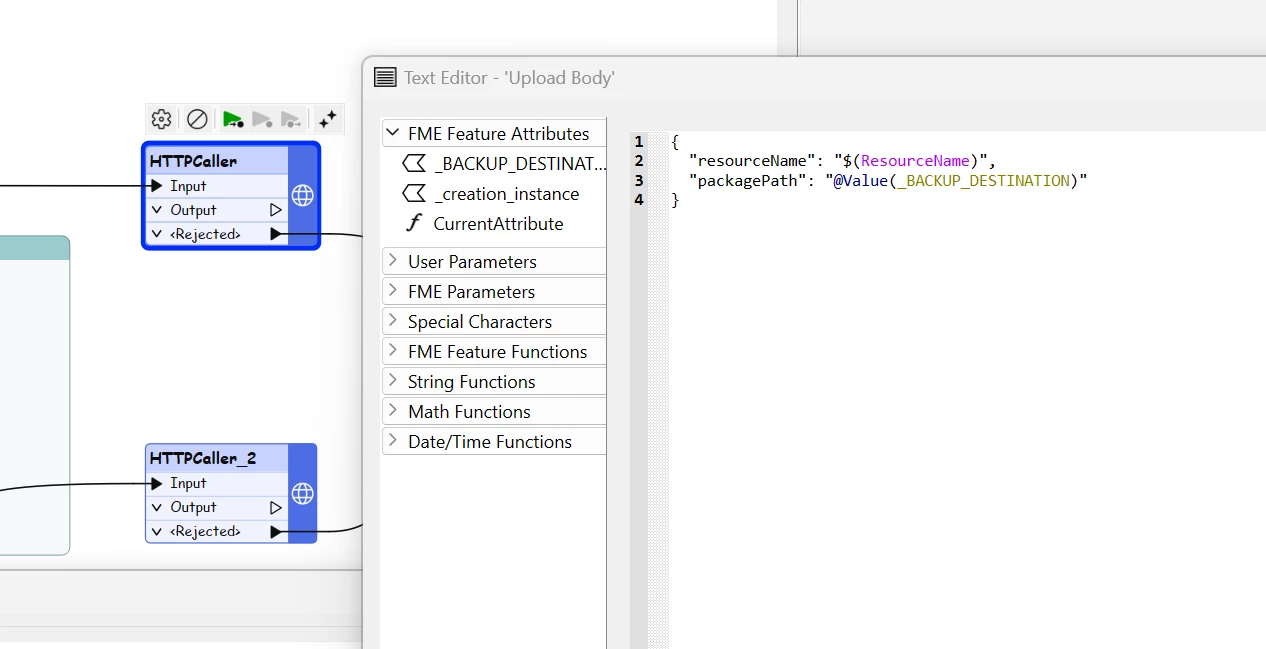
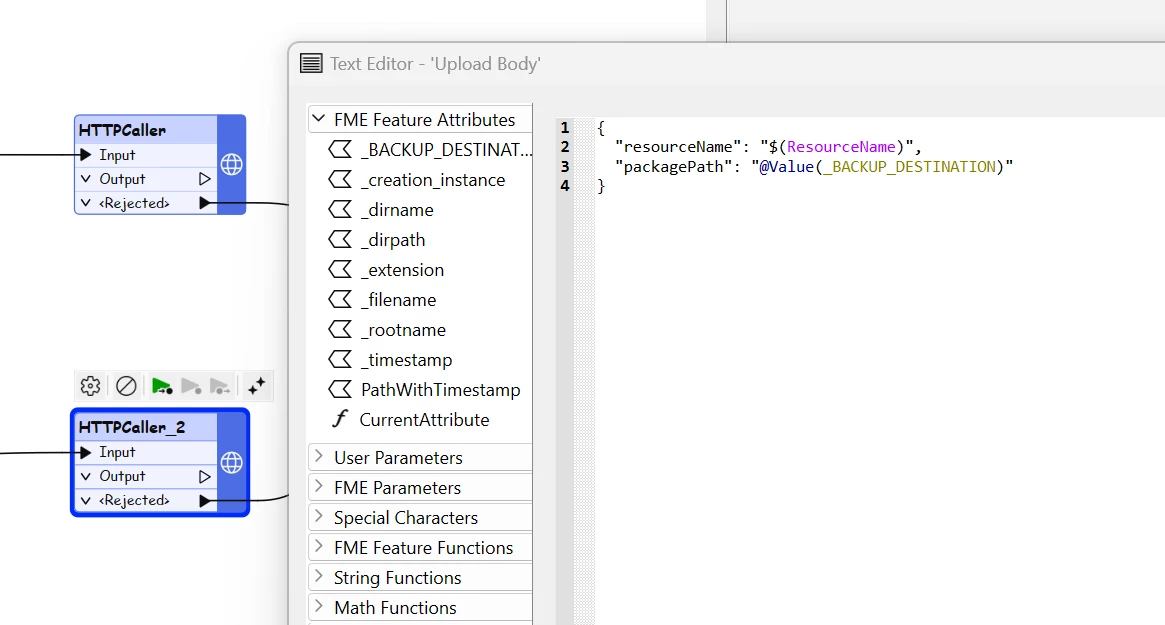
Looking at the httpcallers they both submit using the non-timestamped attribute:

If Append Date is No:
If Append Date is yes:
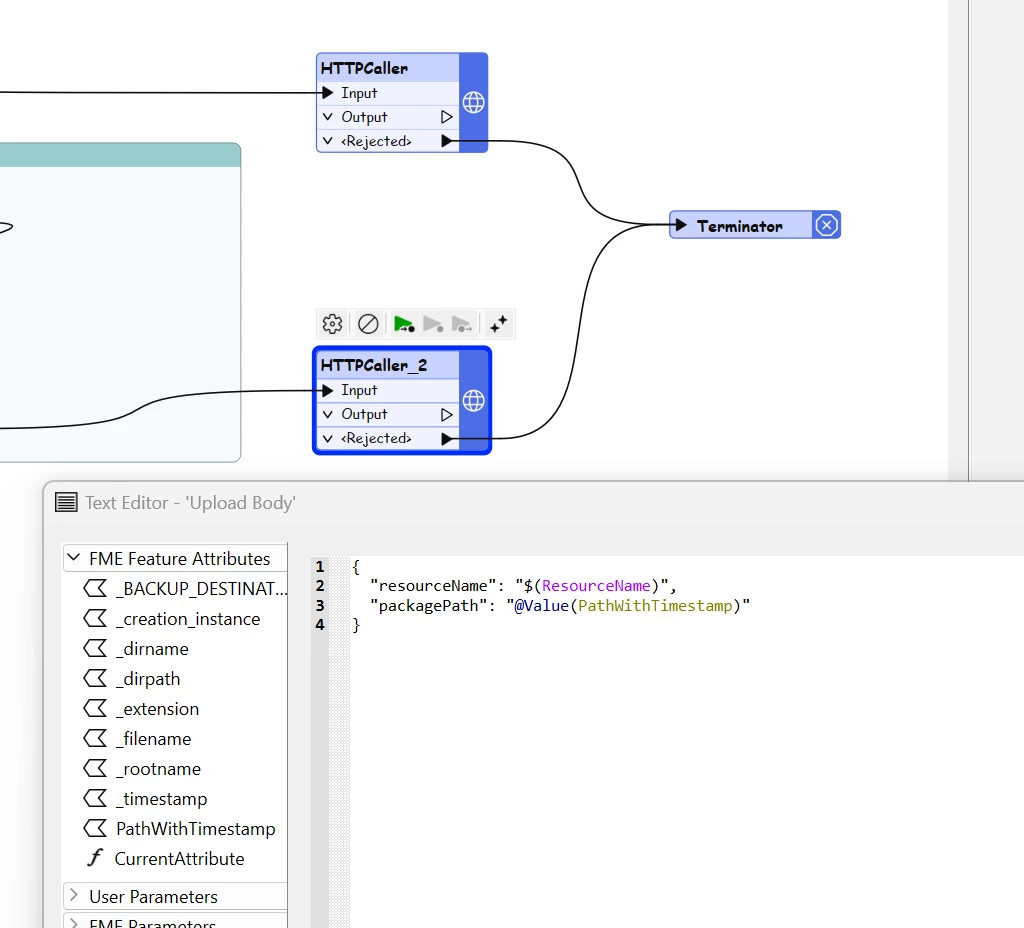
What it should be:
 

Thanks,

Marc

Best answer by zoe.forbes

Hi ​@rudy_v,

A fix has been implemented and is currently planned to be shipped with 2026.1 (although this is not guaranteed). I’ve attached the updated workspace for 2025.2.3 for you to use in the meantime.

Please let me know if you have any questions about this!

6 replies

skyleratsafe
Safer
Forum|alt.badge.img+5
  • Safer
  • December 26, 2025

Hi ​@mgg_beca,

I was wondering what FME Form version you are using. Is it the same version as FME Flow?

Based on the screenshots, it appears that the actual value of packagePath is not automatically updated when you set 'append date' to 'yes'.

However, I could see the _timestamp attribute under the FME Feature Attributes. I would recommend concatenating the original path and timestamp and checking if that works.

Cheers,

Skyler


mgg_beca
Enthusiast
Forum|alt.badge.img+17
  • Author
  • Enthusiast
  • January 11, 2026

Hi ​@mgg_beca,

I was wondering what FME Form version you are using. Is it the same version as FME Flow?

Based on the screenshots, it appears that the actual value of packagePath is not automatically updated when you set 'append date' to 'yes'.

However, I could see the _timestamp attribute under the FME Feature Attributes. I would recommend concatenating the original path and timestamp and checking if that works.

Cheers,

Skyler


Hi,

Yes I have also install the latest version of FME Form, so they match.

I can also see the timestamp attribute, and the concatenated attribute already exists in the workspace, as per my third screenshot. It is created in the bookmarked part of the flow just out of my screenshot. I think that this is an error in the workspace that is supplied with FME Flow.  Safe should correct the attribute and replace this in future versions of Flow.


Thanks,

Marc


zoe.forbes
Safer
Forum|alt.badge.img+5
  • Safer
  • January 14, 2026

Hi ​@mgg_beca,

This definitely seems like an error with the Utilities/BackupConfiguration.fmw workspace in 2025.2.1 - I’ve reported this to our Development team (reference FMEFLOW-27189).

I’m glad you were able to get the workspace working despite this mistake. Let us know if there’s anything else we can help with!

Thanks,
Zoe


rudy_v
Contributor
Forum|alt.badge.img+6
  • Contributor
  • March 3, 2026

Hi ​@mgg_beca 

I can also report - it has not been fixed, just deployed 2025.2.3

I migrated from 2025.1.2 - and deployed 2025.2.3 - today

Rudy


rudy_v
Contributor
Forum|alt.badge.img+6
  • Contributor
  • March 3, 2026

Hi ​@skyleratsafe 

It would be great if Safe fixes this - and just attasched the fix here, or add it to a download area - to be downloaded.


zoe.forbes
Safer
Forum|alt.badge.img+5
  • Safer
  • Best Answer
  • March 3, 2026

Hi ​@rudy_v,

A fix has been implemented and is currently planned to be shipped with 2026.1 (although this is not guaranteed). I’ve attached the updated workspace for 2025.2.3 for you to use in the meantime.

Please let me know if you have any questions about this!