



Question

write features once read of source dataset is complete

  • August 15, 2018
  • 2 replies
  • 29 views

elpone
Contributor
Forum|alt.badge.img+4

Hi,

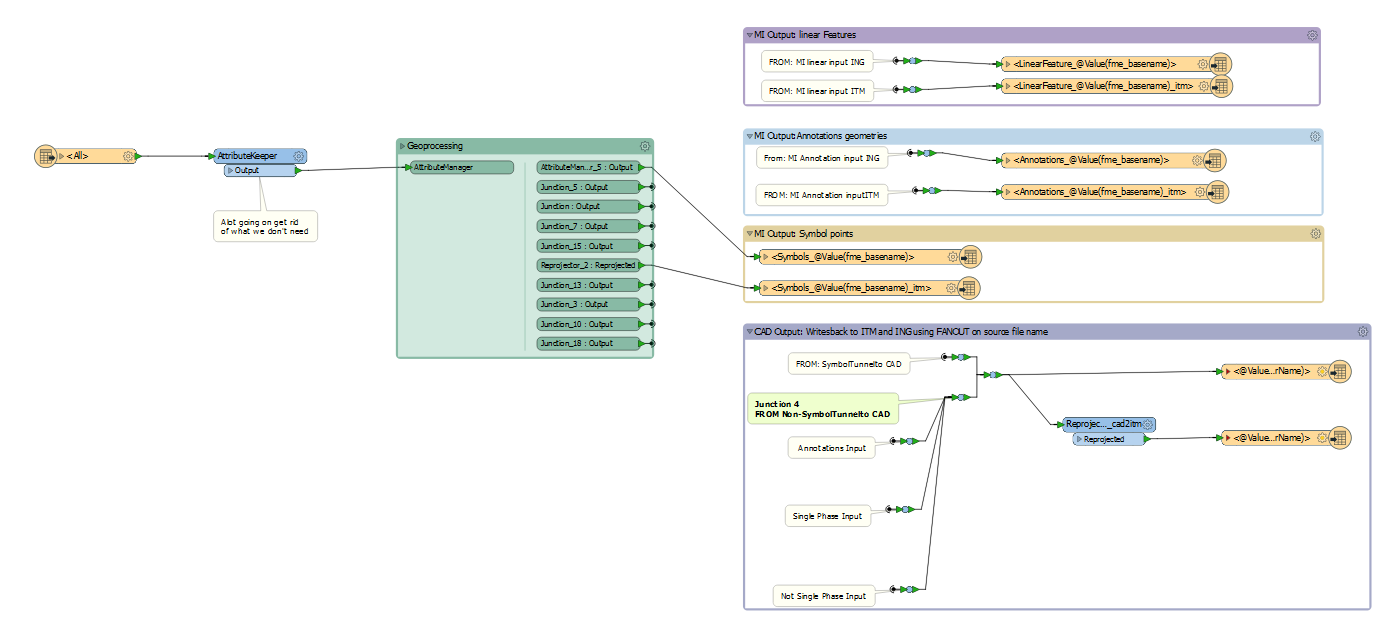
I've developed a workflow to convert about 100 dgn files into mapinfo and cad formats. In essence I have a single merged .dgn reader. Each .dgn is read in and some geoprocessing happens to make layernames explicit and then a writeback happens. The issue is that the writeback will only happen once everything is read in. The output features are named based on the input file.

For cad writeback using a fanout: @Value(fme_basename).dwg

For mapinfo writeback using TABLE NAME: LinearFeature_@Value(fme_basename)

What I would like to happen is once the source dgn is read it gets written which should free up memory and hopfully speed up the process.

This has sort of been asked before with write features as they are read from @mapper @david_r and also Write outputs before translation is complete from @jamiefinney and @redgeographics

However I am not sure how to implement the master-child pattern suggested by @redgeographics.

Below is a screenshot of the workflow however in essence its

Read dgn==> doing stuff ==>Writeback features.
This post is closed to further activity.
It may be an old question, an answered question, an implemented idea, or a notification-only post.
Please check post dates before relying on any information in a question or answer.
For follow-up or related questions, please post a new question or idea.
If there is a genuine update to be made, please contact us and request that the post is reopened.

2 replies

takashi
Celebrity
  • August 15, 2018

Hi @elpone, possibly you could apply the basic batch processing method (PATH reader + WorkspaceRunner) described in this article.

Batch Processing Using the WorkspaceRunner


elpone
Contributor
Forum|alt.badge.img+4
  • Author
  • Contributor
  • August 15, 2018

Hi @elpone, possibly you could apply the basic batch processing method (PATH reader + WorkspaceRunner) described in this article.

Batch Processing Using the WorkspaceRunner

Thanks @takashi , This is exactly the tool for the job. The link explains how to implement this.


