

Question

Why doesn't FME Desktop write all the selected parameters to a CSV file?

  • April 22, 2017
  • 3 replies
  • 70 views

Forum|alt.badge.img

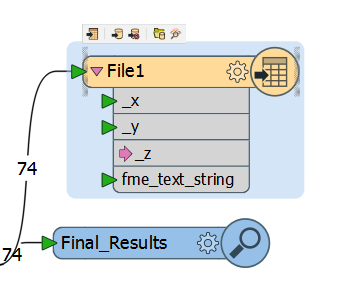
I have a workspace in which I have selected a CSV file writer to contain the results. The user parameters selected to be written appear in the CSV file. On the other hand, the format attribute (fme_text_string) I have selected does not appear in the CSV. All the results appear in the data inspector, and for a workaround I am forced to select the data in the table and save it to a file from there.

What am I doing wrong?

This post is closed to further activity.
It may be an old question, an answered question, an implemented idea, or a notification-only post.
Please check post dates before relying on any information in a question or answer.
For follow-up or related questions, please post a new question or idea.
If there is a genuine update to be made, please contact us and request that the post is reopened.

3 replies

ciarab
Contributor
Forum|alt.badge.img+9
  • Contributor
  • April 23, 2017

Hi @michaellampi you need to to extract the information from the format attribute fme_text_string and insert it into a user attribute. Use the attribute manager or creator to create a new user attribute called Text_String for example and use the format attribute fme_text_string to populate this. Once you add the new attribute Text_String into you writer you will now find it in your csv output


itay
Supporter
Forum|alt.badge.img+18
  • Supporter
  • April 23, 2017

Try exposing the fme_text_string attribute in the reader or via an AttributeExposer transformer.


Forum|alt.badge.img

Hi @michaellampi you need to to extract the information from the format attribute fme_text_string and insert it into a user attribute. Use the attribute manager or creator to create a new user attribute called Text_String for example and use the format attribute fme_text_string to populate this. Once you add the new attribute Text_String into you writer you will now find it in your csv output

Thank you! It is taking me a while to wrap my head around the UI as well as the terminology, but your detailed answer really helped to clear up my confusion.





