Question

Text above attributes in excel and csv files

  • August 18, 2015
  • 3 replies
  • 22 views

Hello!


I was wondering if it's possible to create a standard text above the different attributes in excel or csv files?


Here's an example of how it should look like. Two rows is standard and the attribute names will start at row four.
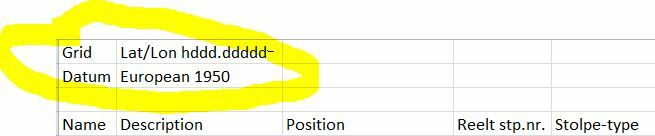


Thank you!

This post is closed to further activity.
It may be an old question, an answered question, an implemented idea, or a notification-only post.
Please check post dates before relying on any information in a question or answer.
For follow-up or related questions, please post a new question or idea.
If there is a genuine update to be made, please contact us and request that the post is reopened.

3 replies

david_r
Celebrity
  • August 18, 2015
Hi


If I'm not mistaken, it should be possible using a template file with named ranges.


There is more info in the help: http://docs.safe.com/fme/html/FME_ReadersWriters/FME_Readers_Writers.htm#xlsx/XLSX_writer.htm


David

  • Author
  • August 25, 2015
Hi again!


I really tried to figure this out, but i'm not quite sure what kind of template I should use.


Is it possible to give me an example of how you're thinking of this issue?


Best regards


Fredrik

david_r
Celebrity
  • August 25, 2015
Hi


You create the template file yourself, filling in fields and formatting it as you like. You then define so-called named ranges (e.g. http://spreadsheets.about.com/od/excelformulas/ss/2011-01-15-excel-range-name-overview.htm) which defines where FME will later write the values. You save this Excel file and specify it as a template file for your Excel writer.


There is also a lot of good information here: https://www.youtube.com/watch?v=pJrsV34VdFc


David


