Question

SQL Statement to Execute Before Translation Double Encoded

  • August 5, 2016
  • 8 replies
  • 43 views

Forum|alt.badge.img

Hi,

Not sure if this is a bug. 

I've found that the PostGIS writer's SQL Statement to Execute Before Translation can accidentally double encode the SQL such that it results in a fatal error on trying to write.

As a process;

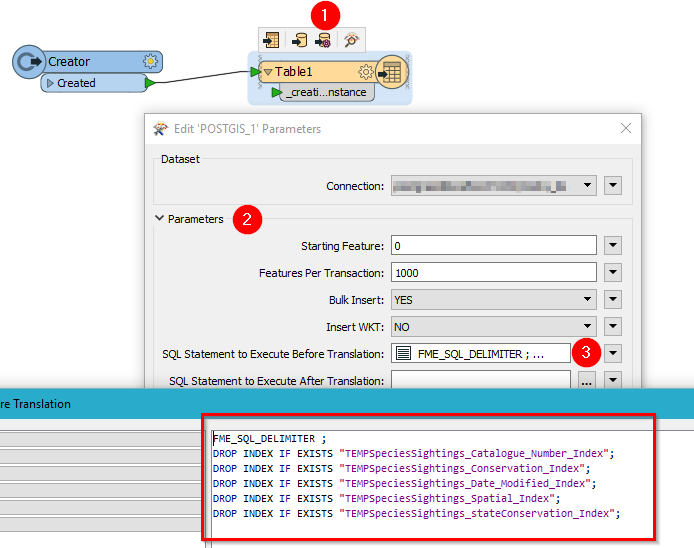
  • Enter this SQL code in the advanced editor (by clicking the elipsis button on the writer's Edit Parameters pane);
FME_SQL_DELIMITER ;
DROP INDEX IF EXISTS "TEMPSpeciesSightings_Catalogue_Number_Index";
DROP INDEX IF EXISTS "TEMPSpeciesSightings_Conservation_Index";
DROP INDEX IF EXISTS "TEMPSpeciesSightings_Date_Modified_Index";
DROP INDEX IF EXISTS "TEMPSpeciesSightings_Spatial_Index";
DROP INDEX IF EXISTS "TEMPSpeciesSightings_stateConservation_Index";

  • FME encodes this to;
FME_SQL_DELIMITER<space><semicolon><lf>DROP<space>INDEX<space>IF<space>EXISTS<space><quote>TEMPSpeciesSightings_Catalogue_Number_Index<quote><semicolon><lf>DROP<space>INDEX<space>IF<space>EXISTS<space><quote>TEMPSpeciesSightings_Conservation_Index<quote><semicolon><lf>DROP<space>INDEX<space>IF<space>EXISTS<space><quote>TEMPSpeciesSightings_Date_Modified_Index<quote><semicolon><lf>DROP<space>INDEX<space>IF<space>EXISTS<space><quote>TEMPSpeciesSightings_Spatial_Index<quote><semicolon><lf>DROP<space>INDEX<space>IF<space>EXISTS<space><quote>TEMPSpeciesSightings_stateConservation_Index<quote><semicolon>

  • Click OK and then OK to exit the Parameters pane
  • Re-enter the advanced SQL editor, click OK again back out without changing anything
  • Go all the way back in and check the encoded SQL and it should look similar to this;
FME_SQL_DELIMITER<lt>space<gt><lt>semicolon<gt><lt>lf<gt>DROP<lt>space<gt>INDEX<lt>space<gt>IF<lt>space<gt>EXISTS<lt>space<gt><lt>quote<gt>TEMPSpeciesSightings_Catalogue_Number_Index<lt>quote<gt><lt>semicolon<gt><lt>lf<gt>DROP<lt>space<gt>INDEX<lt>space<gt>IF<lt>space<gt>EXISTS<lt>space<gt><lt>quote<gt>TEMPSpeciesSightings_Conservation_Index<lt>quote<gt><lt>semicolon<gt><lt>lf<gt>DROP<lt>space<gt>INDEX<lt>space<gt>IF<lt>space<gt>EXISTS<lt>space<gt><lt>quote<gt>TEMPSpeciesSightings_Date_Modified_Index<lt>quote<gt><lt>semicolon<gt><lt>lf<gt>DROP<lt>space<gt>INDEX<lt>space<gt>IF<lt>space<gt>EXISTS<lt>space<gt><lt>quote<gt>TEMPSpeciesSightings_Spatial_Index<lt>quote<gt><lt>semicolon<gt><lt>lf<gt>DROP<lt>space<gt>INDEX<lt>space<gt>IF<lt>space<gt>EXISTS<lt>space<gt><lt>quote<gt>TEMPSpeciesSightings_stateConservation_Index<lt>quote<gt><lt>semicolon<gt>

Note all the previous encoding is doubly encoded. For example, <space> is now <lt>space<gt>.

If I were to accept this statement and try and run the workspace the write will fail with a syntax error.

Thanks.

This post is closed to further activity.
It may be an old question, an answered question, an implemented idea, or a notification-only post.
Please check post dates before relying on any information in a question or answer.
For follow-up or related questions, please post a new question or idea.
If there is a genuine update to be made, please contact us and request that the post is reopened.

8 replies

mark2atsafe
Safer
Forum|alt.badge.img+59
  • Safer
  • August 5, 2016
Hi - it sure sounds like a bug, but I can't replicate it, and I can't find any other reports of this issue. So I am going to ask our development team to look at this question and see what they say.


mark2atsafe
Safer
Forum|alt.badge.img+59
  • Safer
  • August 5, 2016
I forgot to ask - what version/build of FME are you using?


Forum|alt.badge.img
  • Author
  • August 6, 2016


Hi, thanks for looking into it.


I'm using FME Desktop 2016.1 on Windows.


I caused the behaviour by clicking the PostGIS writer's parameter editing button (the one that appears above the writer when you hover over it) more than once.


Thanks again.


david_r
Celebrity
  • August 8, 2016

Just tested this with 2016.1.0.1 (build 16494 win32) and was unable to reproduce the error. Did the following repeatedly:

Maybe try re-creating the writer?


mark2atsafe
Safer
Forum|alt.badge.img+59
  • Safer
  • August 8, 2016
No, I still can't get it to fail as described, and our developers tell me that - while they have seen this before - there should be no problem in 2016.1


I think it might take more testing than is feasible here. Maybe you could file this as a support case (safe.com/support) and include your workspace so they can try it out? That is, if it only occurs in this workspace and not in any others.


Forum|alt.badge.img
  • Author
  • August 8, 2016
Thanks Mark, I'll raise a support case as you suggest.


This isn't causing any problems executing the workspace as it's a relatively simple matter to avoid opening and closing the parameters dialog repeatedly.


Thanks for all your help.


Aiden


Forum|alt.badge.img
  • Author
  • August 9, 2016

Just tested this with 2016.1.0.1 (build 16494 win32) and was unable to reproduce the error. Did the following repeatedly:

Maybe try re-creating the writer?

I'm using 2016.1.0 on WIN64. Perhaps that's part of the difference?


Forum|alt.badge.img
  • Author
  • August 15, 2016
This bug seems to have stopped affecting me now.


The solution could have been either of two things that I've done in the intervening time;


1. I updated FME Desktop to 2016.1.1


2. I pushed the workspace up to FME Server and then pulled it back down again


Either way I'm happy now. Thanks for your help.


Aiden