
Question

SpatialFilter keeps rejecting filter polygons

  • May 24, 2016
  • 4 replies
  • 74 views

Hi all!

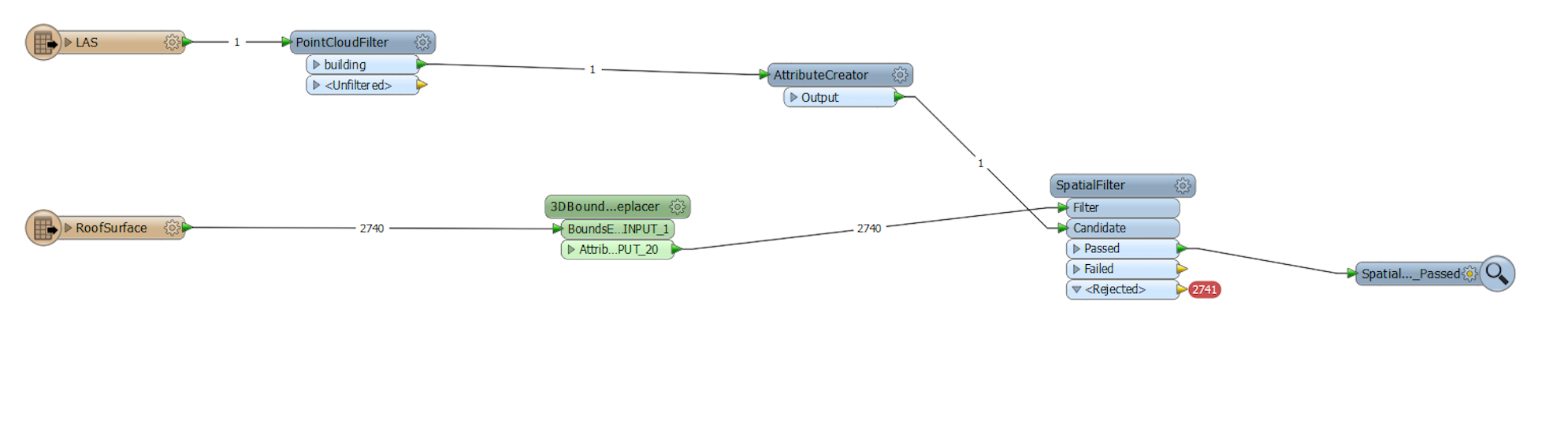
I've got a point cloud file of an area, and citygml file of this area as well. In the citygml file, I have the roof surface as polygons. Now I am connecting the points in the point cloud with the polygons of the roof surface. I tried several transformers, such as PointOnAreaOverlayer, Interjector, and now SpatialFilter. But as you can see in the below snapshot, the filters are rejected at the first place. I tried to add a BoundingBoxReplacer to my roof surface before the SpatialFilter. But still it didn't work.
Thanks in advance.


This post is closed to further activity.
It may be an old question, an answered question, an implemented idea, or a notification-only post.
Please check post dates before relying on any information in a question or answer.
For follow-up or related questions, please post a new question or idea.
If there is a genuine update to be made, please contact us and request that the post is reopened.

4 replies

erik_jan
Contributor
Forum|alt.badge.img+26
  • Contributor
  • May 24, 2016

I think you need the Clipper instead of the SpatialFilter. I assume you want the part of the PointCloud that is inside the roof polygon.


takashi
Celebrity
  • May 25, 2016

Hi @summercyn1110, the 3DBoundingBoxReplacer replaces the input geometry with a solid (extrusion), and both the SpatialFilter and Clipper won't accept solid features. Why not use the BoundingBoxReplacer instead of the 3DBoundingBoxReplacer?


I think you need the Clipper instead of the SpatialFilter. I assume you want the part of the PointCloud that is inside the roof polygon.

Thanks it finally worked with Clipper. Thank you so much!


Hi @summercyn1110, the 3DBoundingBoxReplacer replaces the input geometry with a solid (extrusion), and both the SpatialFilter and Clipper won't accept solid features. Why not use the BoundingBoxReplacer instead of the 3DBoundingBoxReplacer?

I then used this Clipper and worked it out. And I found out it's because that some of these transformers only work in 2d way instead of 3d... Anyway, many thanks!!




