


Question

Reading and Writing Font from AutoCAD DWG

  • December 9, 2019
  • 2 replies
  • 87 views

deanhowell
Influencer
Forum|alt.badge.img+24

I have a DWG file that I am needing to validate and one of the tasks is to assess the font.


1. How do I find out the font or fonts used in the DWG?


Secondly, once I know the original font, I want to use that same font to write out the drawing using MapnikRaster.


2. How do I set the font and font size based on what is in the original drawing?

 

This post is closed to further activity.
It may be an old question, an answered question, an implemented idea, or a notification-only post.
Please check post dates before relying on any information in a question or answer.
For follow-up or related questions, please post a new question or idea.
If there is a genuine update to be made, please contact us and request that the post is reopened.

2 replies

sigtill
Supporter
Forum|alt.badge.img+25
  • Supporter
  • December 9, 2019

Hi @deanhowell


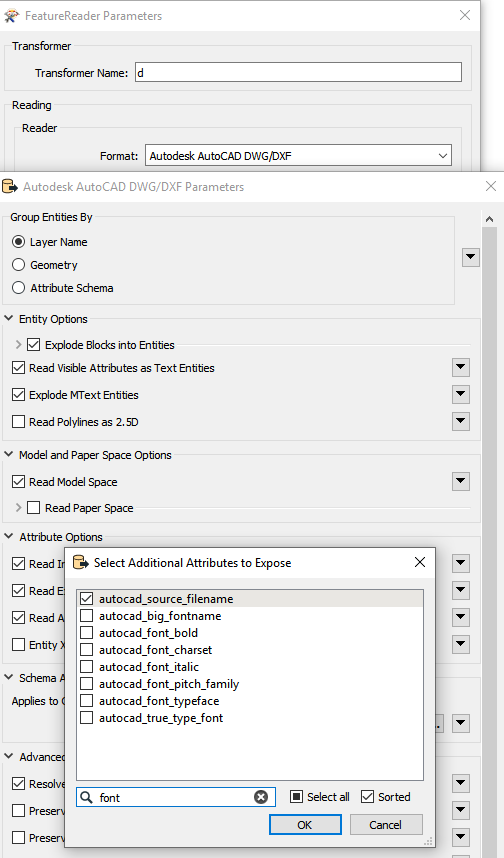
To see the "invisible" autocad font you can add the "Select additional attribute to expose" and search for font. Then you can use these. Not sure if they work straight on in the mapnikrasterizer - but its worth a try!


deanhowell
Influencer
Forum|alt.badge.img+24
  • Author
  • Influencer
  • December 10, 2019

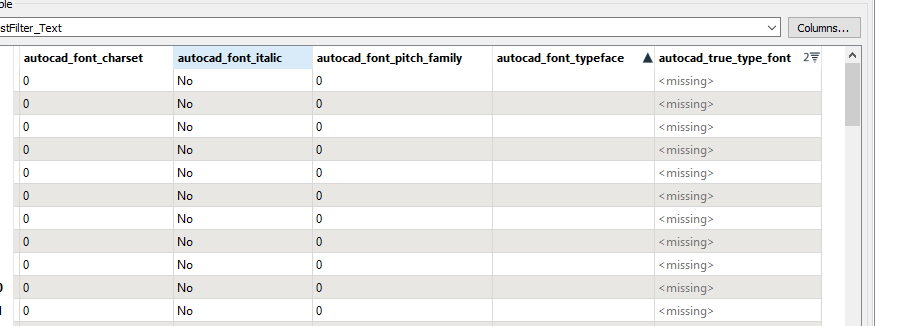
Thanks again @sigtill, but unfortunately these attributes are empty, missing or 0 when reading them in.

Maybe there is a default font that is being used and we will need to dictate the fonts that are acceptable :)