


Solved

Read dwg from a excel list with folder name

  • January 14, 2020
  • 2 replies
  • 38 views

clowncutie
Contributor
Forum|alt.badge.img+7

Hi, I have an excel table with over 100 folder, lets say for example


folder


C:\\data\\1a\\z


C:\\data\\1b\\z


C:\\data\\2a\\z


C:\\data\\2b\\z


that I read in my main.fmw workspace

and I want to send it to another workspace that is named edit.fmw for example.


In each folder I know there is many dwg, but I want to open the one in the subfolder that ends with ....03.dwg because that is always the terrain file in all folders.

I want to

1. Read excel

2. Find the name of the dwg in each folder

3. Send it to my other workspace and open it with a reader to do other stuff with.


Any ideas?

I basically need help with how to set up the workspacerunner and since I dont want to manually find and enter the name of the correct dwg is there a way to test/search for a file in that folder that ends with a specific string?


I have looked at pathreader but that only reads dwg--> find metadatafiles and filepath but I want the other way around, folder-->list of all files.

Best answer by ebygomm

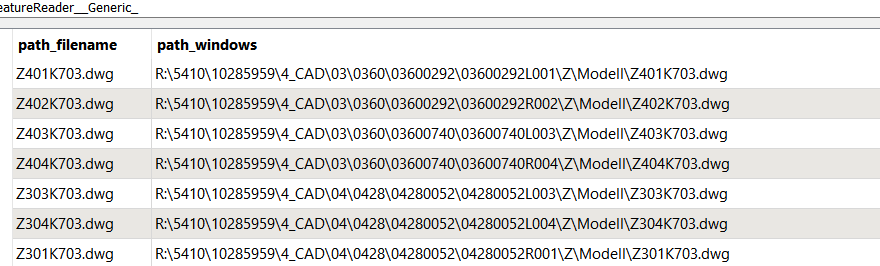
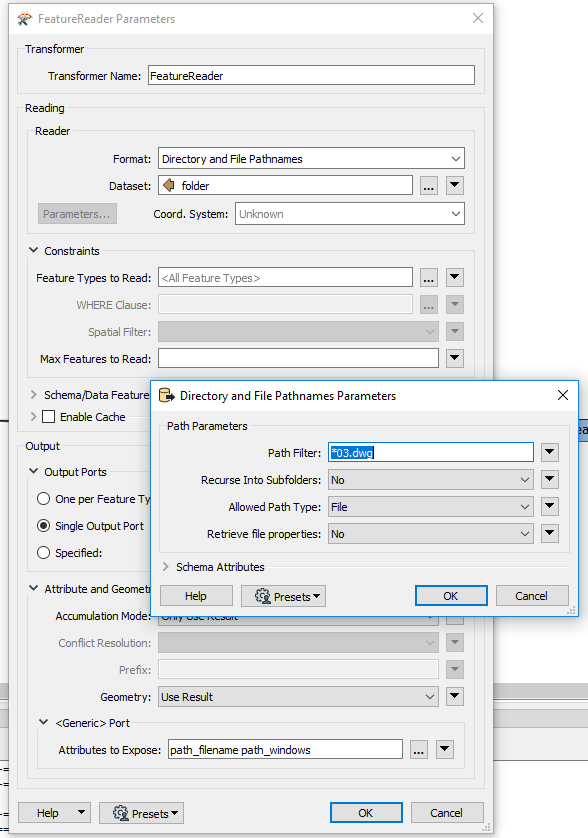
You should be able to use a featurereader to get the filepath of the dwg file after reading the folder specified from the excel file, you can then use this as an input parameter in your workspace runner

This post is closed to further activity.
It may be an old question, an answered question, an implemented idea, or a notification-only post.
Please check post dates before relying on any information in a question or answer.
For follow-up or related questions, please post a new question or idea.
If there is a genuine update to be made, please contact us and request that the post is reopened.

2 replies

ebygomm
Influencer
Forum|alt.badge.img+46
  • Influencer
  • Best Answer
  • January 14, 2020

You should be able to use a featurereader to get the filepath of the dwg file after reading the folder specified from the excel file, you can then use this as an input parameter in your workspace runner


clowncutie
Contributor
Forum|alt.badge.img+7
  • Author
  • Contributor
  • January 14, 2020

You should be able to use a featurereader to get the filepath of the dwg file after reading the folder specified from the excel file, you can then use this as an input parameter in your workspace runner


Thank you very much seems to work fine!