I have a text file that contains an AutoCAD pathname on each line, e.g.,
D:\\project4033\\dwg\\p1234.dwg
D:\\project515\\dwg\\p642.dwg
X:\\dwg\\a556.dwg
How can I set up a Reader to process each file (the output format will be Adobe GeospatialPDF)? I see answers like a "TextFileReader", but on my 2020.1 system there is no such transformer.
Best answer by becchr
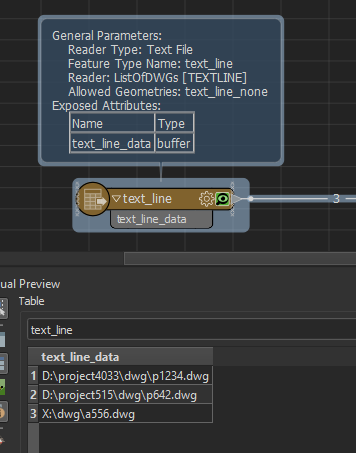
hi @rudystricklan1, there is a Text File Reader which you should be able to use? It reads your text file and makes a separate feature of each line of text, so for your example:
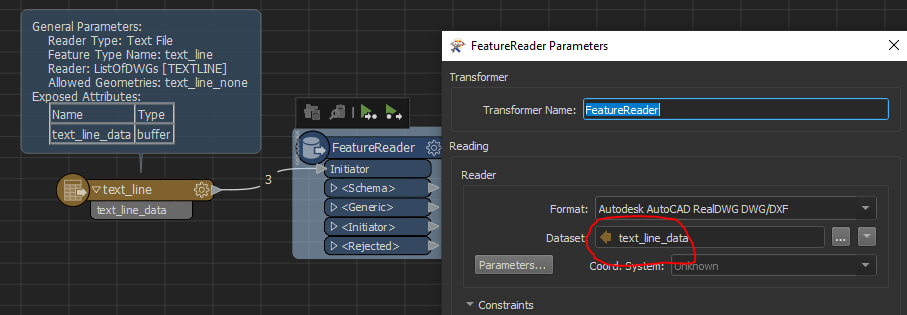
you can use these features to feed a feature reader which reads your dwg's:
Set to 'single output ports' at the bottom and you could use a FileExistenceChecker between both readers to make sure every dwg-file (line in your txt-file) actually exists
Hope this helps
This post is closed to further activity.
It may be an old question, an answered question, an implemented idea, or a notification-only post.
Please check post dates before relying on any information in a question or answer.
For follow-up or related questions, please post a new question or idea.
If there is a genuine update to be made, please contact us and request that the post is reopened.
hi @rudystricklan1, there is a Text File Reader which you should be able to use? It reads your text file and makes a separate feature of each line of text, so for your example:
you can use these features to feed a feature reader which reads your dwg's:
Set to 'single output ports' at the bottom and you could use a FileExistenceChecker between both readers to make sure every dwg-file (line in your txt-file) actually exists
hi @rudystricklan1, there is a Text File Reader which you should be able to use? It reads your text file and makes a separate feature of each line of text, so for your example:
you can use these features to feed a feature reader which reads your dwg's:
Set to 'single output ports' at the bottom and you could use a FileExistenceChecker between both readers to make sure every dwg-file (line in your txt-file) actually exists
Hope this helps
@becchr, this answers my question completely. My FME background is... a little light and it shows :-). Thank you very much for the detailed answer-- I marked it as accepted.