




Solved

PointCloudExpressionEvaluator producing string column

  • March 28, 2019
  • 2 replies
  • 28 views

txalaparta
Contributor
Forum|alt.badge.img+3

Hello

I am trying to create a point cloud with a string column. The value of the component depends on the value of another component. I am using PointCloudExpressionEvaluatot but this doesn´t allow string components.

I could use PointCloudComponentAdder to create string components but it doesn´t work because it creates constant strings which is not what I need.

For example:

If I have the following PointCloud:

x|y|gid|col0|col1

2653000|2565400|147729036548|0|255

2654000|2565400|147729036548|0|12


I´d like this output

x|y|gid|col0|col1

2653000|2565400|147729036548|0|

2654000|2565400|147729036548|0|12

Replacing 255 with empty string


I am using FeatureReader and String concatenator but it´s very slow for about 200millionpoints


Any help woud be appreciated

Thanks

Oskar


Best answer by daveatsafe

Hi @txalaparta,

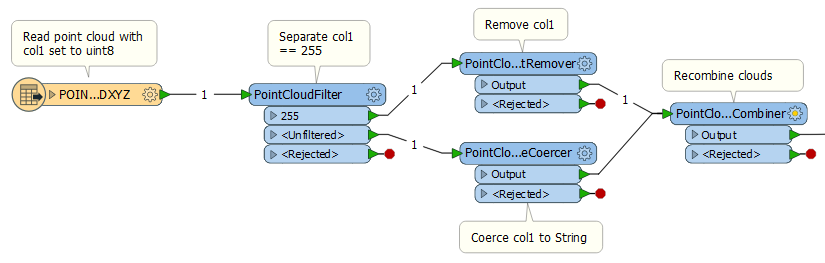
Please read the source XYZ file with col1 defined as uint8, then use a PointCloudFilter to separate the 255 points into their own cloud. The filter only accepts numeric values. You can then use a PointCloudComponentRemover on that cloud to remove the col1 component.

Send the Unfiltered cloud to a PointCloudComponentCoercer to coerce col1 to String. Send both clouds to a PointCloudCombiner to join them again. Because the 255 cloud has no col1 component, those points will have the default for String added, which is blank.

This post is closed to further activity.
It may be an old question, an answered question, an implemented idea, or a notification-only post.
Please check post dates before relying on any information in a question or answer.
For follow-up or related questions, please post a new question or idea.
If there is a genuine update to be made, please contact us and request that the post is reopened.

2 replies

daveatsafe
Safer
Forum|alt.badge.img+20
  • Safer
  • Best Answer
  • March 29, 2019

Hi @txalaparta,

Please read the source XYZ file with col1 defined as uint8, then use a PointCloudFilter to separate the 255 points into their own cloud. The filter only accepts numeric values. You can then use a PointCloudComponentRemover on that cloud to remove the col1 component.

Send the Unfiltered cloud to a PointCloudComponentCoercer to coerce col1 to String. Send both clouds to a PointCloudCombiner to join them again. Because the 255 cloud has no col1 component, those points will have the default for String added, which is blank.


txalaparta
Contributor
Forum|alt.badge.img+3
  • Author
  • Contributor
  • March 30, 2019

Hi @txalaparta,

Please read the source XYZ file with col1 defined as uint8, then use a PointCloudFilter to separate the 255 points into their own cloud. The filter only accepts numeric values. You can then use a PointCloudComponentRemover on that cloud to remove the col1 component.

Send the Unfiltered cloud to a PointCloudComponentCoercer to coerce col1 to String. Send both clouds to a PointCloudCombiner to join them again. Because the 255 cloud has no col1 component, those points will have the default for String added, which is blank.

Yes!!! This does exactly what I wanted


Thanks so much



