

Question

Microstation V8 attributes from 2 objects to create one output

  • September 15, 2016
  • 3 replies
  • 43 views

Forum|alt.badge.img

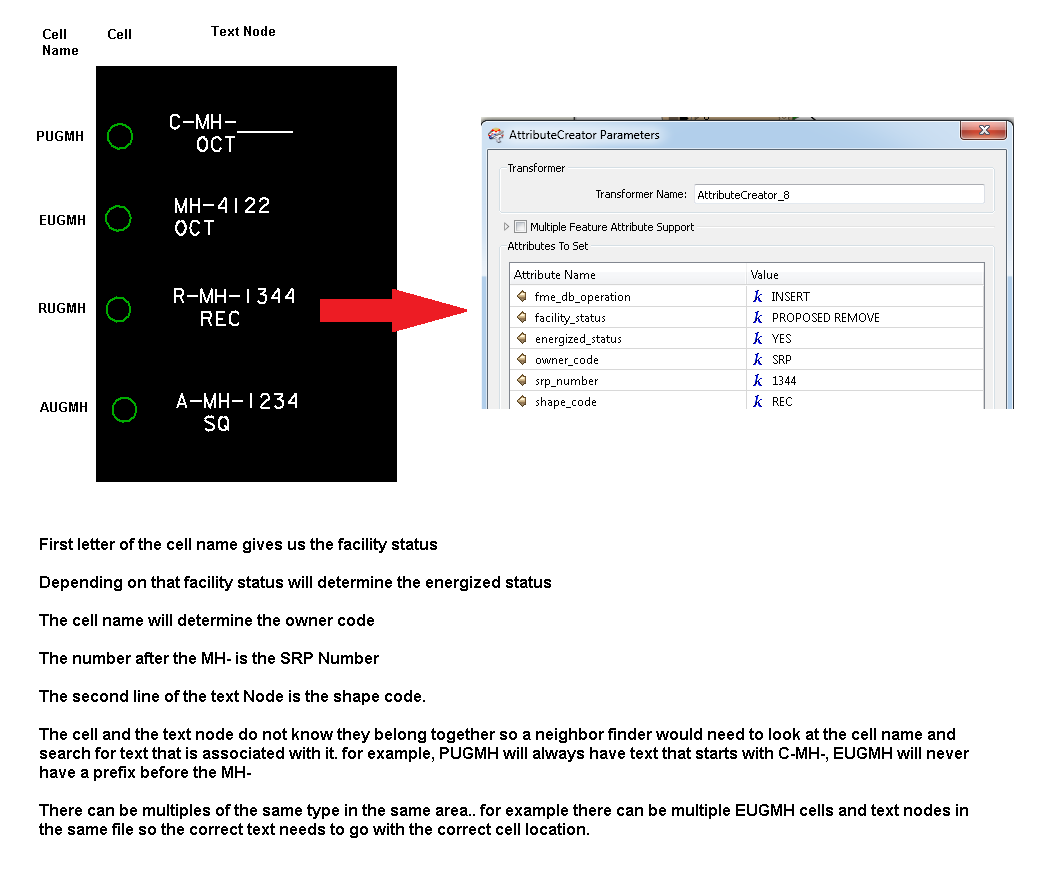
I am currently translating from Microstation and want to take attributes from a cell and a text node and combine them to output one object. The cell and the text node do not know each other so I am guessing a neighborfinder will need to be used. I have been struggling on how to get it all done and was hoping for an example :)

This post is closed to further activity.
It may be an old question, an answered question, an implemented idea, or a notification-only post.
Please check post dates before relying on any information in a question or answer.
For follow-up or related questions, please post a new question or idea.
If there is a genuine update to be made, please contact us and request that the post is reopened.

3 replies

itay
Supporter
Forum|alt.badge.img+18
  • Supporter
  • September 15, 2016

Hi,

The neighborfinder can help and is useful once there a 1:1 relation between cell and text in the case of 1:N filtering the list generated by the neighborfinder (you have have to specify that in the parameters) can help when there are not too many neighbors found.

Where a 1:N relation exists and the list filtering does not result in any matching, a more manual and labor intensive method is usually safer.

Hope this helps,

Itay


redgeographics
Celebrity
Forum|alt.badge.img+62

In addition to what @itay said I'd like to point out that the NeighborFinder will use the text reference point and in cases where there's cells/texts close together it may not always make the right connection (it's purely based on distance) so even if you have a 1:1 relation it's probably good to do spot checks on tricky locations.


mark2atsafe
Safer
Forum|alt.badge.img+59
  • Safer
  • September 16, 2016

For an example, check out this exercise from the FME Desktop basic training:

https://desktopmanualbasic.safe.com/DesktopBasic4Components/4.Exercise8.html

It takes contours and find the closest label in order to apply an elevation, which is pretty similar to your scenario. There's another example in our knowledgebase here:

https://knowledge.safe.com/articles/23302/passing-attributes-between-features-in-close-proxi.html










