Sadly, no, FME can only read, not write merged cells. However, if you were to use a template that already had the cells merged in it, I hope they would be preserved as such.
This post is closed to further activity.
It may be an old question, an answered question, an implemented idea, or a notification-only post.
Please check post dates before relying on any information in a question or answer.
For follow-up or related questions, please post a new question or idea.
If there is a genuine update to be made, please contact us and request that the post is reopened.
Sadly, no, FME can only read, not write merged cells. However, if you were to use a template that already had the cells merged in it, I hope they would be preserved as such.
Sadly, no, FME can only read, not write merged cells. However, if you were to use a template that already had the cells merged in it, I hope they would be preserved as such.
btw If you need proper merged cell writing support, please do contact the support team (www.safe.com/support) and ask them to file an enhancement request.
Sadly, no, FME can only read, not write merged cells. However, if you were to use a template that already had the cells merged in it, I hope they would be preserved as such.
How would you go about setting up/writing to that template? I have no idea of the number of features that would result, but I know they would always be paired.
Sadly, no, FME can only read, not write merged cells. However, if you were to use a template that already had the cells merged in it, I hope they would be preserved as such.
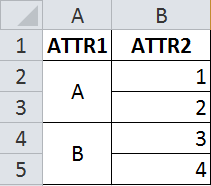
Well, I would do a bit of testing. Create a spreadsheet with Excel where two cells are merged (like in your image). Then try writing a couple of features from FME to that file. If you look in the parameters for the Excel Writer there is one for the Template File to use (i.e. write to this excel file and don't overwrite the structure). I'm not sure whether to expect the first feature to stay in the cell, or the second feature to overwrite it - but I'm confident that it would be consistent.
Sadly, no, FME can only read, not write merged cells. However, if you were to use a template that already had the cells merged in it, I hope they would be preserved as such.
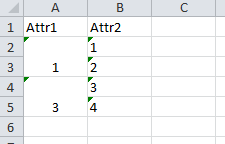
Just tried it. The first feature wins. So if Attr1 has values 1,2,3,4 and Attr2 has values 1,2,3,4, the cells are:
nb: I just set the template to use, but then had to set a feature type parameter to tell FME to start writing at cell A2.
Sadly, no, FME can only read, not write merged cells. However, if you were to use a template that already had the cells merged in it, I hope they would be preserved as such.
I know there have been some significant changes to the excel writer since this post, are merged cells still not possible?




 +41
+41