




Question

KML/XML file flattened - How to expose attributes that are in feature information window

  • October 14, 2015
  • 2 replies
  • 23 views

geospatiallover
Participant
Forum|alt.badge.img+6
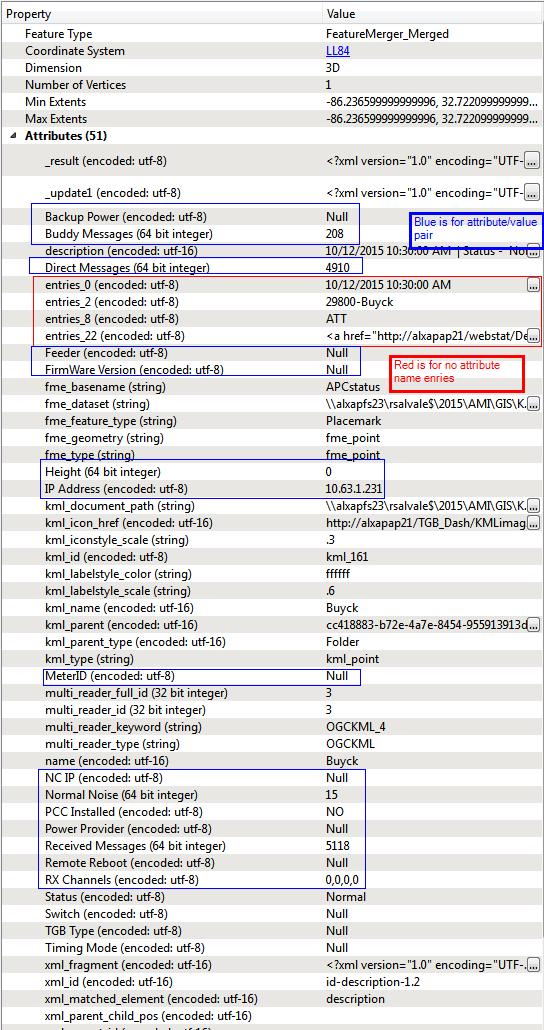
My KML files have a Description element and the Description have either an attirbute/value pair or just a value. After the Description has been extracted and a ListExploder for each entry on the description, two stream were created - one for entries that have an attribute name/value pair and another one for entries that have a value with no attribute name.


For the name/value pair (22 entries per feature) they are split and then @Value(_list{0}) was created and (_list{1}) assigned a value to each entry.


For the value only entry (3 entries per feature), an attribute name (attr_name) is created using the element index and then another atribute using @Value(attr_name) is assigned the value of each entry.


When the attributes are merged back with the geometry, the data stream from both attribute streams appear only in the feature information window when features are identified in the inspector. he transformers don't show any attributes . When I use AtributeRenamer to make the attributes friendlier for the data stream which has values only, the attributes show up on the transformer and its suceeding transformer. This does not work for the pairs.  In theory I don;t have to rename the attributes from the pairs because I can see the results and they are attributed but I can't make them show up on the translation so I could write these attributes on my output.
This post is closed to further activity.
It may be an old question, an answered question, an implemented idea, or a notification-only post.
Please check post dates before relying on any information in a question or answer.
For follow-up or related questions, please post a new question or idea.
If there is a genuine update to be made, please contact us and request that the post is reopened.

2 replies

geospatiallover
Participant
Forum|alt.badge.img+6
Feature Information window screencapture. 


geospatiallover
Participant
Forum|alt.badge.img+6
Solved my own answer... use Attribute Exposer and then Rename as the fields from the entries have spaces.


Thanks to this thread and Takashi for opening my eyes to what the exposer can do: https://knowledge.safe.com/CommunityAnswers?id=906a0000000cuLcAAI


I thought you can expose only format attributes that's available onthe drop down.... you can use it to expose hidden attributes created by the translation during run time....