
Solved

Is there a way to preserve the file name not the sheet name: converting excel files to geodatabase feature classes

  • Nov 22, 2017 12:26 AM UTC
  • 2 replies
  • 101 views

Forum|alt.badge.img

Hi,


I have a workspace set up to convert excel files to geodatabase feature classes with the sheet names being preserved in the output. I'm wondering if there's a way to preserve the actual excel file name instead?


Thanks!

Best answer by takashi

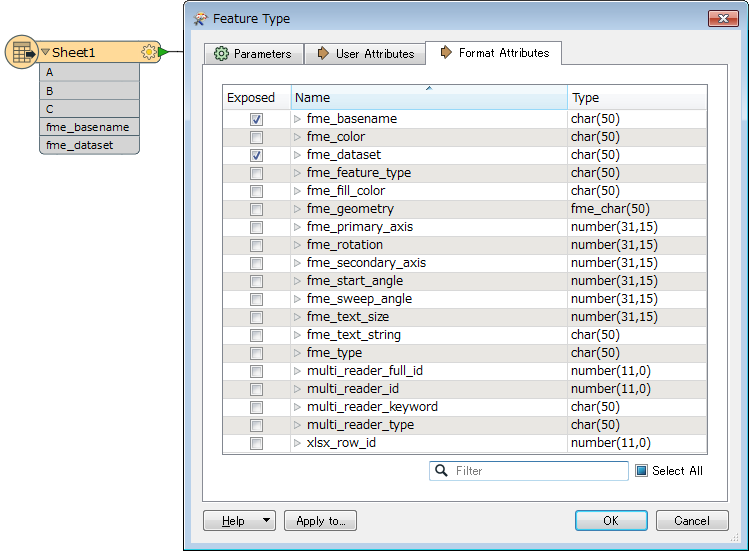
Hi @badams, try exposing "fme_basename" or "fme_dataset" in the Format Attributes tab of the Excel reader feature type. "fme_basename" will contain the source file name without extension; "fme_dataset" will contain the source file path.

View original
This post is closed to further activity.
It may be an old question, an answered question, an implemented idea, or a notification-only post.
Please check post dates before relying on any information in a question or answer.
For follow-up or related questions, please post a new question or idea.
If there is a genuine update to be made, please contact us and request that the post is reopened.

2 replies

takashi
Celebrity
  • Best Answer
  • Nov 22, 2017 1:14 AM UTC

Hi @badams, try exposing "fme_basename" or "fme_dataset" in the Format Attributes tab of the Excel reader feature type. "fme_basename" will contain the source file name without extension; "fme_dataset" will contain the source file path.



Forum|alt.badge.img
  • Author
  • Nov 22, 2017 1:36 AM UTC

Hi @badams, try exposing "fme_basename" or "fme_dataset" in the Format Attributes tab of the Excel reader feature type. "fme_basename" will contain the source file name without extension; "fme_dataset" will contain the source file path.

Worked perfectly! Thanks so much @takashi