Question

I have a *.LAS file, I want to transform it to ASCII ....file which contains the coordinates of the points, organised in one line per point. The coordinates are separated per spaces or tabs. Any thoughts?

  • September 11, 2017
  • 15 replies
  • 226 views
This post is closed to further activity.
It may be an old question, an answered question, an implemented idea, or a notification-only post.
Please check post dates before relying on any information in a question or answer.
For follow-up or related questions, please post a new question or idea.
If there is a genuine update to be made, please contact us and request that the post is reopened.


15 replies

steveatsafe
Safer
Forum|alt.badge.img+13
  • Safer
  • September 11, 2017

Source(LAS)>PointCloudCoercer (Individual Points)>CoordinateExtractor>StringConcatenator(attribute named text_line_data)>TextLine Writer


Forum|alt.badge.img
  • Author
  • September 11, 2017

Source(LAS)>PointCloudCoercer (Individual Points)>CoordinateExtractor>StringConcatenator(attribute named text_line_data)>TextLine Writer

thanks


will try it an see


steveatsafe
Safer
Forum|alt.badge.img+13
  • Safer
  • September 11, 2017
thanks


will try it an see


Make sure to add the PointCloudCoercer - I missed that on my initial reply.


steveatsafe
Safer
Forum|alt.badge.img+13
  • Safer
  • September 11, 2017
thanks


will try it an see


And depending on the size of your point cloud - you may be creating millions of points...


Forum|alt.badge.img
  • Author
  • September 11, 2017

Source(LAS)>PointCloudCoercer (Individual Points)>CoordinateExtractor>StringConcatenator(attribute named text_line_data)>TextLine Writer

so, not ASCII writer?


Forum|alt.badge.img
  • Author
  • September 11, 2017
And depending on the size of your point cloud - you may be creating millions of points...


yes


it is really big


it is almost 12 million points!!

erik_jan
Contributor
Forum|alt.badge.img+26
  • Contributor
  • September 11, 2017

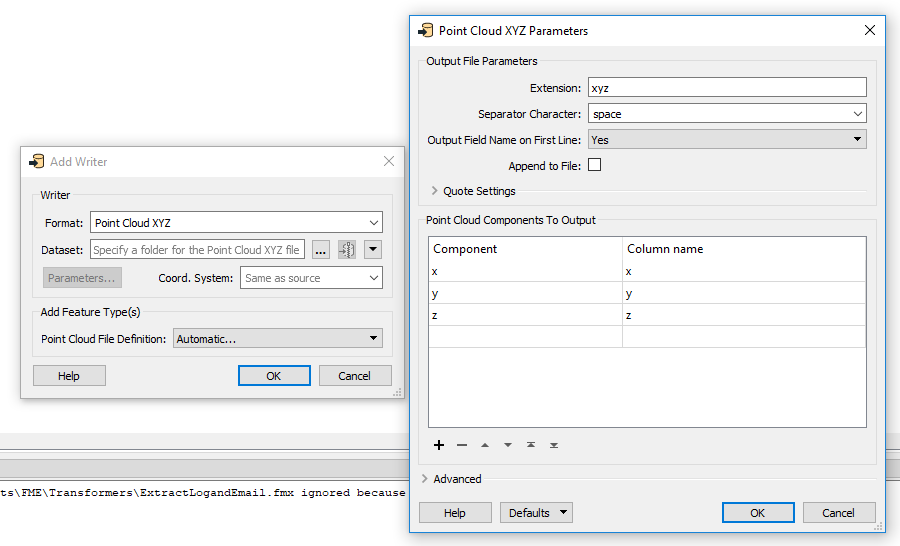
Have you looked at the Pointcloud XYZ writer?


Forum|alt.badge.img
  • Author
  • September 11, 2017
Make sure to add the PointCloudCoercer - I missed that on my initial reply.


where should it be placed between?


steveatsafe
Safer
Forum|alt.badge.img+13
  • Safer
  • September 11, 2017
so, not ASCII writer?


What do you want to achieve?


Forum|alt.badge.img
  • Author
  • September 11, 2017
What do you want to achieve?


a bit complicated


transform my *.LAS file into an ASCII file (like the one attached)cube.pdf ... to open it in a software called DSE to extract discontinuities from a rock face...


Forum|alt.badge.img
  • Author
  • September 11, 2017

Have you looked at the Pointcloud XYZ writer?

yes


I tried it


and it successfully worked...however I need the final file format in ASCII


erik_jan
Contributor
Forum|alt.badge.img+26
  • Contributor
  • September 11, 2017
yes


I tried it


and it successfully worked...however I need the final file format in ASCII


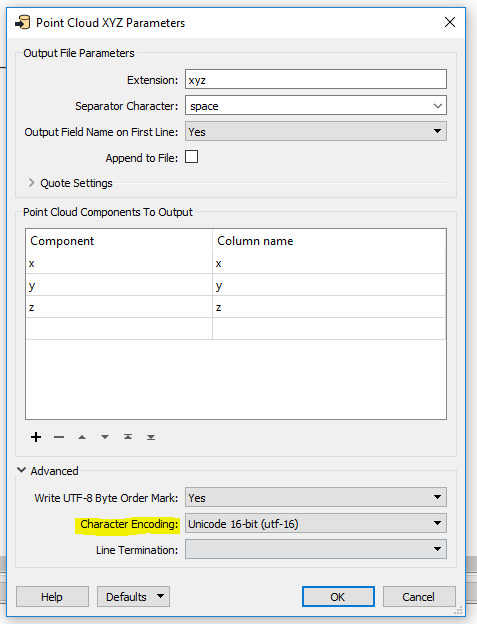
Yo can set the Character encoding in the parameters.


The output will be a text file (with default extension xyz).


steveatsafe
Safer
Forum|alt.badge.img+13
  • Safer
  • September 11, 2017
so, not ASCII writer?


You could add the PointCloudThinner in before the Coercer... or you might want to look at thinning the points afterwards...

Forum|alt.badge.img
  • Author
  • September 12, 2017

Source(LAS)>PointCloudCoercer (Individual Points)>CoordinateExtractor>StringConcatenator(attribute named text_line_data)>TextLine Writer

lidar-points-to-dfn.pdf


successuflly run..however, for some reason it resulted 4,051,966 rows !!


Forum|alt.badge.img
  • Author
  • September 12, 2017

Source(LAS)>PointCloudCoercer (Individual Points)>CoordinateExtractor>StringConcatenator(attribute named text_line_data)>TextLine Writer

and this is how the inspector looks like...I did a mistake somewhere...all the data in one column!!!


inspector.pdf


Can you please advise where is my mistake?