Solved

How to write out point cloud intensity

  • February 11, 2020
  • 2 replies
  • 82 views

akipin
Forum|alt.badge.img

I'm having difficulties writing out the intensity of my point cloud pts after thinning them.

I see the intensity in the XYZ input but can't see how to write it out.

Best answer by takashi

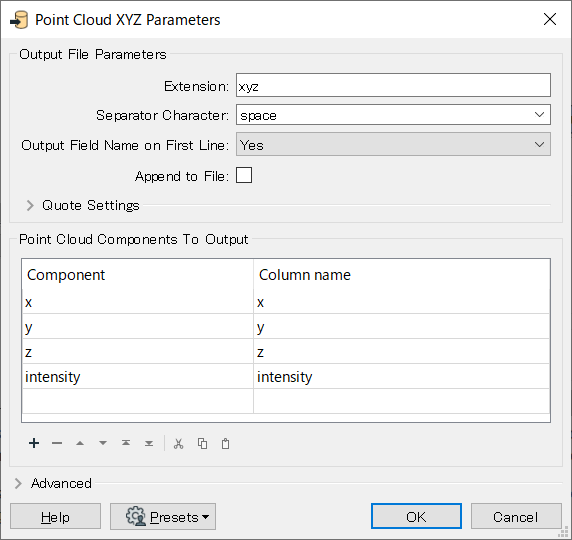
Hi @akipin, if the input point cloud has "intensity" component and the destination format is Point Cloud XYZ, you can use the Point Cloud XYZ writer to write a XYZ file having "intensity" column. Set the component and column name appropriately when adding the writer, as in.

This post is closed to further activity.
It may be an old question, an answered question, an implemented idea, or a notification-only post.
Please check post dates before relying on any information in a question or answer.
For follow-up or related questions, please post a new question or idea.
If there is a genuine update to be made, please contact us and request that the post is reopened.

2 replies

takashi
Celebrity
  • Best Answer
  • February 11, 2020

Hi @akipin, if the input point cloud has "intensity" component and the destination format is Point Cloud XYZ, you can use the Point Cloud XYZ writer to write a XYZ file having "intensity" column. Set the component and column name appropriately when adding the writer, as in.



akipin
Forum|alt.badge.img
  • Author
  • February 12, 2020

Many thanks @takashi !

It's odd how this is hidden in a parameter and not accessible like a regular user or format attribute in the writer on the workbench.