Question

How to write multi-columns results to csv/txt as multi-lines ?

  • January 15, 2020
  • 6 replies
  • 28 views

Hey there,

I'm new to FME, sorry if it is a newbie question.


My pipeline result is the following:
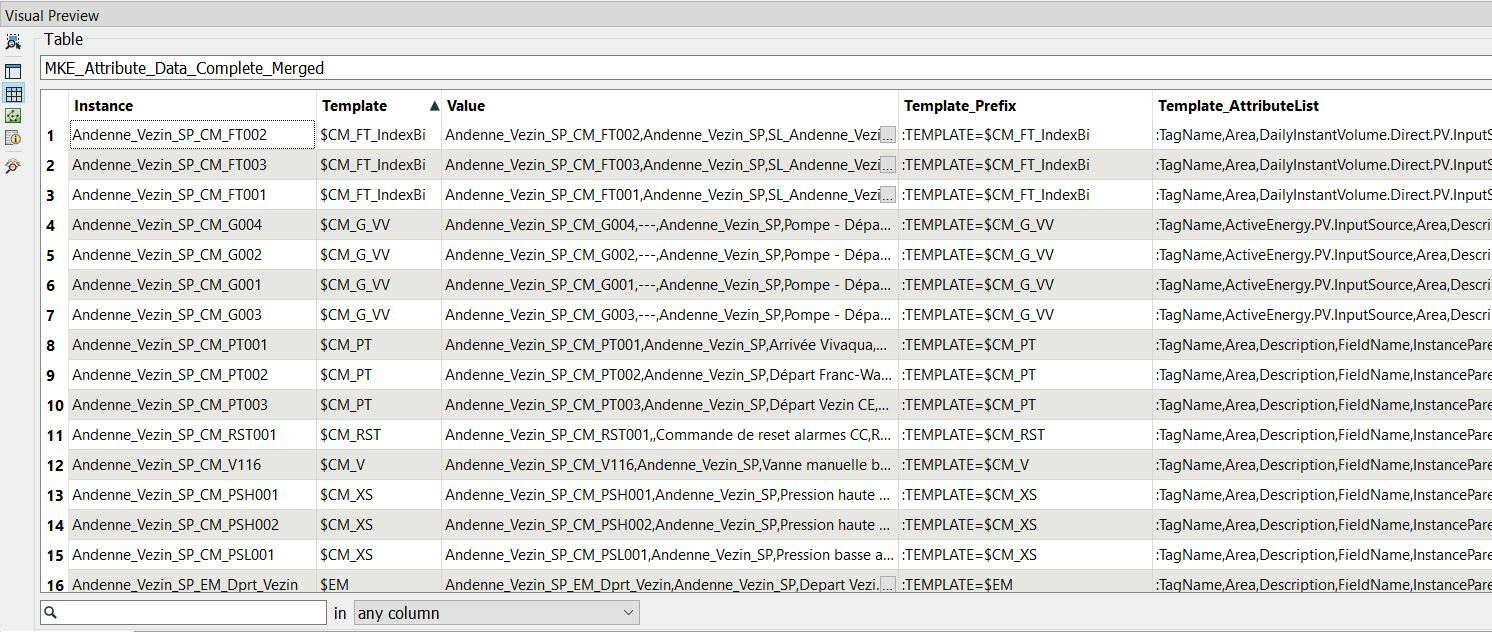
I would like to create a text file with the following structure grouped by Template_Prefix and Template_AttributeList:

:Template=$CM_FT_IndexBi


:TagName, Area, DailyInstantVolume.Direct.PV.InputSource, ......etc


<content of line#1 column "Value" here>


<content of line#2 column "Value" here>


<content of line#3 column "Value" here>


:Template=$CM_G_VV


:TagName, ActiveEnergy.PV.InputSource, Area, Description......etc


<content of line#4 column "Value" here>


<content of line#5 column "Value" here>


<content of line#6 column "Value" here>


<content of line#7 column "Value" here>


:Template=$CM_PT


....etc...

How would you approach it ?

Thank you for your help !

Best regards,

Oli

 

This post is closed to further activity.
It may be an old question, an answered question, an implemented idea, or a notification-only post.
Please check post dates before relying on any information in a question or answer.
For follow-up or related questions, please post a new question or idea.
If there is a genuine update to be made, please contact us and request that the post is reopened.

6 replies

erik_jan
Contributor
Forum|alt.badge.img+26
  • Contributor
  • January 15, 2020

Have you tried using the StringConcatenator transformer?

Or the Text Editor in the AttributeCreator.

Both should have the possibility to create multi-line attributes.

Then write that multi-line attribute to the text file (name by default text_line_data).

Hope this helps.


takashi
Celebrity
  • January 15, 2020

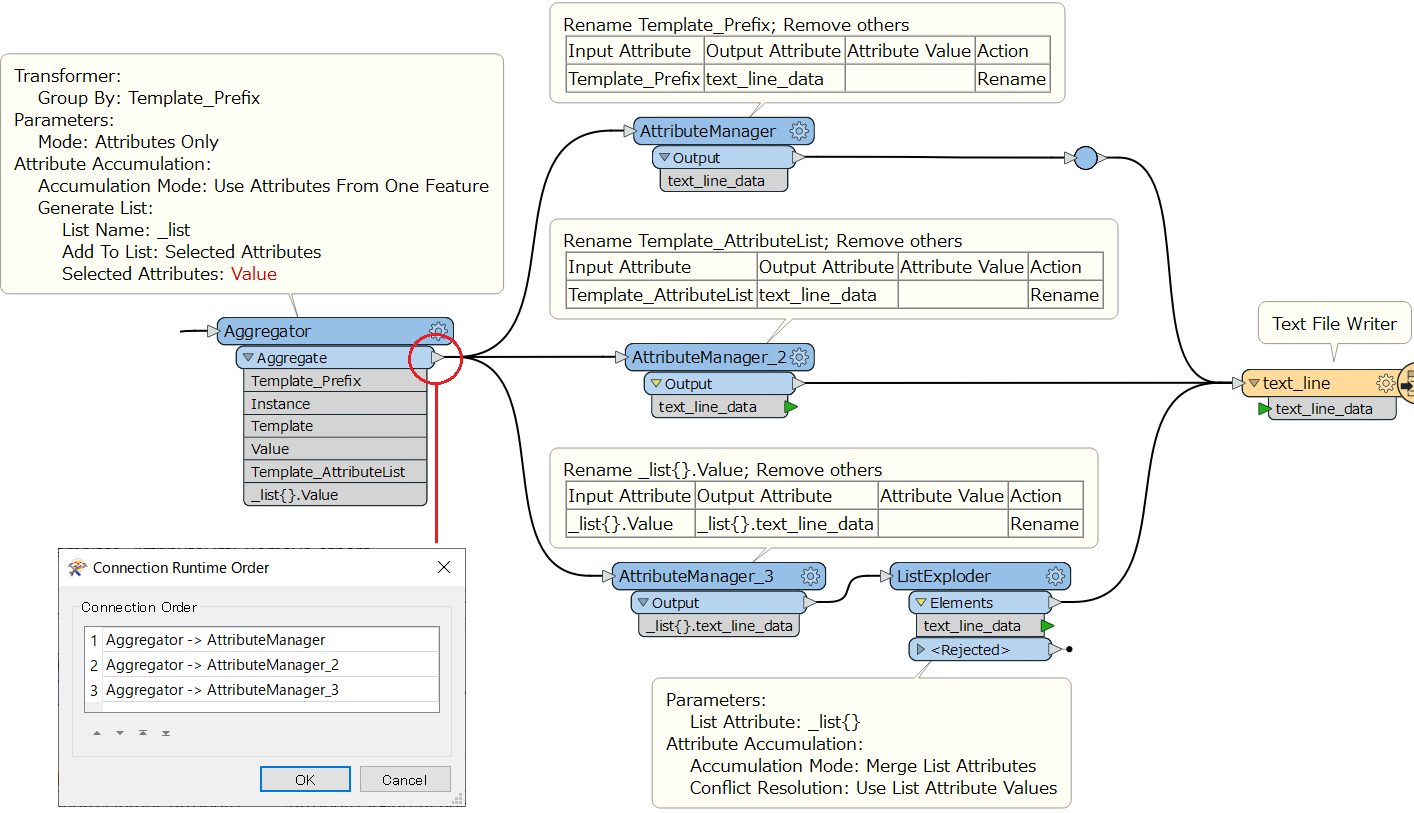
Hi @h2o2, if I could understand your requirement correctly, this workflow might help you. Be aware that you need to set the connection runtime order at the output port of Attregator properly (right-click on the ourput port > Set Connection Runtime Order).


  • Author
  • January 16, 2020

Hi @h2o2, if I could understand your requirement correctly, this workflow might help you. Be aware that you need to set the connection runtime order at the output port of Attregator properly (right-click on the ourput port > Set Connection Runtime Order).

Excellent ! Arigato Gozaemashita.....

This was exactly what I expected and I learnt a new feature also.....Thank you for taking time for making a clear mockup!

PS: Just struggling to find the "Connection Order" property that only shows up once there are at least two subsequent transformers (it makes sense actually)

Thank you.


  • Author
  • January 16, 2020

Have you tried using the StringConcatenator transformer?

Or the Text Editor in the AttributeCreator.

Both should have the possibility to create multi-line attributes.

Then write that multi-line attribute to the text file (name by default text_line_data).

Hope this helps.

I'll have a look into those ones. Thank you for taking time to respond...


  • Author
  • January 16, 2020

Hi @h2o2, if I could understand your requirement correctly, this workflow might help you. Be aware that you need to set the connection runtime order at the output port of Attregator properly (right-click on the ourput port > Set Connection Runtime Order).

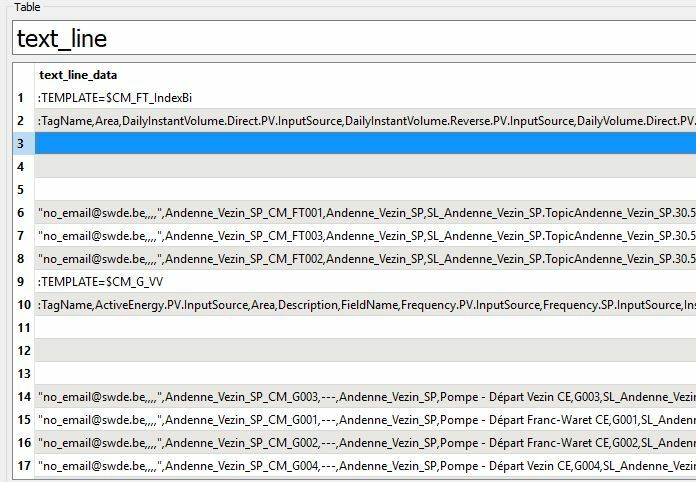
Short side question. It looks to insert extra "Carriage Return" characters (0x0A) although outputs just before the Text File Writer look OK. I don't see any reason nor parameters to filter it.....


Is this an expected behavior ?

It inserts 3 carriage returns at each new Template_Attribute_List:


  • Author
  • January 16, 2020

Short side question. It looks to insert extra "Carriage Return" characters (0x0A) although outputs just before the Text File Writer look OK. I don't see any reason nor parameters to filter it.....


Is this an expected behavior ?

It inserts 3 carriage returns at each new Template_Attribute_List:

OK. I got it. I inserted an extra AttributeManager to Trim the AttributeList text_line_data prior to the File Writer.


Looks perfect now. Thank you again