Question

How to read two different cell ranges form the same sheet in the same Excel reader

  • May 13, 2019
  • 1 reply
  • 34 views

Forum|alt.badge.img

Hi,

I'm trying to automate a process where FME reads in an Excel sheet in a specific format, but i need to split the Sheet into two parts (as they are completely different structures) and treat as two different datasets effectively. Is there a way in the Excel sheet reader to effectively duplicate a sheet in order to choose the different cell ranges that i require?


This post is closed to further activity.
It may be an old question, an answered question, an implemented idea, or a notification-only post.
Please check post dates before relying on any information in a question or answer.
For follow-up or related questions, please post a new question or idea.
If there is a genuine update to be made, please contact us and request that the post is reopened.

1 reply

takashi
Celebrity
  • May 13, 2019

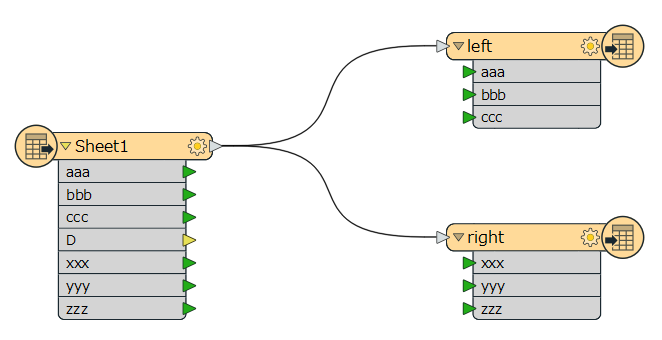
If the spreadsheet contains two different tables like this, you can just split the data flow from the Excel reader into two streams and write the two tables into different datasets separately.

This screenshot illustrates the basic concept. Depending on the actual structure of the source spreadsheet, probably you should consider some additional processes.