Question

How to read multiple csv with dynamic URL ?

  • November 12, 2019
  • 4 replies
  • 40 views

Hello I have a problem,

I try to read multiple csv from an URL that changes.

An exemple of URL :

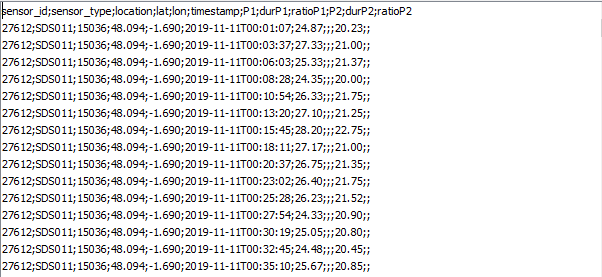
I tried to use an HTTPCaller and it works but I don't know how to treat the result. I don't find any transformer that can help me to translate this string "csv" into a list of attribute.

If someone can help me it could be great please.


Here are two images of what I get with httpcaller :

This post is closed to further activity.
It may be an old question, an answered question, an implemented idea, or a notification-only post.
Please check post dates before relying on any information in a question or answer.
For follow-up or related questions, please post a new question or idea.
If there is a genuine update to be made, please contact us and request that the post is reopened.

4 replies

ebygomm
Influencer
Forum|alt.badge.img+46
  • Influencer
  • November 12, 2019

You can use the httpcaller to save the response to a file(s) and then use a featurereader to read the csv file(s) back in.


You can use the httpcaller to save the response to a file(s) and then use a featurereader to read the csv file(s) back in.

Mmh it could work but I save all the csv into one file ?


ebygomm
Influencer
Forum|alt.badge.img+46
  • Influencer
  • November 12, 2019

Mmh it could work but I save all the csv into one file ?

I'd save to multiple files, they can always be deleted later. The other option is to use an attribute exploder to split by line, followed by another attribute exploder to split at the semi colon, then rename the resulting list elements as per the csv structure.


I'd save to multiple files, they can always be deleted later. The other option is to use an attribute exploder to split by line, followed by another attribute exploder to split at the semi colon, then rename the resulting list elements as per the csv structure.

Ok actually your first answer worked pretty well. Thank you very much !