I’d like to read a folder of documents and a set of points (say from a csv) and then join these together (filename of documents might match an attribute on the points), then write them all to an ArcGIS Online feature service with the documents as attachments. I would ideally like to do this in one workspace and not have to hardcode anything.
I don’t think this is possible without using one workspace to write the CSV to feature service, and then another to read it and add attachments using the ArcGISAttachmentCOnnector, as that requires the feature service URL, which may not be known at the time of creating the feature service.
Thanks,
Marc
Best answer by salvaleonrp
Hi,
I’d like to read a folder of documents and a set of points (say from a csv) and then join these together (filename of documents might match an attribute on the points), then write them all to an ArcGIS Online feature service with the documents as attachments. I would ideally like to do this in one workspace and not have to hardcode anything.
I don’t think this is possible without using one workspace to write the CSV to feature service, and then another to read it and add attachments using the ArcGISAttachmentCOnnector, as that requires the feature service URL, which may not be known at the time of creating the feature service.
Thanks,
Marc
You are absolutely correct when it comes to the creation of the feature service first before reading the feature url and then using that feature url to use the Add Attachments action item of the transformer.
There is an enhancement/Idea request to expose the feature service feature url as an output attribute of the feature writer so that we can make this a single workspace workflow. IDEA-2341: Esri ArcGIS Feature Service – Expose Feature Service Web Service URL as an Output Attribute in the ArcGIS Feature Service Writer
You can’t avoid hardcoding the output feature service in the feature reader to make it look seamless.
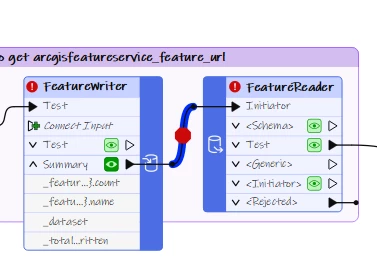
In one of my demo for this workflow I added a breakpoint to highlight this gap.
One option that you can try is to use the List action item to show all the services and then find a way to retrieve that newly created feature service to pass downstream to your add attachment transformer. If you need assistance with the workaround, please DM me.
This post is closed to further activity.
It may be an old question, an answered question, an implemented idea, or a notification-only post.
Please check post dates before relying on any information in a question or answer.
For follow-up or related questions, please post a new question or idea.
If there is a genuine update to be made, please contact us and request that the post is reopened.
These transformers act as regular readers and writers with the added benefit of placing them in the middle of your workspace. A FeatureWriter can initiate a FeatureReader or other transformers in your workflow. If you are able to pull the URL from the FeatureWriter after writing to AGOL you can perform the attachment upload after like you planned without hardcoding the values.
I’d like to read a folder of documents and a set of points (say from a csv) and then join these together (filename of documents might match an attribute on the points), then write them all to an ArcGIS Online feature service with the documents as attachments. I would ideally like to do this in one workspace and not have to hardcode anything.
I don’t think this is possible without using one workspace to write the CSV to feature service, and then another to read it and add attachments using the ArcGISAttachmentCOnnector, as that requires the feature service URL, which may not be known at the time of creating the feature service.
Thanks,
Marc
You are absolutely correct when it comes to the creation of the feature service first before reading the feature url and then using that feature url to use the Add Attachments action item of the transformer.
There is an enhancement/Idea request to expose the feature service feature url as an output attribute of the feature writer so that we can make this a single workspace workflow. IDEA-2341: Esri ArcGIS Feature Service – Expose Feature Service Web Service URL as an Output Attribute in the ArcGIS Feature Service Writer
You can’t avoid hardcoding the output feature service in the feature reader to make it look seamless.
In one of my demo for this workflow I added a breakpoint to highlight this gap.
One option that you can try is to use the List action item to show all the services and then find a way to retrieve that newly created feature service to pass downstream to your add attachment transformer. If you need assistance with the workaround, please DM me.