
Question

Filter WFS by both BBOX and attribute

  • January 25, 2018
  • 1 reply
  • 217 views

Hi!

I am using the wfs-reader in FME accessing the web feature service(wfs):

http://slwgeo.artdata.slu.se:8080/geoserver/SLW/wfs

Feauturetype: "AllSwedishOccurrences {All Swedish Occurrences}"
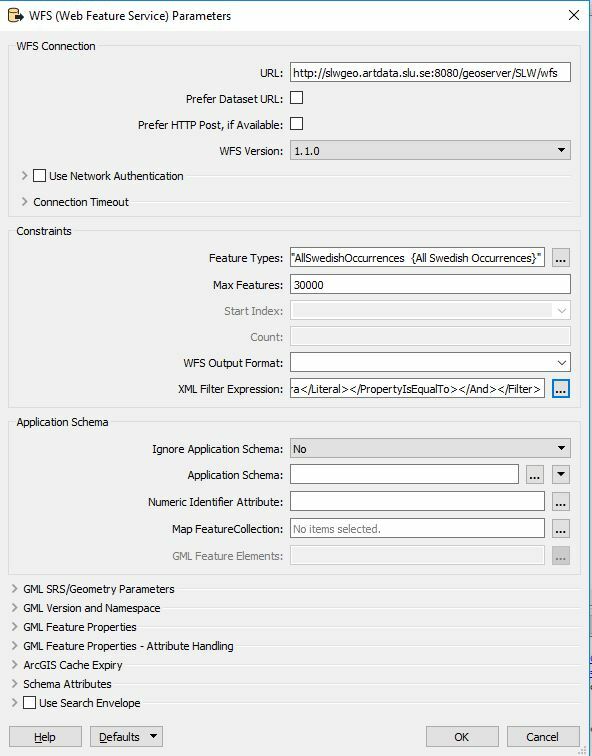
I am trying to filter specific(e.g. "Margaritifera margaritifera" species in a municipality(Borås) Seems like I can´t get both criterias on the same time.

Getcapabilities: http://slwgeo.artdata.slu.se:8080/geoserver/ows&VERSION;=1.0.0&SERVICE;=WFS&REQUEST;=GetCapabilities

How can I get scientificName Margaritifera margaritifera in municipality Borås by filtering in the WFS-reader? It would be ok to apply a bounding box on coordinates instead of using the attribute municipality Borås.

I know some of xml, and I have been trying to find a solution,using the filter functions taught on Geoserver but now I reached a dead end.

I have tried:

<Filter><And><PropertyIsEqualTo><PropertyName>municipality</PropertyName><Literal>Borås</Literal></PropertyIsEqualTo><PropertyIsEqualTo><PropertyName>scientificName</PropertyName><Literal>Margaritifera margaritifera</Literal></PropertyIsEqualTo></And></Filter>

Seems hard to use two attribute within same xmfilter. Guess I must use attribute and geographic filter within the same xml filter. Envelope-function in wfs-reader and attribute xml filter doesn´t seems to worh together in this case.

Can someone help me?

This post is closed to further activity.
It may be an old question, an answered question, an implemented idea, or a notification-only post.
Please check post dates before relying on any information in a question or answer.
For follow-up or related questions, please post a new question or idea.
If there is a genuine update to be made, please contact us and request that the post is reopened.

1 reply

gio
Contributor
Forum|alt.badge.img+15
  • Contributor
  • January 26, 2018

@tobiasrydlinge

The property filter seems correct.

Apart form having unquoted space(s) in the second property, you need to quote it (like you do in your message...)

</PropertyName><Literal>"Margaritifera margaritifera"</Literal></


The Capabilites document shows that geometric filtering is activated. So you should be able to do things like.

<Within>


<PropertyName>geometry</PropertyName>


<gml:Polygon><gml:outerBoundaryIs>


<gml:LinearRing><gml:coordinates>89800,455000 99200,455000 99200,469000 89800,469000 89800,455000</gml:coordinates>


</gml:LinearRing></gml:outerBoundaryIs></gml:Polygon>


</Within>

You can combine the geo filter with the property filter.

I can get to the features.

But when I run I get a connection error. So can't test it.


